
After teasing the feature at I/O 2024 and confirming it earlier this year, Google has officially launched Workspace Studio. It’s a powerful automation tool that lets users design, manage, and share AI agents using Gemini 3’s multimodal intelligence.
Formerly known as Workspace Flows, the system follows a simple “if this, then that” automation model that integrates seamlessly with Gmail, Drive, Chat, and even third party apps like Asana, Jira, Mailchimp, and Salesforce.
With Google Gemini powered agents, Workspace Studio helps automate repetitive tasks and accelerate content creation, making work on Google Workspace smarter and more efficient.
What is Google Workspace Studio Agents?
Google Workspace Studio Agents are AI enabled agents that automate activities, optimize processes, and boost productivity inside Google Workspace workspace.google.com/studio/.
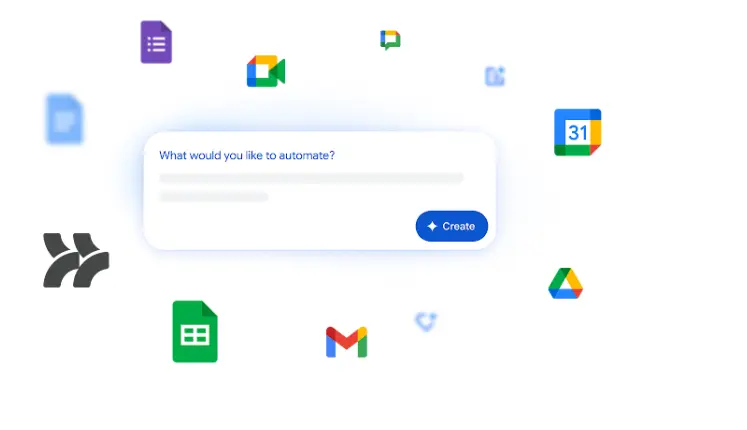
These agents may be developed, maintained, and shared directly in Workspace, allowing users to work smarter by automating common tasks and delivering intelligent support across business and enterprise plans.
“Workspace Studio lets you craft powerful automation agents in minutes — no coding, no complexity, just streamlined workflows”
Google Workspace Studio Rollout Pace Overview 2025
Scheduled Release domains Admin console settings will be progressively rolled out beginning December 3, 2025, and end-user access to Workspace Studio will begin January 5, 2026.
Google Workspace Studio Rollout Pace:
| Domain Type | Admin Console | End User Access |
|---|---|---|
| Rapid Release | Gradual rollout starting Dec 3, 2025 | Gradual rollout starting Dec 3, 2025 |
| Scheduled Release | Gradual rollout starting Dec 3, 2025 | Gradual rollout starting Jan 5, 2026 |
How Build AI Agents Like a Pro – No Coding Needed
Open Workspace Studio, select a template or start from scratch, and describe your assignment in straightforward words.
After that, you can drag and drop the necessary steps triggers, actions, and conditions and link apps like as Gmail, Drive, Chat, Asana, or Salesforce.
Once everything is in place, you test the agent to ensure that it works as intended, then save and share it with your team so that they can begin using it immediately.
Create Smart AI Agents – Full Process
Step 1: Pick the Right No-Code AI Platform
-
Match the platform to your use case:
- Customer support: strong NLP + multi-channel support
- Sales/marketing: CRM integrations + lead scoring
- Operations: data analysis + workflow automation
-
Check for ease of use, integrations, scalability, and pricing.
Step 2: Define Your Agent’s Goal and Tasks
-
Set a specific objective, not a broad one.
-
List the main task, escalation rules, required data sources, and success metrics.
Step 3: Train with Models or Connect APIs
-
Use pre built models for common tasks.
-
Upload your data for custom training and deeper context.
-
Connect APIs to pull real time info from your systems.
Step 4: Test, Refine, and Deploy
-
Use a sandbox to run real scenarios and edge cases.
-
Check tool integrations and compare setups with A/B tests.
-
Deploy only after consistent, accurate behavior.
Step 5: Monitor and Optimize
-
Track completion rates, escalations, and user satisfaction.
-
Watch the business impact and tweak the agent as patterns emerge.
Google Workspace Studio Popular Templates
Get started with dozens of popular templates
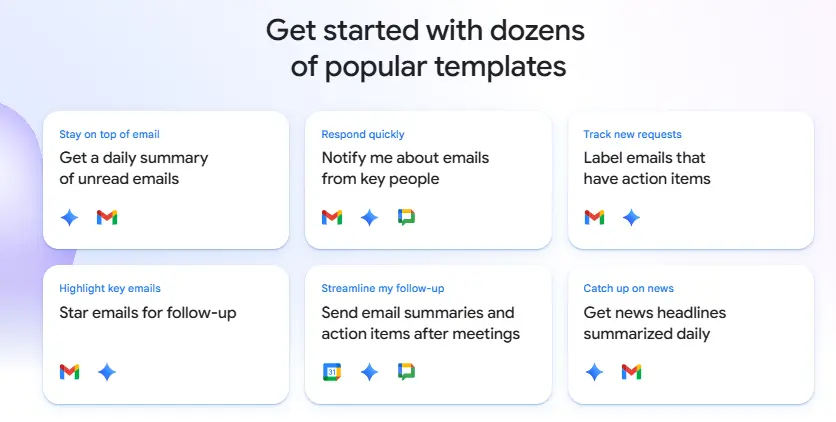
- Stay on top of email: Get a daily summary of unread emails
- Respond quickly: Notify me about emails from key people
- Track new requests: Label emails that have action items
- Highlight key emails: Star emails for follow up
- Streamline my follow up: Send email summaries and action items after meetings
- Catch up on news: Get news headlines summarized daily
Google Workspace Plan & Availability
Plans:
- Business Starter, Standard, Plus
- Enterprise Starter, Standard, Plus
- Education Fundamentals, Standard, Plus
Availability:
- Google AI Pro for Education
- Google AI Ultra for Business
FAQs
Q1. What is the easiest way to build an AI agent?
The easiest way is to use no code tools like Zapier or Lindy. Just pick a template, describe what you want, and customize it in a few clicks.
Q2. Do you need coding skills for AI agents?
No, you don’t need any coding. Most platforms work with drag-and-drop steps and simple English instructions.
Q3. Which is the best no-code AI platform?
It depends on your goal. Zapier is great for beginners, Lindy is good for business tasks, and Make is best if you need advanced automation.
Q4. How much does it cost to build AI agents without coding?
Basic plans usually start from $10–$20 per month, depending on features and usage.