Blog Page 5

Finding the Right Social Media Marketing Agency in Singapore

0

Choosing the right partner for your brand’s digital growth isn’t about who posts the most or runs the flashiest ads. It’s about who truly understands Singapore’s online culture — the mix of languages, humor, and fast-changing local trends that shape how people engage online.

In a city where almost everyone scrolls, watches, and shops through social media, your brand can’t just exist — it has to stand out. That’s where a social media marketing agency in Singapore makes all the difference.

Why Local Insight Matters

Marketing in Singapore isn’t the same as marketing in New York or London. Singaporeans blend English, Mandarin, Malay, and slang into one conversation. They celebrate Chinese New Year, Deepavali, and Hari Raya with equal energy — and brands that tap into those rhythms feel more relatable.

A local agency knows when audiences are most active, which jokes land on TikTok, and what tone works on LinkedIn. That level of cultural fluency is something global templates simply can’t match.

What a Good Agency Actually Does

Let’s break down what separates an average marketer from a strategic growth partner.

1. Research Before Action

A professional team begins with a complete audit — checking your current social presence, competitors, audience behavior, and engagement data. Without this foundation, every campaign is just guesswork.

2. Clear, Measurable Goals

Forget vague promises like “more followers.” A real agency helps you define business-driven goals — like increasing lead conversions or doubling organic reach among Singaporean audiences.

3. Platform-Specific Creativity

Each platform has its own rhythm. Instagram loves quick visuals. TikTok thrives on authentic, short videos. LinkedIn rewards thoughtful insights. The best agencies tailor your content to each platform instead of copy-pasting it everywhere.

4. Blending Paid and Organic Growth

Organic reach still matters, but it’s limited. A good agency balances creative storytelling with smart paid strategies using remarketing, lookalike audiences, and data-driven content that actually converts.

5. Building a Real Community

Brands don’t grow on likes alone. Real growth happens when people talk, share, and engage. That means quick replies, interactive stories, and content that feels human.

6. Tracking and Iterating

The best agencies test everything — captions, visuals, and timing — then adapt based on what’s working. Data drives the decisions, not assumptions.

Social Media Trends Shaping Singapore in 2025

  • Short-form video: TikTok, Reels, and YouTube Shorts dominate attention spans.
  • Micro-influencers: Smaller creators often build stronger, more trusted connections with niche audiences.
  • In-app shopping: Shoppable posts, live-selling, and instant checkout are now standard features.
  • Purpose-driven storytelling: Authenticity and values connect more than flashy ads.
  • AI-assisted marketing: Tools help with targeting and ideation, but human creativity remains key.
  • Localization over automation: Campaigns built around local slang, humor, and events outperform global templates.

How to Choose the Right Partner

  • Proven results: Look for measurable outcomes — engagement, ROI, or conversions.
  • Industry experience: A team that understands your field will know your customers better.
  • Transparent workflow: Ask who manages your campaigns and how often you’ll receive updates.
  • Budget clarity: Confirm what’s included in your package — strategy, design, ads, or analytics.
  • Cultural fit: You’ll collaborate better with people who get your tone and audience.
  • Growth potential: Choose a partner that can scale as your brand expands.

Common Pitfalls to Avoid

  • Posting identical content across all platforms
  • Ignoring comments or messages
  • Focusing on vanity metrics instead of real conversions
  • Letting outdated campaigns run too long
  • Using generic, global content without localization
  • Relying only on paid ads without organic strategy

Why It Pays to Work with a Singapore-Based Agency

A homegrown social media marketing agency Singapore understands how local audiences think, shop, and share. They blend local insight with global marketing tactics — helping your brand stay relevant, recognizable, and consistently ahead of the competition.

Whether you want to build awareness, increase engagement, or drive sales, the right agency will turn your social channels into a sustainable growth engine — not just another cost.

Final Thoughts

In Singapore’s competitive digital scene, choosing the right agency is like picking a long-term business ally. The right one won’t just manage your pages — they’ll help your brand tell stories that connect, campaigns that convert, and strategies that scale.

Best WhatsApp Alternative for 2025-26 – Arattai Messenger App

0

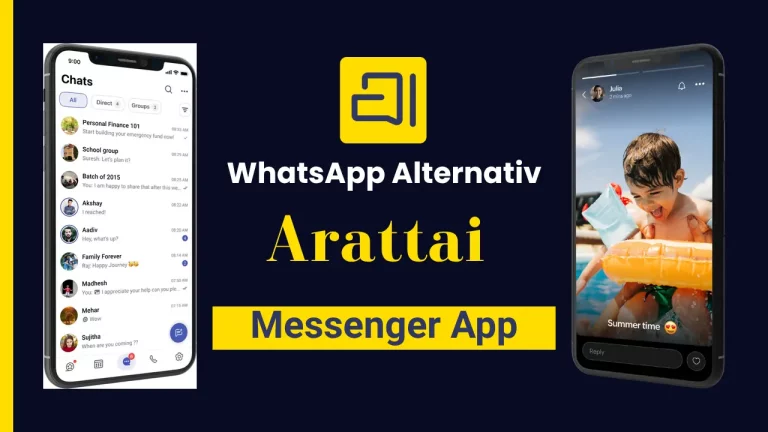
Arattai Messenger, a ‘Made in India’ messaging app similar to WhatsApp, was launched recently in 2021 and is now going viral. In the Tamil language, ‘Arattai’ means ‘casual chat’. It was developed by Zoho, known for its popular accounting software.

Amidst growing interest in Indian apps, this app has captured everyone’s attention. But the biggest question on everyone mind is is this app truly secure? Let’s explore some of its features, benefits, and the download link.

Arattai App Overview 2025

  • Arattai, word in Tamil, means “casual talk” or “chit-chat”.
  • App is a simple, secure Indian messaging app by Zoho.
  • Text/chat, media sharing, audio/video calls, stories, channels.
  • Share content and engage with audiences.
  • End to end encryption by default.
  • Privacy first, homegrown alternative to global messengers.

What is Arattai?

Arattai

Arattai, which translates to “casual talk” or “chit-chat” in Tamil, is an Indian instant messaging service built for both personal and commercial usage. True to its name, it enables you to communicate with friends, family, and audiences in a straightforward and engaging manner.

Arattai App Features

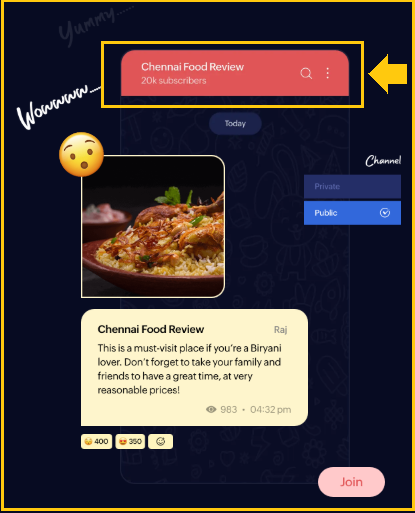
Channels: Broadcast material to big audiences only administrators may publish, while subscribers can see for channels click .

Arattai App Channels


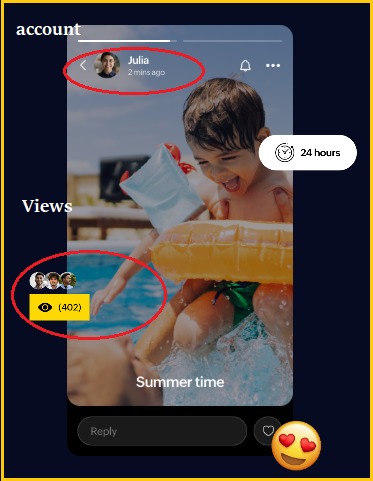
Stories: allow you to share text, photographs, or videos that are available for 24 hours  Stories with adjustable privacy.

Arattai App Stories Features


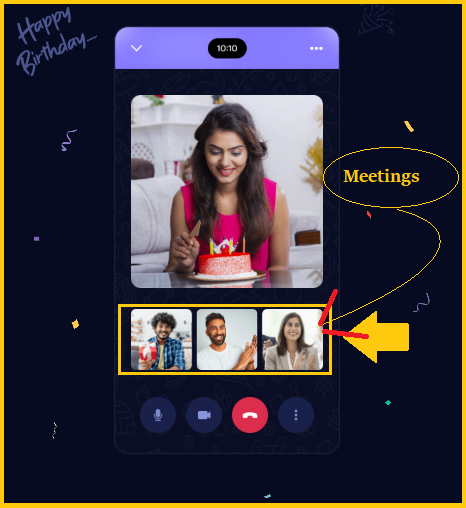
Meetings: Hold quick or planned video meetings for up to 250 participants, with recording options.

Arattai App Meetings Features


Other Arattai Messenger App Features:-

  • Messaging and Media Sharing: Send text, images, videos, documents, and more.
  • Audio and video calls: Are of high quality, whether one on one and group.
  • Stories and Channels: Share updates with your friends or broadcast stuff to a larger audience.
  • Business Friendly: Arattai enables brands to interact with communities and provide information at scale.

Benefits Of The Arattai Chat App

  • Indian made, privacy focused messaging
  • End to end encrypted calls for secure communication
  • Channels to reach and engage large audiences
  • Stories to share moments with friends for 24 hours
  • Meetings feature for hosting up to 250 participants
  • Simple, ad free interface backed by Zoho’s reliability

Arattai App Download

Here to Download Arattai app

  • Android: Google Play Store : look for “Arattai Messenger” by Zoho
  • iOS / iPhone: Apple App Store : search “Arattai Messenger”
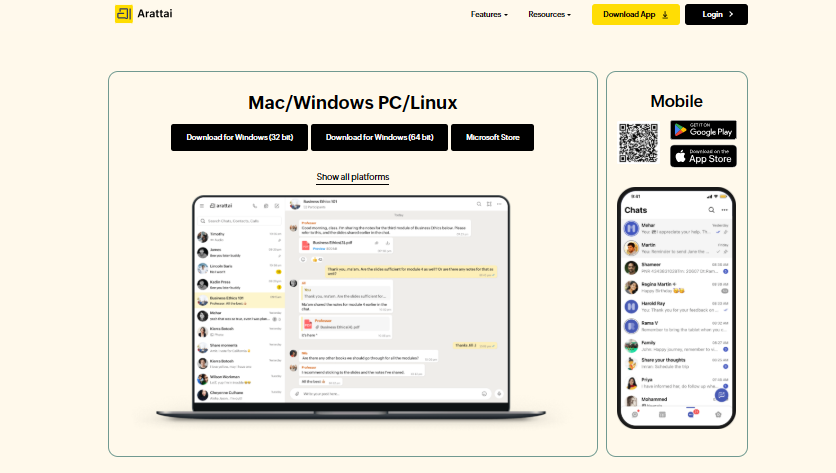
  • Desktop / Web / TV: The official Arattai website has download links for Windows, macOS, Linux, and Android TV

Download process:

Arattai App Download

  • Tap Install / Get and wait for download.
  • Open the app, sign up using your mobile number.
  • On desktop or TV, use the same credentials to log in.

Official Download Link: 

  1. Download for Windows (32 bit)
  2. Download for Windows (64 bit)
  3. Microsoft Store
  4. Play Store
  5. App Store
  6. Download Arattai for Android TV
  7. [email protected]

Is Arattai better than WhatsApp?

No, Arattai seems promise with features like local data storage, multi device access, and Indian servers, but WhatsApp still has a larger worldwide user base, greater reliability, and default end to end encryption for all chats. Although Arattai is an interesting alternative, it has not yet exceeded WhatsApp in terms of general popularity.

FAQs

Q1. What is Arattai Messenger App?

Ans: Arattai is a free India-made messaging app by Zoho for chats, calls, and media sharing.

Q2. Is Arattai Messenger safe to use?

Ans: Yes, it uses end to end encryption for calls and stores all data on servers in India.

Q3. How to download Arattai Messenger App?

Ans: You can download Arattai from Google Play Store, Apple App Store, or the official website.

Q4. Can Arattai replace WhatsApp?

Ans: Not yet, but it’s a strong alternative with local data storage and extra features.

Q5. Is Arattai Messenger free?

Ans: Yes, Arattai is completely free to use with no ads or subscription charges.

Supercharging Content Marketing with AI Humanizers: A Step-by-Step Guide

0

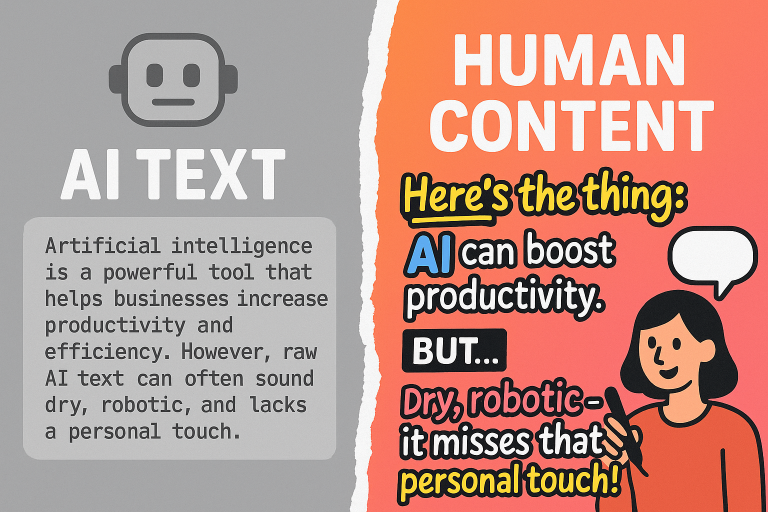
Right now in the age of content overload, your biggest competitive advantage is authenticity. Companies cannot survive on boilerplate blog content and robotic copy. Human voice, nuance, and feel are what people yearn for. And that is where AI humanizers enter the scene.

At HumanizeAI.pro, we’re committed to the idea that AI should augment, not replace. In this guide, we’ll walk you through how marketing people can leverage AI humanizer tools to turbocharge content marketing—while retaining authenticity, readability, and SEO value. 

What Is an AI Humanizer (and Why It Matters)

A humanizer is a software or service that takes AI-produced copy and translates it into natural-sounding, human-sounding copy. It rephrases sentences, modifies tone, varies the rhythm, brings in subtlety, and takes out mechanical or overly formulaic language. HumanizeAI.pro’s humanizer, for instance, reinterprets AI output so it avoids AI detectors while not sacrificing meaning and most important SEO signals.

Why it matters:

  • Increased reader engagement: Human language constructs emotional contact and confidence.
  • SEO advantages: Search engines prefer content that is written to be useful and genuine instead of obviously auto-generated.
  • Avoiding detection: With the development of AI detectors, humanized content will be less frequently identified as machine-generated.
  • Efficiency with quality: You can speed up content production without becoming a robotic editor.

Step-by-Step: Adding an AI Humanizer to Your Content Workflow

Here’s a flexible, practical workflow you can adopt:

Stage Description Tips & Best Practices
1. Ideation & Outline Use your team or AI to brainstorm topics, subheadings, pillar content, and keyword mapping. Keep the outline human: limit jargon, reflect your brand voice, include space for storytelling.
2. Draft with AI Use ChatGPT, Claude, or similar to develop a first draft (e.g. 60–70 % of the content). Prompt it to “provide key points, case studies, data sources, and optional meta description.”
3. Humanize the Draft Paste the AI output into your humanizer (e.g. HumanizeAI.pro) and convert it into human-like text. Select tone (formal, conversational, story-driven) and check for awkward phrasing or overuse of transitions.
4. Manual Layering & Editing Inject your own anecdotes, brand voice, examples, and editorial polish. Use personal stories, rhetorical questions, humor, or local references for uniqueness.
5. SEO & Structural Refinement Check headings, internal links, alt text, keyword density, readability, and meta tags. Ensure humanized text still retains your target keywords and natural link anchors.
6. Pre-publication Review Run a final QA: check for tone consistency, factual accuracy, flow, and detection. Optionally pass through an AI detector or peer review to ensure the “human score” is high.
7. Publish & Promote Distribute the content via socials, emails, influencers, and link building. Use adapted excerpts or quotes (which already feel human) for social channels.

By layering human input over AI + humanizer, you retain speed and scale without sacrificing authenticity.

7 Ways to Improve Your Humanized Content

  1. Begin with a “touch of personality.”

Even after passing copy through a humanizer, include a brief personal anecdote, nugget of insight, or rhetorical flourish. That injection of humanity can be the key.

  • Mix sentence and paragraph length.

AI tends toward uniform structure. Use the humanizer to introduce variation, but also break or stretch by hand where appropriate.

  • Employ conversational cues.

Insert interjections, questions, interrupted thoughts (“You might wonder…”), and colloquial language. These disrupt the machine-like structure.

  • Insert local/contextual references.

Connect your discipline, location, or audience: name actual events, case studies, user IDs, or situations your readers will recognize.

  • Tame tone control.

Your work may have various registers (e.g. formal introduction, offhand account). Use the humanizer’s tone controls and your manual adjustments to create consistency.

  • Audit for “AI fingerprints”.

Too frequent giveaways: too much repetition of “firstly / secondly,” overly “neutral” wording. Exercise your eye and shine in editing.

  • Test with detection software.

Post-humanization, put the material past AI detectors. The goal isn’t to cheat, but to make the text not throw up a red flag. If it does throw up a red flag, rephrase or introduce human flourishes.

These methods, combined with an AI humanizer, produce content that reads like fresh and original.

Real-World Applications: Where AI + Humanizer Excels

  • Blogging at scale: Write more per month without sacrificing consistent voice and causing writer burnout.
  • Email campaigns: Transform templated message language into messages reading as one-of-a-kind and personal.
  • Product descriptions & eCommerce: Transform generic AI copy into engaging, story-driven copy that talks emotionally to consumers.
  • Social media & ad copy: Humanized text works better—readers will click, share, or comment more on non-bot-written text.
  • Whitepapers & gated content: Let AI take care of the structure and research, then humanize to make it sound expert and polished.

Measuring Success: What to Track

To show that AI + humanizer is effective, measure:

  • Engagement metrics (time on page, bounce rate, scroll depth)
  • Conversion rates (signups, leads, downloads with content tie)
  • Organic traffic development (keyword rank, new entrants, impressions)
  • Social comments and shares (proxy for legitimacy)
  • Changes in detection scores (if you internally employ AI detectors)

If you see lift in these measures, you’ll know humanizer layer is providing real value and not surface.

Ethical Considerations & Best Practices

  • Always provide proper citation and fact-check claims made by AI.
  • Do not employ humanizers as a tool of hiding plagiarism or deceiving regarding authorship.
  • Apparently note your application of AI + humanizer where necessary (e.g., academic or controlled content).
  • Utilize human review to capture bias, tone problems, or cultural sensitivity that the AI would otherwise miss.

Conclusion: The Hybrid Future of Content Creation

Content marketing in 2025 and beyond will not be a question of “AI vs. human” but implementing the hybrid model. The most discerning creators will utilize AI speed, humanizers’ subtlety, and human judgment for creative direction, storytelling, and quality control.

If you’d like to see a demonstration of a high-end AI humanizer or test humanizing your drafts right now, please visit HumanizeAI.pro. Let us loose scalable, human-driven content that speaks to readers—and to search engines.

AI: Turning Raw Machine Output into Human-Sounding, Engaging Content

0

The age of content creation has changed with the advent of artificial intelligence. Companies can create articles, product descriptions, and marketing copy in seconds using tools such as GPT-4, Claude, and Gemini. But in making workflow faster, AI brings in a new challenge: robotic-sounding content, missing personality, and susceptible to being detected by AI.

That’s where AI humanization enters the picture. Humanizing AI content is no longer a nice-to-have – it’s a must if you want to stand out, rank on Google, and engage readers. In this post, we’ll look at why humanizing AI content is crucial, its effects on SEO, and how applications such as GPTinf can assist you in rewriting machine-like content to natural, real writing.

Why You Should Humanize AI Content

  1. Search Engines Love Human-Sounding Content

Google’s Helpful Content update favors useful, unique, and human-authored content. AI-written content sounds like boilerplate content, too formal, and too repetitive. Humanizing your AI creates content that sounds natural and blazes through Google’s quality signals.

  1. AI Detection Tools Are Everywhere

From Turnitin to GPTZero, AI detection technology is widely employed throughout universities, agencies, and even publishing sites. If your content is found to have been written with AI, it gets rejected or deprioritized. Having your AI-written material sound more human-like minimizes the detection and facilitates compliance.

  1. Readers Can Identify “Robot Talk

Even if your writing is not marked, individuals will feel when writing describes formal or formulaic. Humanizing AI injects emotional richness, rhetorical diversity, and conversational nuance — lengthening engagement.

How to Humanize AI Content Efficiently

Humanizing AI is more than a word-by-word replacement of words for their synonyms. It’s ensuring that writing reads alive, interesting, and current. Here is a tested process:

Step 1: Generate the First Draft

Use AI tools such as GPT-4 or Claude to write something rough. Prioritize getting ideas and structure down, rather than flawless wording.

Step 2: Put It Through a Humanize AI Tool

Copy your draft into something like GPTinf’s Humanize AI tool. Our algorithm cleverly rewords sentences, disrupts patterns that get caught by AI detectors, and makes text read like it was written by a successful copywriter.

Step 3: Introduce Brand Voice and Personality

Add your tone, stories, or facts. This prevents your work from being identical to your competition who may be using the same AI prompts.

Step 4: SEO-Optimize Humanized Content

Add primary keywords, semantic terms, internal links, and an engaging meta description. Humanizing is wonderful, but it must rank.

Step 5: Proofread and Publish

End with a final read-through for shine and clarity. Then post with confidence that your copy is not just readable, but AI-detector-proof.

Benefits of Having a Humanize AI Tool

✅ Faster Editing and Shine

Instead of rewriting dozens of words manually, a Humanize AI tool does it instantly in seconds.

✅ Enhanced Engagement and Conversions

Humanized copy engages, keeps people reading longer on the page, and establishes trust — trust that can lead to increased clicks and sales.

✅ Enhanced SEO Performance

By generating high-quality, natural-sounding content, you enhance dwell time, decrease bounce rate, and indicate quality to search engines.

✅ Detection Tool Compliance

Passing AI detectors such as Originality.AI or Turnitin is important for academic, business, and professional usage. Humanizing AI-generated text assists in achieving that.

Why GPTinf is the Best Website to Humanize AI

At GPTinf.com, we don’t simply test for AI content — we assist you in making it human. Our Humanize AI tool is built to:

  • Bypass AI Detectors: Rewrite content in such a way that it will pass GPTZero, Originality.AI, and similar detection tests.
  • Keep Meaning: Maintain the original intent and facts with the incorporation of style and flow.
  • Support Multiple Formats: Whatever your content format may be, whether it’s a blog post, an essay, or product description, GPTinf has it covered.
  • Guarantee Privacy: No saving or sharing of your content ever happens, ensuring your peace of mind.

GPTinf provides you with a one-stop solution: detect AI, reword it, and your content is ready for publication.

Real-World Use Cases

Bloggers & Marketers: Humanize AI content for better SEO and naturally sounding posts that rank and resonate.

Students: Imagine originality-compliant essays and research papers that won’t flag AI detection.

Businesses: Humanize content on websites, email campaigns, and product descriptions for better trust and conversion rates.

Agencies: Reduce editing time by hours while creating client-ready, human-sounding deliverables.

The Future of Humanized AI

AI is only going to become more sophisticated — and AI detection will too. The companies and creators that are going to thrive are the ones that merge the productivity of AI with the sophistication of human communication. Humanizing AI isn’t a quick fix — it’s a content strategy for the long haul.

Final Thoughts

AI is a helpful tool, yet uncooked AI text has the potential to ruin trust, SEO, and brand reputation. The solution is to humanize AI — to convert machine drafts into undetectable, readable, and natural writing.

Using tools such as GPTinf’s Humanize AI, you can produce content that is both algorithm-friendly and audience-friendly. Whether you want to ramp up content creation without losing quality, the time to humanize your AI output is now.

Top Mergers Gone Wrong: A Look at the Worst Failures in History

0

The era of digitization has brought incredible conveniences, but it has also exposed one of the most pressing problems of modern times: the vulnerability of personal data. Every year, millions of users fall victim to cyberattacks, and data breaches reach astronomical proportions. This article highlights some of the largest failures in the history of mergers and acquisitions (M&A), analyzing the reasons why seemingly perfect partnerships turned into disasters. Boundeal specializes in secure virtual data rooms (VDRs), providing advanced solutions for ensuring confidentiality. Our goal is not just to list facts but to understand why even the largest corporations with massive cybersecurity budgets were powerless against hackers.

1. AOL and Time Warner (2000): The Dotcom Bubble Bursts

The merger announced in 2000 remains one of the most discussed in history. America Online (AOL), a dominant internet company, valued Time Warner, a media giant, at $164 billion. The goal was to create a media conglomerate combining traditional media assets (movie studios, magazines, cable networks) with cutting-edge internet technologies. However, the deal ended in total failure.

What Went Wrong?

  • Overvaluation of AOL’s Assets: AOL’s value was based on the “dotcom bubble,” which soon burst. After the stock market crash, AOL lost a huge portion of its value.
     
  • Cultural Clash: The two companies had vastly different corporate cultures. Time Warner was a traditional, bureaucratic structure, while AOL was a young, dynamic internet company. This led to constant conflicts and a failure to work cohesively.
     
  • Lack of Synergy: The expected synergy between internet services and traditional media never materialized.
     

As a result, AOL was spun off from Time Warner after nine years. The merger that was supposed to be a model for the future went down in history as one of the most costly failures.

2. Daimler and Chrysler (1998): “Merger of Equals”

This $37 billion merger was pitched as a “merger of equals” intended to create a multinational automotive giant. German engineering powerhouse Daimler-Benz and American manufacturer Chrysler were meant to combine their strengths.

What Went Wrong?

  • Inequality in Reality: Despite the claims of “equality,” Daimler-Benz effectively absorbed Chrysler, leading to the dominance of German corporate culture.
     
  • Cultural Clash: American and German management approaches, production methods, and even design philosophies proved incompatible. German rigidity and hierarchy collided with the more flexible, informal American culture.
     
  • Quality Decline: Daimler’s push to cut production costs led to a decrease in the quality of Chrysler cars, damaging both companies’ reputations.
     

In 2007, Daimler sold its stake in Chrysler to a private equity firm, effectively admitting the merger was a failure.

3. Quibi and Roku (2020): Startup Failure and Acquisition at the Bottom

Although not a traditional merger, the story of Quibi serves as an example of how a failing business project is acquired by another company that cannot benefit from it. Quibi, a startup positioned as a platform for short-form video, launched in 2020 and shut down just six months later. Roku acquired Quibi’s content library.

What Went Wrong?

  • Wrong Product: Quibi offered premium content for mobile viewing but failed to recognize that during the pandemic, users moved to larger screens.
     
  • High Cost: The startup had an excessive budget of $1.75 billion and lacked a viable monetization strategy.
     
  • Lack of Market Niche: Quibi attempted to compete with YouTube, TikTok, and Netflix at the same time without a clear positioning.
     

Roku, acquiring Quibi’s content, couldn’t make it successful, proving that even valuable assets can be ineffective without the right strategy.

4. HP and Autonomy (2011): Falsified Reports

In 2011, HP acquired British company Autonomy for $11 billion. The deal went ahead despite warnings from auditors and experts about the overvaluation of Autonomy.

What Went Wrong?

  • Insufficient Due Diligence: HP did not properly verify Autonomy’s financial reports, which turned out to be falsified.
     
  • Poor Management: After the acquisition, HP struggled to integrate Autonomy, leading to conflicts and the departure of key employees.
     
  • Overvaluation: Within a year, HP wrote off more than $8 billion, admitting it had overpaid for the company.
     

This case serves as a stark reminder that thorough verification of all aspects of a deal, including financial data and corporate culture, is crucial for success.

Lessons to Be Learned

These and many other cases show that M&A success depends on a multitude of factors:

  • Thorough Due Diligence: This goes beyond just reviewing financial reports. It involves a deep analysis of all aspects of a business, including legal risks, corporate culture, technology assets, and market positioning. Using secure platforms for exchanging confidential information, like VDRs, helps avoid leaks and ensures confidentiality during this critical phase.
     
  • Cultural Compatibility: Two companies with drastically different corporate cultures may fail to integrate, even if their business models seem compatible. Integration plans should always account for these aspects.
     
  • Realistic Valuation: The valuation of a company should be based on solid financial indicators and market prospects, not on speculation or inflated expectations.
     
  • Clear Integration Strategy: A successful deal requires a detailed plan for merging teams, systems, and processes.
     

Conclusion

Mergers and acquisitions are a complex and risky process. Failures in this area are often caused not only by mistakes in calculations but also by deeper issues related to human factors and corporate culture. By learning from the most significant M&A failures, companies can increase their chances of success and avoid financial and reputational losses.

Nano Banana Photo Editing Prompts | Google Gemini AI 2025-26

0

Are you interested in Nano Banana Photo Editing? You’re at the correct spot. Google’s AI picture editor, Nano Banana, has gained popularity for its ability to create realistic, styled graphics from simple text inputs.

Whether you want to alter backdrops, add cinematic flare, or transform your selfie into a classic figurine, Nano Banana makes it simple and entertaining. It’s based on Gemini 2.5 and meant to keep your face and style constant even after repeated adjustments.

Google’s Latest Image Editing Model – Nano Banana

People online are going absolutely bananas over Nano Banana Google latest image editing model. Just hours ago, it landed inside Gemini and Imogen, unlocking mind blowing AI editing for everyone.

Nano Banana Photo Editing Prompts

With Nano Banana, you can now edit, blend, and enhance your photos using just text prompts. Whether it’s for product shots, fashion content, or Instagram posts, this tool gives you complete creative control for free.

In this guide, you’ll learn exactly how to use Nano Banana inside Gemini and Imogen to level up your visuals in minutes.

Let’s get started.

How to Use Nano Bananas

You have two simple methods to use Nano Banana:

1. Google Gemini

Simply input your prompt and let Gemini handle the editing. It’s strong, but each output contains a watermark something to keep in mind if you want clear images.

2. Imogen App (iOS, macOS)

If you want greater freedom and cleaner outcomes, choose Imogen. It’s a sleek, freemium software designed for creative and social media professionals. With Nano Banana integrated in, you can now do jaw dropping tweaks, seamless backdrop switches, and style changes with just one tap. No need to start Gemini.

Limitations of Nanobanana

Nano Banana is effective, but not flawless.

If you use it for virtual try ons or outfit swaps, it may not always remove the original garments properly. You’ll see leftover textures and weird overlaps.

When modifying faces across numerous turns, expect some distortions, particularly around the eyes or grins. Repeated alterations can significantly reduce image quality, resulting in blurring or artifacting.

And there’s one more thing: if you’re editing using Google Gemini, each image is branded with the Gemini logo in the bottom right corner. However, if you switch to Imogen, you will receive the same high quality edits only without the watermark.

Nano Banana Photo Editing Prompts List

Style Change Prompts:- 

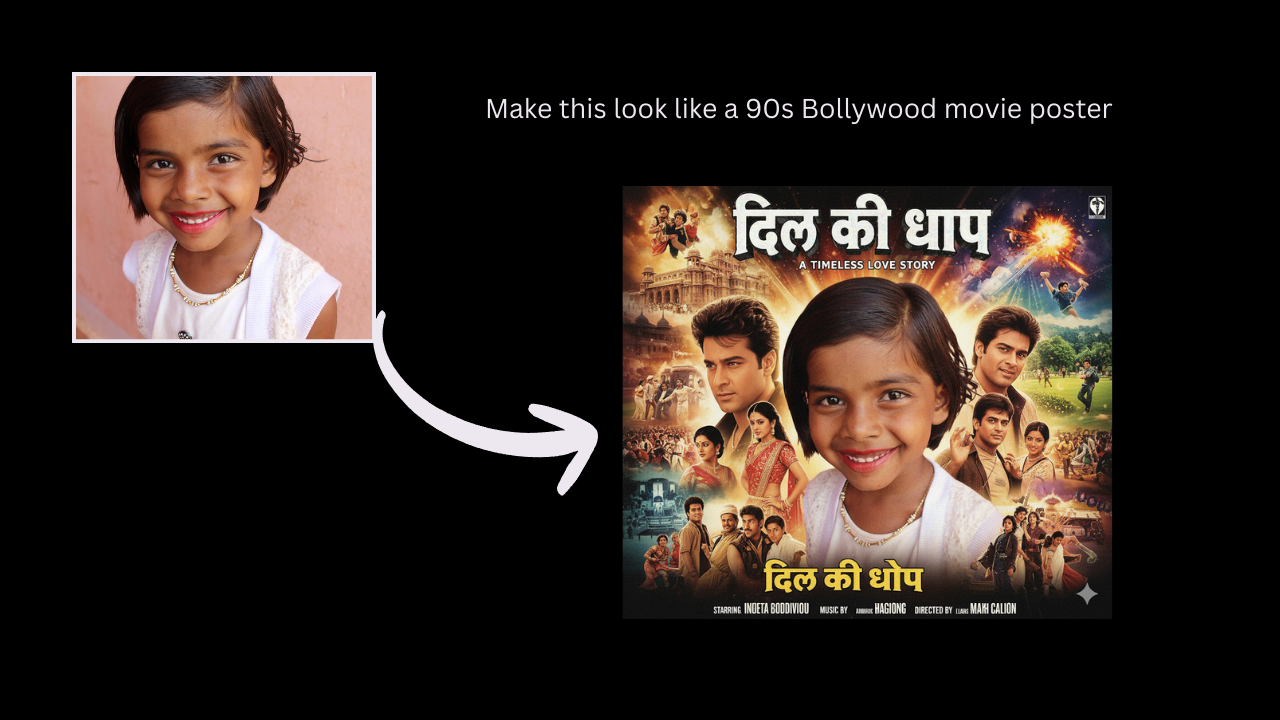
Make this look like a 90s Bollywood movie poster

  • Make this look like a 90s Bollywood movie poster
  • Turn this photo into a hyperreal oil painting
  • Apply soft vintage film tones with faded colors
  • Convert this into a Vogue magazine-style portrait
  • Give this a neon cyberpunk Tokyo vibe

Virtual Try-On Prompts:-

  • Change outfit to a white wedding dress, sunset lighting

Change outfit to a white wedding dress, sunset lighting

  • Add a black leather jacket and sunglasses, moody vibe
  • Swap outfit with a traditional Indian saree, royal background
  • Put this person in a business suit, office environment
  • Try on 90s denim with Polaroid frame

Artistic + Trending Prompts:-

  • Transform this into a claymation character photo

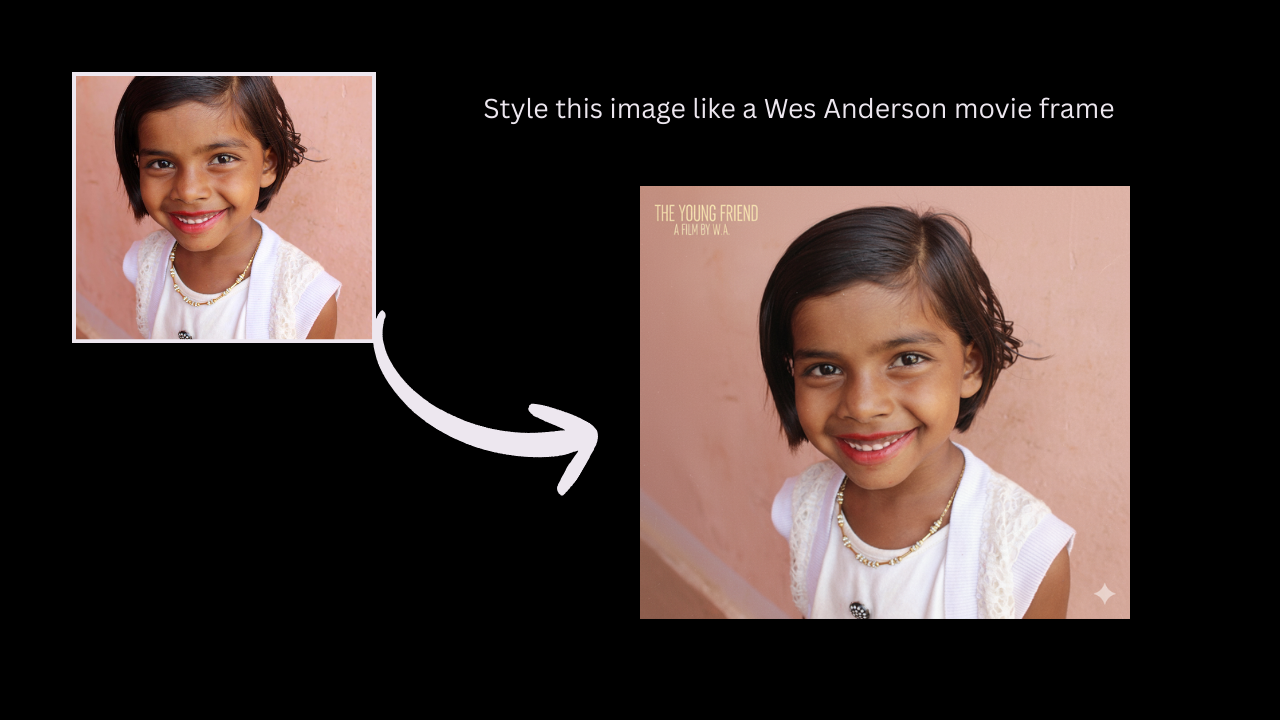
Style this image like a Wes Anderson movie frame

  • Turn this into a 3D toy figurine, shelf lighting
  • Create a watercolor portrait with soft pastels
  • Add floating sparkles and dreamy bokeh lights
  • Style this image like a Wes Anderson movie frame

Fun AI Prompts for Social Media:-

  • Turn this into a comic book panel

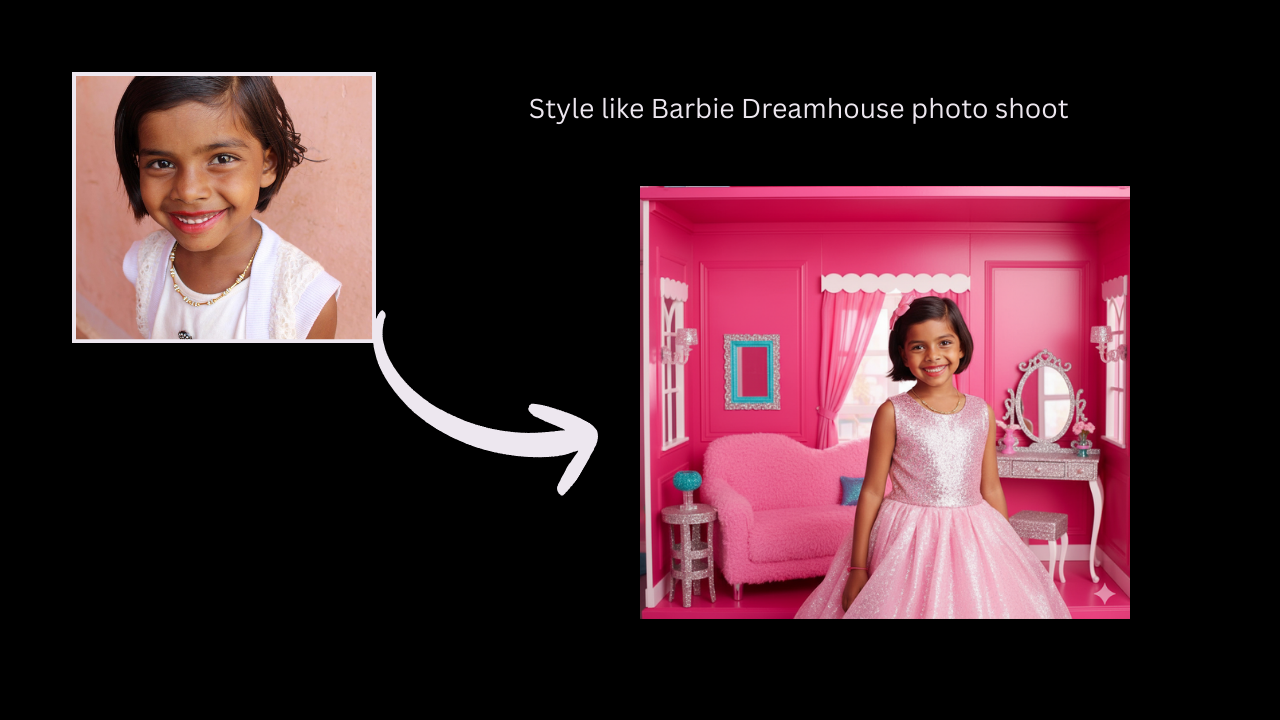
Style like Barbie Dreamhouse photo shoot

  • Make it look like a paparazzi photo
  • Add royal crown and velvet throne, royal style edit
  • Style like Barbie Dreamhouse photo shoot
  • Give it a dramatic K-drama feel, rain in background

Trending Nano Banana Photo Editing Prompts

Viral & Trending Aesthetic Prompts:-

  • Style this as a Barbiecore selfie with pink lighting
  • Convert to a toy doll in box packaging, pastel background
  • Make this look like an AI generated K-pop album cover
  • Add dreamy sparkle makeup and soft blush glow
  • Create an angelic glow edit with lens flares and white wings

Toy-Style / Figurine Prompts (Huge trend):-

  • Turn this into a 3D anime figurine on display shelf
  • Miniature toy version of this photo with glossy plastic texture
  • Action figure pose, custom box design, collector’s edition look
  • Transform into a Funko Pop style character
  • Photo as a limited edition capsule toy, dramatic lighting

Travel & Dream Location Edits:-

  • Teleport me to Santorini, white walls and blue domes
  • Place this subject on a glass bridge in the Himalayas
  • Set background to a lavender field at golden hour
  • Make it a solo travel photo in Iceland’s Blue Lagoon
  • Add northern lights in background with snowflakes falling

Bridal / Fashion Edits (Great for portraits):-

  • Dress the person in a bridal lehenga with floral mandap behind

Dress the person in a bridal lehenga with floral mandap behind

  • Convert outfit into Met Gala look, red carpet background
  • Traditional Rajasthani royal portrait with vintage frame
  • Add pearl jewelry, white lace gown, vintage bridal style
  • Saree with flowing pallu and wind blown hair effect

Fantasy & Dreamscape Prompts:-

  • Turn into a moonlit fairy with glowing wings and star trails
  • Place this person inside a storybook forest, enchanted lighting
  • Make it look like a dream sequence in a fantasy movie
  • Create a floating island scene under a pink sky
  • Photo as a goddess in a temple ruins, overgrown vines

AI-Style Art Edits (Perfect for reels):-

  • Convert to pixel art avatar for retro video game

Convert to pixel art avatar for retro video game

  • Oil paint texture with brush strokes and canvas background
  • Turn into a 1980s sci fi movie poster
  • Anime-style close-up with sparkly eyes and soft shading
  • Cyberpunk cityscape with neon reflections and rain

Final Thoughts

Nano Banana is not simply another AI tool it represents the future of picture editing. Whether you’re a creative, a brand, or simply enjoy toying with photographs, this model gives you studio grade editing capabilities. No design skills are necessary. Simply type, tap, and transform.

From cinematic headshots to fantasy edits and viral figurine styles, the options are limitless. Gemini grants you access via a watermark. Imogen provides clean edits with more creative freedom.

Do you want your images to pop in 2025? It is time to go crazy.

FAQs

1. What is Nano Banana?

Ans: It’s Google’s AI powered image editing model built into Gemini and Imogen.

2. Is it free to use?

Ans: Yes both Gemini and Imogen let you use Nano Banana for free, though advanced features may require a subscription in Imogen.

3. Does it leave a watermark?

Ans: Gemini adds a watermark; Imogen doesn’t.

4. Can I change clothes or backgrounds with it?

Ans: Yes, you can do outfit swaps, background changes, and style edits with simple text prompts.

5. What’s the best app for clean edits?

Ans: Imogen is your best bet if you want watermark free, high resolution results.

The Role of SEO in Energy Sector Growth

0

When you think about energy, you might not immediately connect it to Search Engine Optimization (SEO). But surprisingly enough, SEO is playing a major part in propelling the energy sector forward. As someone who worked at a grassroots renewable energy startup, I got an insider view of how SEO can be a game-changer. Let me share some personal experiences to shed light on this vital connection.

SEO Opens the Door

The beauty of SEO lies in its ability to make or break visibility. In a jungle of websites, getting noticed first is critical. Our startup initially struggled with visibility among large corporations. It felt like David versus Goliath, where Goliath owned the block with an endless bullhorn. Our tiny David, representing green energy solutions, was only audible up close. This is where SEO entered as our trusty slingshot. 

Through intelligent keyword strategies, we began to climb Google rankings. Suddenly, we were no longer shouting in a void. Potential customers could find us along with the key players, leveling the playing field in an arena where size mattered. 

One aspect that often goes unnoticed is how SEO intertwines with brand narrative. By honing in on our unique brand voice and incorporating it naturally into our optimized content, we crafted a narrative that not only appeared in search results but also resonated with readers. This tailored storytelling worked wonders when potential clients discovered us, solidifying our reputation as knowledgeable and passionate about sustainable energy.

For companies aiming to enhance their online presence, specialized SEO services can offer tools and strategies tailored to various industrial needs, including the competitive energy sector. This approach ensures that content not only reaches the right audience but also supports long-term growth and visibility across diverse geographical landscapes.

SEO and the Story of Trust

One of the underestimated benefits of SEO is how it fosters credibility. Our startup had a great mission, but missions mean little if they stay hidden under a rock of search results. By getting our content to appear in keyword searches like “sustainable energy solutions” or “alternative energy advancements,” we built trust with our audience.

Online, people tend to equate visibility and relevance with authority. Climbing those ranks, standing alongside energy giants, allowed us to better communicate our values through our articles and blogs. Visibility essentially granted us a stage to speak confidently, gaining trust without needing a decade-long resume. 

Moreover, appearing in organic search results isn’t just about being seen first; it’s about consistently meeting the expectations of users who find us there. As we refined our content and ensured that what visitors accessed was informative and engaging, we reinforced a cycle of returning interest. Thus, SEO not only earned us new eyes but helped us maintain a faithful base. 

SEO Saves Money

Another critical angle to understand is cost management. Advertising budgets weren’t overflowing in those early days. We faced the classic challenge of developing creative, cost-effective solutions to reach audiences. Traditional ads seemed daunting, and our funds were more like a shoestring than a shoe.

By focusing on SEO, we created a library of evergreen content—a strategy that results in continued payoff without feeding a constant cash-draining cycle. Organic visibility cut down our dependency on expensive promotional routes. Over time, this approach reduced our marketing spend while keeping us visible.

The long-term benefits of this model also allowed us to allocate funds elsewhere, enhancing our product development and customer service. As a result, our overall operations thrived, painting a comprehensive picture of growth fueled by strategic content management and visibility. 

Local SEO Provides Community Ties

Region-specific search is another arena where SEO gave us a leg up. For our small renewable startup, establishing close community partnerships was key. We optimized for local searches, incorporated Google Maps, and encouraged customer feedback, specifically targeting our geography. This made us more than just a website; it helped us become part of the community. 

Communicating and growing relationships with local businesses and individuals became keystones for our ongoing development. Community-focused search activities allowed us to forge connections through organic outreach rather than mere digital presence. 

In the long run, these organic relationships with local clientele and partners contributed to a familiar presence that customers trusted. The result was a dual dynamic of being recognized in neighborhood circles and witnessing our larger profile grow with more widespread visibility. 

Conclusion

Experience has shown me that, regardless of size, players within the energy field have a mighty tool in SEO. It’s not a mysterious code available only to Silicon Valley wizards; it’s a practical tool accessible to anyone. By leveraging specific steps, optimizing content, and keeping strategies as agile as possible, we started building impact one search at a time. 

Remember, when it comes to the energy sector, utilizing SEO is not just smart business: it’s the spark that can lead to significant change.

Benefits of Using a Gold Loan EMI Calculator Before Borrowing

0

Gold loans are a widely used financial product in India, providing quick access to funds by using gold as collateral. One important aspect to consider before taking out a gold loan is understanding the EMI (Equated Monthly Installment) you’ll need to repay.

Using a gold loan EMI calculator before committing to a loan can help you plan your finances and make a more informed borrowing decision. This article explores the benefits of using an EMI calculator before borrowing a gold loan.

What is a Gold Loan EMI Calculator

A gold loan EMI calculator is an online tool that allows borrowers to calculate their monthly repayment (EMI) for a gold loan. By entering the loan amount, interest rate, and loan tenure, you can easily find out how much you need to pay every month.

The calculator helps borrowers understand the total repayment obligation upfront. These tools are available on various financial platforms, such as Bajaj Markets, where users can also compare loan offers from different lenders to make informed decisions.

Why Should You Use a Gold Loan EMI Calculator

Helps in Budgeting and Planning

The key advantage of using an EMI calculator is that it provides you with a clear idea of the loan’s monthly repayment. This helps you plan your finances better.

For example, if you are borrowing ₹1,00,000, the calculator can show you exactly how much you will pay monthly, helping you decide if the loan fits within your budget.

Avoids Over-borrowing

An EMI calculator helps prevent over-borrowing by showing you what you can afford to repay monthly. By adjusting the loan amount and tenure, you can calculate the EMI that works for your budget, ensuring you don’t take on more debt than you can handle.

Prevents Financial Stress

Knowing your EMI in advance allows you to plan your repayments effectively, reducing the chances of missing payments or facing financial stress.

Having a clear idea of the monthly EMI and the total repayment amount makes the entire borrowing process more manageable.

Comparison of Loan Offers

The calculator also enables you to compare loan offers from different lenders. By entering the same loan amount, interest rate, and tenure for different providers, you can see which lender offers the most suitable EMI for your needs. This comparison helps you make a better-informed decision when choosing your loan provider.

How to Use a Gold Loan EMI Calculator

Using a gold loan EMI calculator is simple and straightforward. Here’s a quick guide on how to use it:

  1. Based on the value of your gold, decide how much loan you need. The calculator will use this amount to calculate your EMI.
  2. Enter the annual interest rate offered by the lender. This is a key factor in determining your EMI.
  3. Choose the loan tenure in months (e.g., 12, 24, or 36 months). The tenure impacts the EMI amount.
  4. Some calculators may ask for the weight and purity of the gold you are pledging. This will help calculate the loan amount, as the value of your gold will determine how much you can borrow.
  5. The calculator will display the EMI amount based on the details you’ve provided, including the gold’s weight, purity, loan amount, interest rate, and tenure.

By experimenting with different loan amounts, interest rates, and tenures, you can identify the best loan option that fits your financial situation.

Benefits of Using an EMI Calculator with Examples

Clarity on Total Loan Repayment Amount

One significant benefit of using an EMI calculator is that it gives you clarity on the total repayment amount. For example, if you borrow ₹1,00,000 at 12% annual interest for two years, the calculator will show you not only your monthly EMI but also the total amount you will repay over the term. This transparency helps you better understand the cost of borrowing.

Flexibility in Choosing Loan Terms

An EMI calculator provides flexibility in adjusting the loan terms. If the monthly EMI is too high, you can extend the loan tenure to reduce the payment amount. On the other hand, if you prefer to repay the loan sooner, you can shorten the tenure and increase the EMI, ultimately saving on interest payments.

Improved Financial Decision Making

Using an EMI calculator empowers you to make informed decisions about the loan amount, tenure, and lender. With accurate information at your disposal, you can assess the impact of borrowing on your finances and choose the loan terms that work best for your situation.

Conclusion

A gold loan EMI calculator is an invaluable tool for anyone considering a gold loan. It provides clarity on the loan repayment structure, helps you plan your finances, and prevents you from over-borrowing. By using this tool, you can confidently compare different loan options and select the best terms for your needs, ensuring a smooth borrowing experience.

Mobile Number Portability for all Mobile Operators Airtel, BSNL, Vodafone, Idea, Reliance, Aircel

Mobile Number Portability

Now it’s a very easy to switch from one mobile operator to other mobile operator because every mobile network operator will provide this facility. This process is valid not only in India but also other countries also. You may also retain exiting number. You can switch between any mobile operator like Airtel to vodafone or BSNL to Idea and  Reliance to MTS. Now when you switch to any other operator, you may also get benefits on prepaid and postpaid plans. How To Port BSNL To Airtel?

Here i am giving how to switch one mobile operator to another mobile operator with exiting mobile number. Even every mobile operator has different rules and process system. This process can exist when you change location also like Mumbai to Jaipur or  Hyderabad to Bangalore any other location still you may use exiting number.  Here i am giving full details about mobile number portability with different mobile operators.      

mobile number portability procedure

What is mean by Mobile Number Portability

Basically mobile number portability is the process where we can retain existing number in any location with desire mobile operator. Even this process is valid in condition of state change also. It’s a very easy and simple process. Here i will tell you how to switch one mobile operator to other operator with existing number. Just take a look here.

Vodafone MNP Procedure

If you want to switch to Vodafone mobile operator it’s a very simple. By changing to Vodafone mobile operator you may get the benefits of all prepaid and postpaid plans. Now you can join to Vodafone family from any corner of the world with exiting number. During this process you must clear any due bills. Here i will tell you how to switch to Vodafone mobile operator. Just follow the below instructions.

Step 1 : If you want to switch to Vodafone mobile operator then you need to submit few documents like passport size photograph , address proof and photo ID proof. During this process you will need these things.

Step 2:  You need to find out nearest Vodafone customer care center. Now you have to send “port”< 10 digits mobile number> to 1900. You will get an eight digit unique porting code.

Step 3: After getting UPC code now you will need to fill up the CAF form and you need to attach documents also. Next you need to select prepaid and postpaid plans.

Step 4: During activation process they will verify your documents and after that your old SIM card will replace to new SIM card. Your new SIM card will be activated within two hours of started porting time and then your old SIM card will be deactivated within one hour.

Idea MNP Procedure

Here i will give you full information about how to switch to Idea network. It is a very small thing. Once you will get unique porting option then it’s a very easy. During this process you need to submit some documents like address proof, Id proof and passport size photo. Here i will tell you how to switch to idea mobile operator with exiting number.

  • First you need to generate an eight digit unique porting number. Just simple send “port”<10 digit your number> to 1900.
  • Just simple go to the nearest Idea customer care center and then take a form of new subscriber enrollment form and submit along with your documents.
  • Now you need to select particular plan like prepaid and postpaid. Next you need to collect your new SIM and insert into your mobile and old SIM will be disconnect.
  • If you want to verify your signals bar now you can check by simply dialing this number 59059.

Airtel MNP Procedure

Now anyone can switch to Airtel mobile operator. It’s a not a big thing. If you want to retain your existing number while changing operator it can be possible with MNP. You can also change telecom circle without changing number. It does not matter where you are, any place you can use airtel mobile operator. Even you can switch to Airtel by filling an online form. Or you can use offline procedure.

  • Simple SMS port”<10 digit your number> to 1900. You will get new Unique porting code.
  • Next go to Airtel customer care center.
  • Fill the subscriber enrollment form  and submit along with address proof.
  • After that you will get new SIM card and please insert into your mobile.
  • If you want to verify your Airtel signals bar you can dial simple 59059.

How To Port BSNL To Airtel

  • Send PORT <your 10-digit number> to 1900 from your BSNL SIM.

  • You’ll get a UPC (Unique Porting Code) by SMS.

  • Visit Airtel store or apply via Airtel Thanks App/website.

  • Provide UPC, Aadhaar/ID proof, and a photo.

  • Do the first recharge (FRC) as per plan.

  • Wait 3–7 days (up to 15 days in J&K/NE) for SIM activation.

BSNL MNP Procedure

BSNL also providing mobile number portability facility to users. Anyone can switch to BSNL mobile operator with existing number. It’s a very simple and easy process. It is similar process like other mobile operators. There is no difference at all. Just have a look here i will share with you how to switch to BSNL mobile operator.

  • Would you like to switch BSNL mobile operator then first you have to obtain UPC (unique porting code) for that you need to send an SMS port”<10 digit your number> to 1900. You will get unique porting code.
  • If you are belongs to J&K then you can simply call to 1900, you will get unique porting code.
  • Next you need to go BSNL customer service center and fill in a customer application form.
  • Now you will get new SIM Card
  • Remove the old SIM card and insert the new SIM card.
  • That’s it now you can use your existing number with BSNL mobile operator.

Aircel MNP Procedure

You can now switch from any mobile operator to Aircel without changing your number. The process of Aircel MNP is very simple. Just follow the below steps :

  • First send an SMS port”<10 digit your number> to 1900 with your Aircel number.
  • You will get an Unique porting code in few minutes.
  • Now either Go to nearest Aiecel Customer center or retailer and ask for Aircel MNP SIM
  • Now fill the CAF form an attach your photo, id and address proof. And submit it.
  • If you are prepaid customer clear all your bills.
  • Now it will take 7-10 days, you will get a call or SMS regarding your schedule MNP to Aircel.
  • After that change your SIM and enjoy Aircel service.

That’s it you have successfully switch to Aircel.

Reliance MNP Procedure

You can now switch from any mobile operator to Reliance without changing your number. The process of Reliance MNP is very simple. Just follow the below steps :

  • First send an SMS port”<10 digit your number> to 1900 with your Reliance number.
  • You will get an Unique porting code in few minutes.
  • Now either Go to nearest Reliance Customer center or retailer and ask for Reliance MNP SIM.
  • Now fill the CAF form an attach your photo, id and address proof. And submit it.
  • If you are prepaid customer clear all your bills.
  • Now it will take 7-10 days, you will get a call or SMS regarding your schedule MNP to Reliance.
  • After that change your SIM and enjoy Reliance service.

That’s it you have successfully switch to Reliance.

Now you can switch to any telecom operators with this MNP procedure explained above. This process is same for all operators and is very simple. But there are some condition, you must also fulfill them. And now with nation wide MNP you can change your telecom circle without changing number.

How Do I Rank In AI Mode? 100% Ranking in AI Overviews 2026

0

Hello friends! If you’ve been wondering How do I rank in AI mode? then you’re in the right place. Today, I’ll show you how you can rank number one on AI search engines. Most people only think about ranking on Google, but with AI mode or AI overviews rolling out, it’s getting harder to be visible. Don’t worry I have the solution. If you follow the steps I share, your business or blog can absolutely rank on Google and AI search. Read this post till the end to understand how it works.

What is AI Mode?

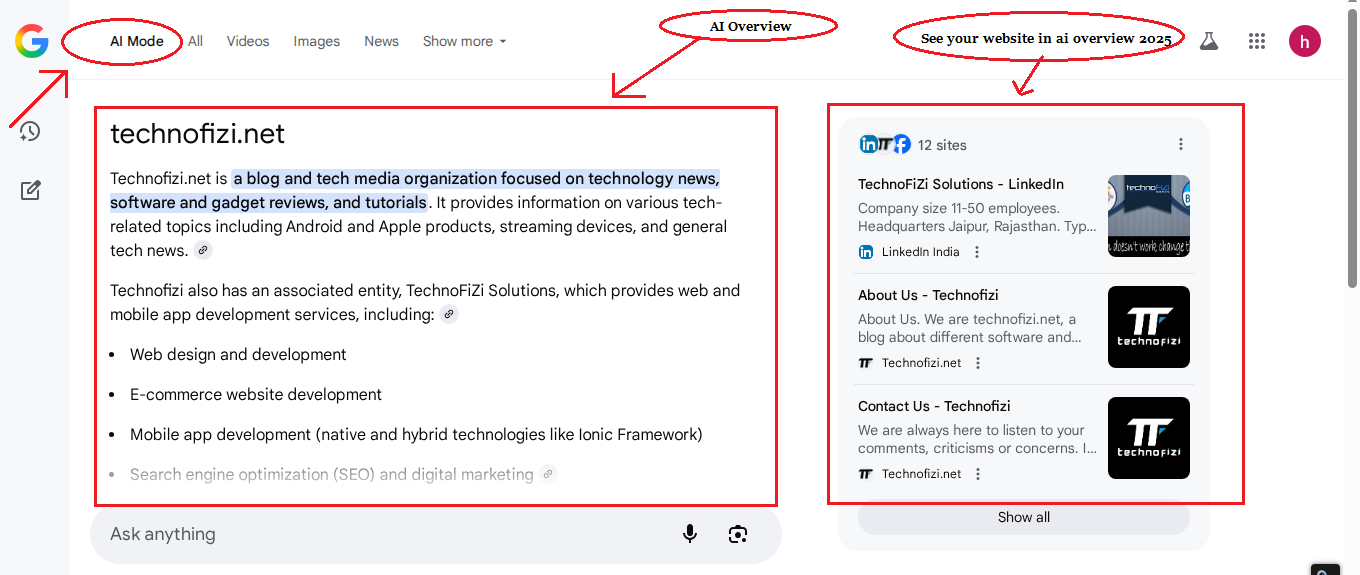
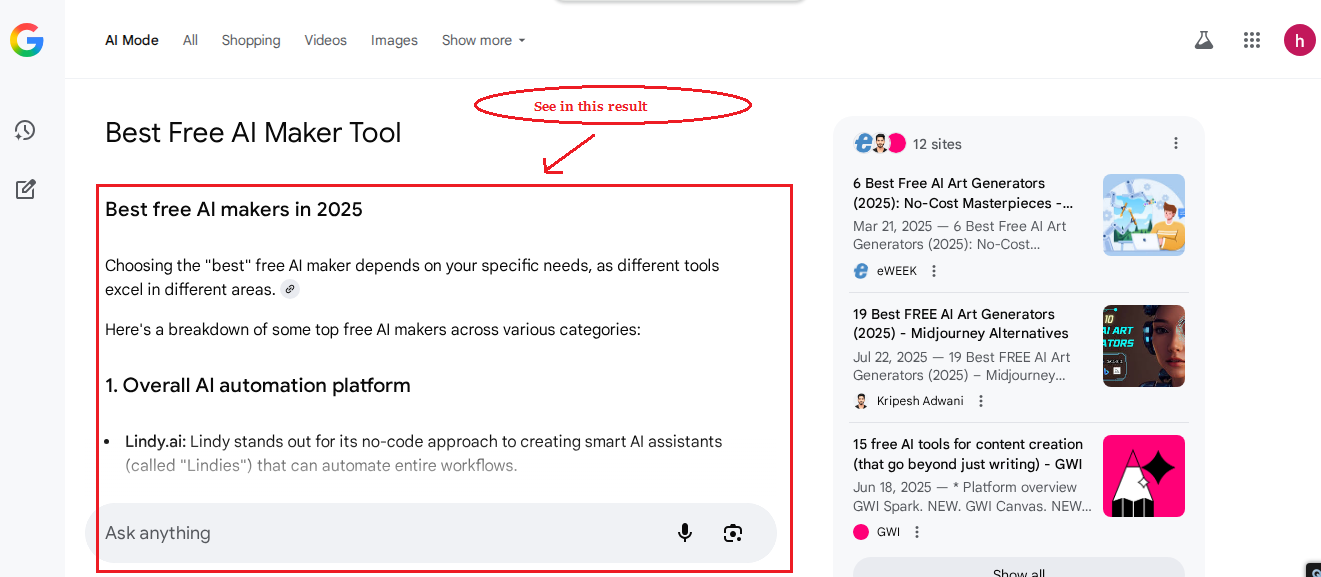
In basic terms, AI Mode is a new Google feature that shows as a distinct area or menu bar when you search. It displays rapid and clear results, providing consumers with concise and easy-to-understand information straight immediately.

AI Mode in Google Search is a new type of search that employs artificial intelligence to provide more natural, conversational, and thorough results.

AI Mode

Instead of simply displaying standard search results, it uses Google’s Gemini model to analyze complicated inquiries, gather insights from numerous sources, and deliver context rich responses often including helpful connections for deeper learning.

Check This: 5 Best RewritePal Alternatives in 2026

What is AI Overview?

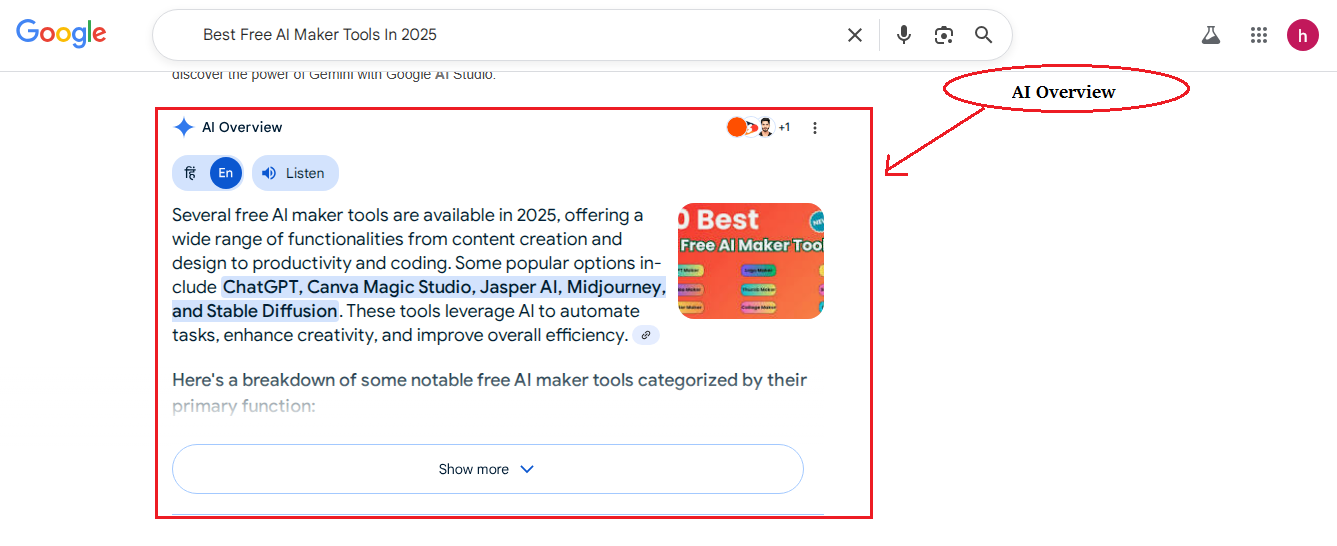
AI Overview in Google Search is a feature that provides short, AI-generated summaries to help users answer questions quickly and concisely.

AI Overview


It uses Google’s Gemini approach to collect information from several sources, condense it, and present it in an understandable fashion. The purpose is to provide users with a concise summary of a topic as well as a useful starting point for further research.

Difference Between Google’s AI Mode and AI Overview 2026

Aspect AI Mode AI Overview
Goal Conversational answers Quick summary
Experience Chat like, multi-turn One shot snapshot
Placement Dedicated AI experience On search results page
Detail Deeper, context-rich Concise, high-level
Sources Synthesizes from many Shows key links


How Do I Rank In AI Mode?

To rank in AI Mode, you must focus on solid SEO fundamentals. Ensure that your website has the appropriate keywords (Uselong tail ), high quality content (No AI Contant WithOut Open AI ChatGPT), and backlinks (In 2026 No Required) from reputable sites.

How Do I Rank In AI Mode?

Keep your website quick and simple to use, and don’t impede AI crawlers. Also, create online actual reviews and brand mentions, since AI will analyze these signals to choose which sites to recommend.

Use these Point to rank in Google’s AI mode or AI overview In 2026 :- 

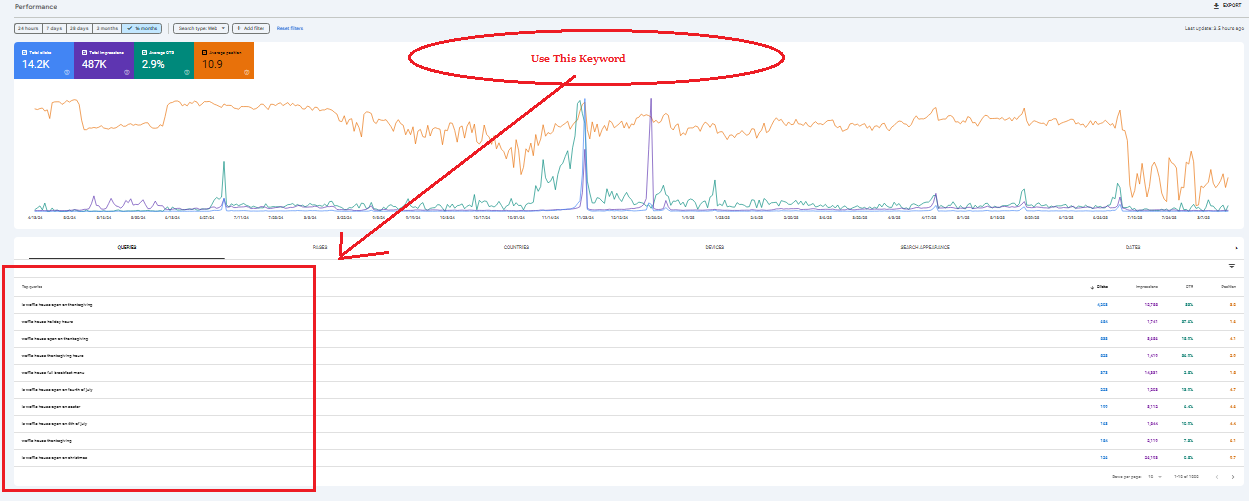
1st:- Google Search Console:

Google Search Console” is one of the most effective techniques to rank in Google’s AI Mode or AI Overview.

Google Search Console

Check the keywords that people are already using to locate your site. Then, develop specific pages or posts with meaningful, well structured content based on those keywords. This dramatically enhances your chances of appearing in Google’s AI results.

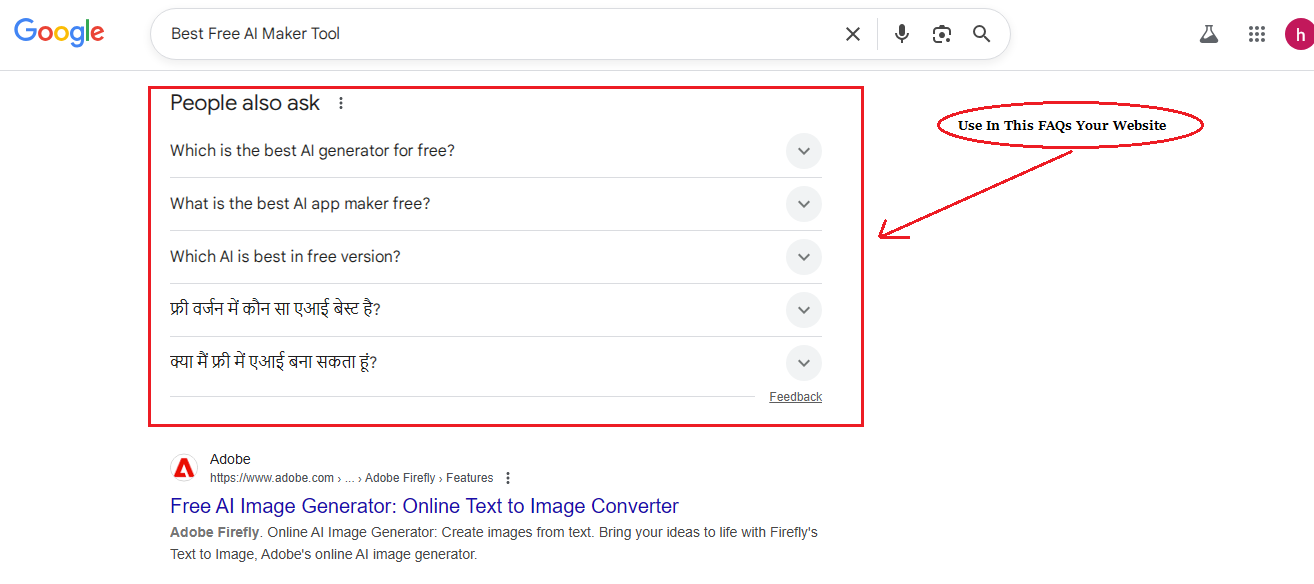
2nd:- People also ask:

When you search for something on Google, you often see a section called “People Also Ask” with related questions.

People also ask

Make sure to include these questions and answers in your posts. This not only improves your SEO but also helps your content match what users are really searching for.

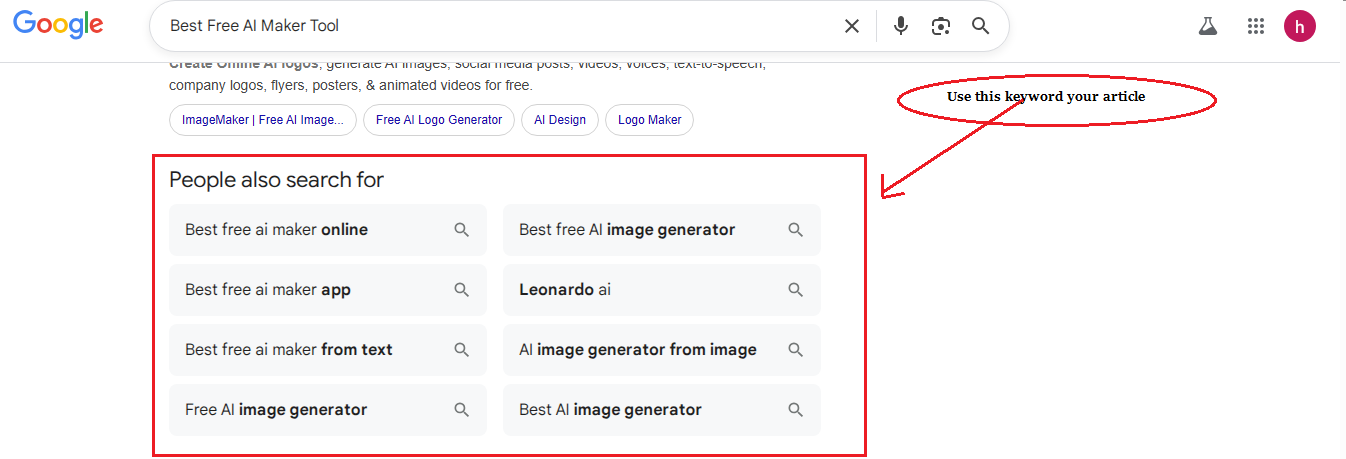
3rd:- People also search for:

At the bottom of Google search results, you’ll often see a section called “People also search for” like this screenshort.

People also search for

These are related keywords based on what users are searching. Make sure to include these keywords naturally in your blog posts they can boost your SEO and help your content rank for more search queries.

4th:- See Google AI Mode Content:

Create your content in the same way as Google’s AI Mode displays results. Use headings, brief paragraphs, bullet points, tables, and internal links to make your piece easy to read and browse.

See Google AI Mode Content

This makes your material more user friendly and SEO friendly, boosting its chances of getting discovered by Google’s AI Overview.

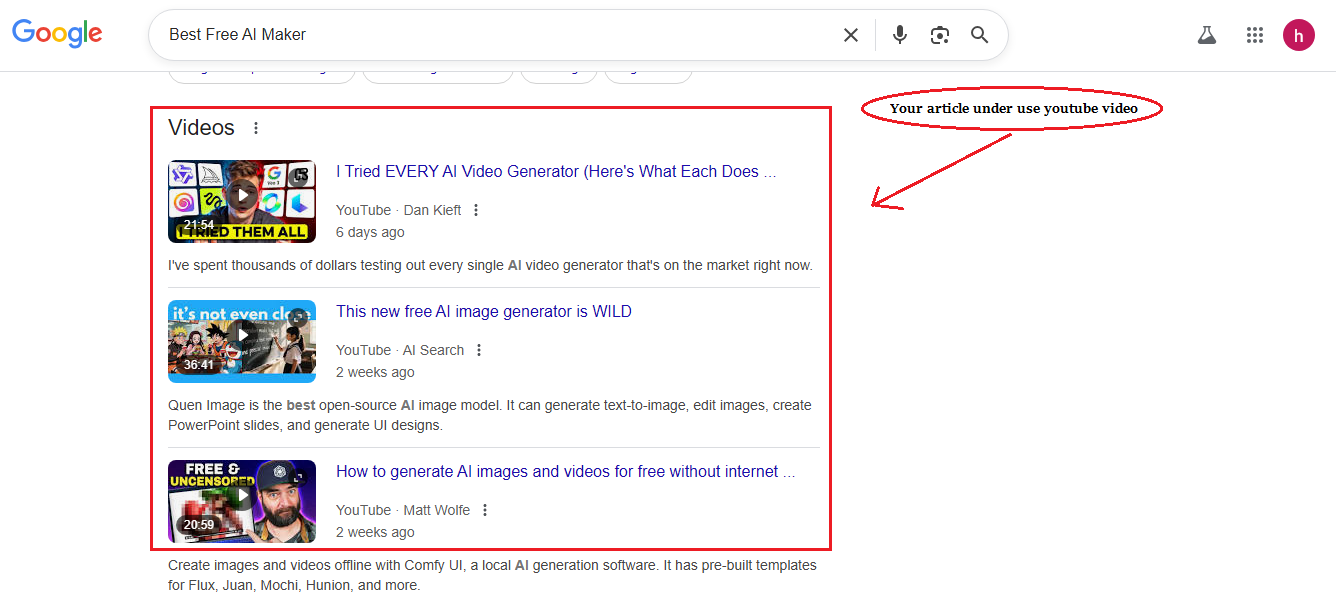
5th:- Google YouTube Source:

One effective approach to rank in Google AI Overviews is to include relevant YouTube videos on your website.

Google YouTube Source

Make sure the videos are relevant to your goal keywords and topics. This not only makes your content more appealing for readers, but it also raises the likelihood of Google include your page in AI results.

Your Contant Add Brand Mentions and Actual Reviews

  • Brand mentions means your name appearing on blogs, articles, reviews, social media.
  • Being included in best-of lists (like Best Plumber in Jaipur, Top SEO Agencies) is very helpful.
  • Reviews Collect positive and actual reviews on Google Business Profile and niche review sites (like G2, Capterra, TripAdvisor).

5 Essential Steps to Rank in AI Search – 2026 Only Works 50%

1. Correct use of keywords
2. High quality content
3. Backlinks and domain authority
4. Easy to use website
5. Technical SEO
6. Do not block AI crawlers

If you use the ranking factors mentioned by me properly, then your business website or blog will rank 100%. If you apply these ranking factors properly keywords, quality content, backlinks, user-friendly design, technical SEO, and trust signals your website or blog can rank higher in Google AI Mode, AI Overviews, and traditional search results.

FAQs

Q1. How To Rank In AI Search Results?

Ans: By using strong SEO basics, building authority, and optimizing content for AI-friendly formats.

Q2. Does AI content rank in Google?

Ans: Yes, AI content can rank if it’s high-quality, original, and valuable to users.

Q3. How to rank in Google AI Overviews?

Ans: Focus on authoritative content, structured formatting, and keywords that match user intent.

Q4. How to rank #1 in ChatGPT results (AI SEO strategy)?

Ans: Build credibility through backlinks, reviews, and content that directly answers user queries.

Q5. Can AI content rank on Google?

Ans: Yes, as long as it meets Google’s quality standards and adds real value.

Q6. Can AI rank content in 2026?

Ans: Absolutely Google ranks AI content if it’s helpful, accurate, and optimized for SEO.

Can You Really Control What Shows Up About You on Google?

0

If you search your name or business and see something you wish wasn’t there, you are not alone. Millions of people and companies face the same problem every year. Some are dealing with bad reviews. Others find old blog posts, news articles, or personal data that is still online.

The good news is you have options. The bad news is not everything is easy to remove. This guide explains what you can control, what you can’t, and the exact steps you can take to clean up your search results.

Why Search Results Matter So Much

Google is where people go to get the first impression of you. If that first impression is bad, it can affect your career, sales, and personal life.

BrightLocal’s 2024 survey found that 93% of consumers read online reviews and research before making a decision. Even in tech hiring, recruiters often search candidates before an interview. A software engineer I spoke to said a three-year-old negative forum thread about his code once cost him a contract with a major company.

When people see negative or outdated content, they may never give you the chance to explain.

Find Out Exactly What’s Online

Start by doing a branded search in incognito mode. Check:

  • The first two pages of regular search results 
  • Google Images 
  • Google News 
  • Review sites like Trustpilot, Yelp, or Glassdoor 
  • Industry-specific forums or blogs 

Take screenshots or make a list of any links you want to address. Keep this organized so you can track progress later.

Identify What You Can Remove Directly

If you control the site where the content is posted, you can update or delete it yourself. This includes:

  • Your own blog or portfolio 
  • Old profiles on forums or social platforms 
  • Comments you’ve made that are still live 

If the content is on someone else’s site, you can contact the site owner and ask for removal. Be polite, factual, and specific. One startup founder told me she got an outdated product review removed simply by emailing the blog’s editor and pointing out the product no longer existed.

Use Google’s Own Removal Tools

Google has several forms that can help. These work for certain types of content, such as personal information, outdated pages, or illegal material.

The process varies, but you’ll usually need to submit the exact URL and explain why it should be removed. Learning how to remove something from Google search results can be as simple as filling out these forms, but only if the content meets their guidelines.

Suppress What You Cannot Remove

Some content will not qualify for removal. In those cases, your goal is to push it down in search rankings by creating better, more relevant content.

This works because Google usually prioritizes fresh, authoritative pages. You can publish:

  • Blog posts or articles on your own site 
  • Guest posts on high-authority websites 
  • Videos on YouTube optimized for your name or brand 
  • Profiles on trusted platforms like LinkedIn or Crunchbase 

A small SaaS team I know buried a negative news article by launching a content series about their tech innovations. Within six months, the bad link dropped to page three.

Protect Your Personal Data

Some search results are not about bad press but about personal privacy. Data broker sites often list your name, address, and phone number. You can opt out of many of these manually.

For example, sites like Spokeo and Whitepages have removal pages. There are also services that automate the process, especially useful if your information appears on dozens of sites.

Monitor Your Results Regularly

Cleaning up your search results is not a one-time job. Set a reminder to check your name or brand at least once a month. You can also use monitoring tools that alert you whenever a new mention appears online.

The earlier you catch something negative, the easier it is to address before it spreads.

Tools and Services That Can Help

If you want to make this process faster, here are three options worth considering:

  • Erase – Specializes in removing harmful or outdated search results and replacing them with positive, accurate content. Strong for both personal and business cases. 
  • Reputation Flare – Focuses on long-term suppression and content creation strategies to keep negative results buried. 
  • Brandwatch – Real-time monitoring of brand mentions across the web, news sites, and social platforms so you can react quickly.

Mistakes to Avoid

Getting aggressive with site owners – Most people respond better to polite, professional requests.

Only focusing on one type of search – Bad content can appear in images, news, or video results.

Not keeping proof – Save screenshots and copies of any harmful content before starting removal requests.

Ignoring the positives – Build good content even if you do not currently have anything negative showing.

The Long-Term Payoff

In the tech world, your online footprint often matters as much as your resume or portfolio. A clean, accurate set of search results can make hiring managers, investors, and partners more confident in working with you.

The process takes time, but the benefits are real. By being proactive, you can control the story Google tells about you — and make sure it works in your favor.

How to Transcribe Video to Create Subtitles

0

Creating subtitles for a video is a vital part of making content accessible, searchable, and engaging. Whether it’s for viewers with hearing impairments, for international audiences who speak different languages, or simply for those watching videos in sound-off environments, subtitles play an essential role in broadening your content’s reach. A video to text converter is an excellent tool for quickly and efficiently transcribing spoken content into text, helping you create subtitles that serve multiple purposes.

Why Subtitles Matter

Subtitles aren’t just a nice-to-have feature; they are critical for enhancing the accessibility of video content. By providing text representation of spoken dialogue, subtitles ensure that your video can be understood by those who are deaf or hard of hearing. They also make content easier to consume for those watching in noisy or silent environments, as many people prefer watching videos without sound, especially on mobile devices in public spaces.

Moreover, adding subtitles to your videos also has significant SEO benefits. Video content is often less searchable due to the lack of text. Subtitles make your video more searchable by search engines because they provide readable text that can be indexed, improving your content’s visibility. This not only broadens your audience but also boosts engagement and retention by allowing viewers to follow along with the dialogue more easily.

Steps to Transcribe Video for Subtitles

1. Select the Right Video to Text Converter

The first step in transcribing your video to create subtitles is choosing the best video to text converter. These transcription tools use speech recognition technology to automatically convert spoken words into written text. However, not all converters are created equal. It’s important to pick a tool that suits your needs, especially in terms of language support, accuracy, and ease of use.

Some converters may work well for clear, slow speech, while others might struggle with complex dialogues or heavy accents. Make sure to try different tools to see which one works best for your videos. Additionally, some converters allow you to transcribe videos in multiple languages, which is helpful if you’re working with international content.

2. Upload the Video

Once you’ve selected your video to text converter, upload the video file. Most transcription software supports various formats, such as MP4, MOV, AVI, and more. Before uploading, ensure your video has good audio quality. Clear and high-quality sound is essential for achieving an accurate transcription. Background noise, poor recording quality, or distorted audio may negatively affect the accuracy of the transcription.

If you are transcribing multiple videos, batch upload options are available in some converters, making the process more efficient and time-saving.

3. Edit the Transcript

While a video to text converter can transcribe video files quickly, the result is often not perfect. You may need to make several edits to ensure that the text is accurate and makes sense. Review the transcript for errors such as missed words, awkward phrasing, or misinterpretation of specialized vocabulary.

It is also important to clean up the text by correcting punctuation, capitalizing proper nouns, and formatting the text for readability. For subtitles, ensure that speaker labels (if necessary) are included, and that the text is segmented into manageable, readable chunks. This will enhance the user experience, as long, continuous lines of text are hard to follow.

4. Sync the Text with the Video

After editing the transcript, it’s time to sync the text with the video. Subtitle synchronization is a key part of creating a seamless viewing experience. Good subtitle timing ensures that viewers can read the text at the right pace without feeling rushed or confused.

Most subtitle editing software allows you to adjust the timing of each subtitle segment. You can manually adjust the in and out points for each subtitle to match the audio accurately. Many tools also provide options for real-time previewing, allowing you to test how well the subtitles match up with the dialogue.

5. Export and Save the Subtitles

Once you have completed the editing and syncing, you are ready to export your subtitles. The most common subtitle file formats are .SRT, .VTT, and .ASS. These file formats are compatible with various video platforms such as YouTube, Vimeo, and other video hosting services.

When exporting, double-check the settings to ensure that the subtitles will appear correctly when uploaded. You may also want to verify that the subtitles are displayed in the correct font and size on your platform of choice. Once saved, you can upload the subtitle file alongside your video, making it accessible to a broader audience.

Common Challenges When Transcribing Videos for Subtitles

While transcription tools have become much more accurate over time, there are still common issues that can affect the quality of subtitles. Here are a few challenges you may encounter:

  • Accents and Dialects: Transcribing content with heavy accents or regional dialects can be problematic for video to text converters. The software may struggle to accurately transcribe words, leading to errors.

  • Background Noise: Background sounds, music, or multiple people talking at once can confuse transcription software, resulting in inaccurate text. Clear, isolated speech makes for more accurate transcription.

  • Technical Terms: If your video contains technical jargon, industry-specific language, or uncommon phrases, automated transcription tools might not catch these words. In these cases, manual corrections will be necessary.

  • Overlapping Dialogue: If several people are speaking at once, it might be difficult for transcription tools to differentiate the speakers and transcribe everything accurately. Using speaker identification features (if available) can help, but some manual intervention will likely still be required.

Tips for Improving Subtitle Accuracy

To ensure the best possible transcription, consider these tips:

  • Use High-Quality Audio: Clean, clear audio results in a more accurate transcript. Invest in a good microphone and record in a quiet environment.

  • Test Different Tools: Different video to text converters have varying degrees of accuracy. Test a few options and pick the one that works best for your content.

  • Proofread the Transcript: Always proofread the transcript after the initial conversion to catch any errors that may have slipped through. Use a second pair of eyes if possible.

  • Use Professional Services for Complex Videos: For high-stakes or technical content, you may want to use professional transcription services. These services often employ human transcribers who can handle complex dialogues and accents more effectively than software.

Transcribing video to create subtitles is an essential task for improving accessibility, SEO, and user engagement. While video to text converters make the process faster and more convenient, manual editing and syncing are still required to achieve the best results. By following the steps outlined above, you can create accurate and well-timed subtitles that enhance the viewer’s experience and broaden the reach of your video content.