Blog Page 82

Top 10 Best Sites to Watch Cartoon Online for Free

2

Kids, as well as teenagers, spend so much time watching cartoons every day and in case if they forgo any episode then try to find it over the internet. The cartoon characters have increased in the past few years as the cartoon and anime movies have gained a lot of popularity, but some of them are not available on famous TV channels.

Online websites are definitely a nice solution that doesn’t just allow viewers to watch latest movies of their favorite cartoon character, but also let them search for the classic movies and watch all of them one by one as per their convenience. There are many scam websites available that offer free content, but most of them do not provide a link for streaming. Instead, they ask for the credit card details to proceed further.

Best Sites to Watch Cartoon Online for Free

Here in this article, we would like to give the details of some best free cartoon/anime websites that allow you to enjoy movies for free and are safe.
  1. Cartoons On

    cartoons-on

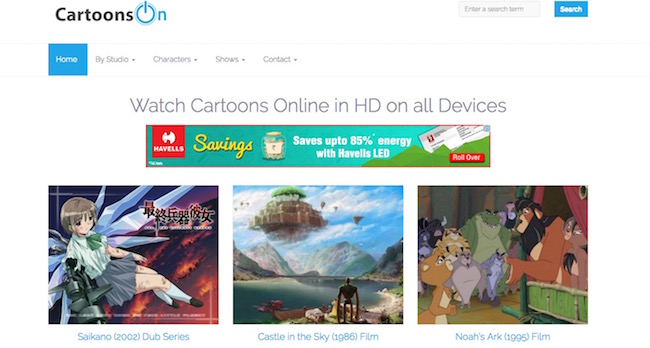
Without any doubt, Cartoon On is one of the best websites which lets users watch cartoons and anime online for free. The website is highly responsive and works fine with all kinds of devices such as smartphone, computer, tablet, iPad etc. You can stream online cartoon movies through direct links for streaming. There  are no unwanted pop-up ads and adult ads to showcase on the website so you can easily watch your favorite show with your family members. They have a huge collection and you can choose from various characters such as Mickey Mouse, Tom, and Jerry and also find the videos as per the studios like Warner brothers or Walt Disney.
  1. Disney Junior

    disney-junior

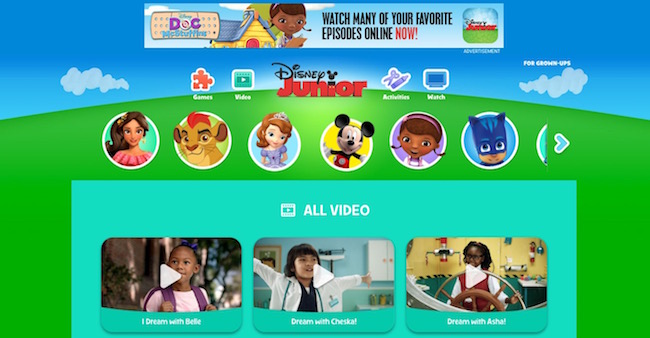
Disney Junior is one of the most famous websites which has an easy to use interface and allows users to watch online anime for free. You can watch all popular Disney cartoons like Micky Mouse, Donald duck etc. The website is obstructed in many countries, but you can use VPN to view your favorite cartoons. One the best thing is that there are no irritating pop-up advertisements that spoil the fun while watching anime.
  1. YouTube

    youtube

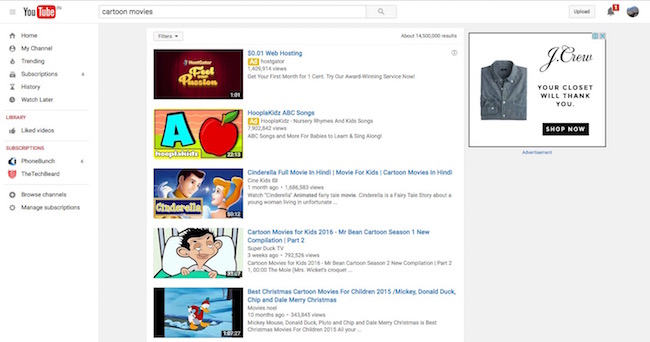
Across the globe, millions of users spend so much time daily on this website. YouTube is the best platform to upload, download, watch and share all kinds of videos and definitely cartoon characters and anime are not any exceptions. There are hundreds of online cartoon movies and shows available and you can find them out using the search bar at the top by entering the name of that character or movie series. Watching a video on YouTube is free. Though, advertisement banners pop-up all the time to bother.

  1. ToonJet

    toonjet

Are you a big fan of classic cartoon characters like Popeye the Sailor Man, Looney Tunes or Tom And Jerry and want to see their best videos online for free? If yes, then ToonJet is the website that you are looking for. The site provides smooth online streaming of popular cartoon shows and doesn’t require the user to sign up to watch any online video. However, Sing up with your account brings some additional features like the Profile Page which can allow you to access videos in a better way. The website is responsive and looks great on all kind of screens.
  1. GO GO Anime

    go-go-anime

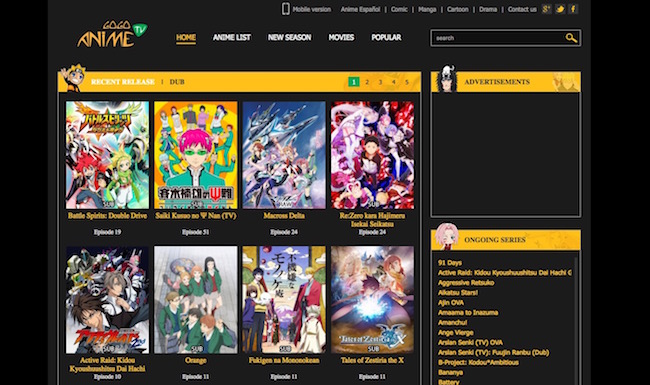
It is one of the best sites which allows users to watch online cartoons for free and also provides dubbed version of any anime in English. You can watch anime at the best possible speed without using VPN as the website is available across the globe. They have a huge collection and you can find almost all kinds of cartoon characters over there. The video quality is also good to provide the good experience on mobile as well as PC.

  1. Watch Cartoon Online

    watch-cartoon-online

The site is highly recommended to watch online anime for free as it gives you the variety of them. The home page of the website consists a huge directory of multiple anime and let you enjoy some of the most famous animated characters such as Teen Titans Go, Uncle Grandpa Season 2, Clarence Episode and many more. There are plenty of cartoon movies available too. There is only one problem that while watching anime or cartoon, you get disturbed by pop-up ads most of the time.
  1. Nick

    nick

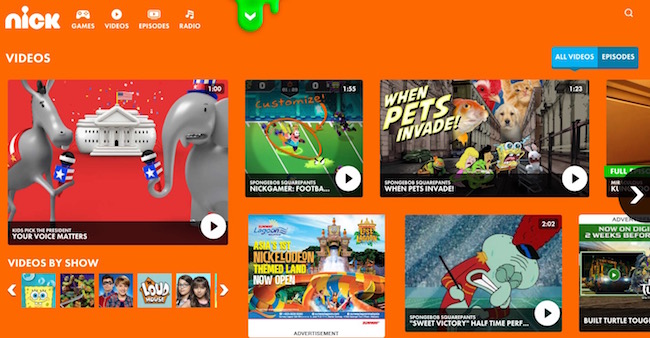
The anime available on the website is limited to only Nick cartoons, still, the website is highly popular among teenagers. The website provides a nice platform to watch Nick cartoon movies online for free. There is a huge collection available and viewers can pick from their favorite characters such as Rugrats, Square-pants, Avatar, Jimmy Neutron, SpongeBob Square-Pants, Hey Arnold and many more. You won’t face any problem while streaming online videos for sure.
  1. Anime Flavour

    anime-flavour

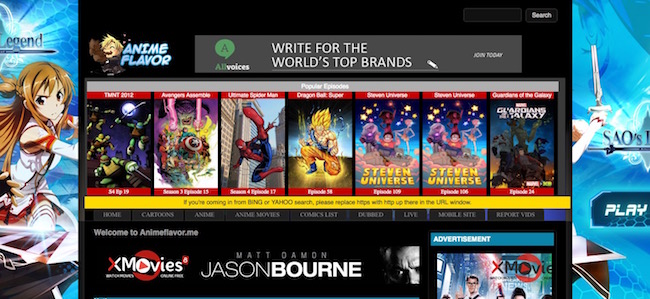
This is the best option for those who love to watch anime as it provides an easy to user interface, a wide range of collection, and smooth streaming of videos online without any charge. The sidebar of the website consists a huge list from where you can pick your favorite character and watch the movie. They have a nice collection of movies released in 2016. The site works fine with all devices such as the tablet, PC, and smartphone and doesn’t contain adult ads.

The video quality of a cartoon or anime movie depends on your device as well the website. If the format is not supported then you won’t be able to watch the movie and if the audio/video quality of your device is below standard then also it will affect the performance. Though, this free cartoon websites sport almost all file formats so that users can find and watch even older movies from the collection. Hopefully, the list we have provided will help you find the cartoon movie or show that you are looking for.


How To Protect Your Data Privacy When Surfing From a Smartphone

0

In general terms, internet and data privacy is a concern for anyone who is planning to make an online money transaction, sign up to a social network, create accounts on mobile apps or play online games. When you commit any of these actions online, you need to consent to the company for storing and using your personal data. The data privacy aspects related to this is about your rights to control this information and how it’s used.

High-detail Personal Information

Some companies need to collect high-detail personal information in order to provide their full services to their users. Products or services requiring high-detail information are financial-related applications or websites where you carry out financial transactions.

One good example is playing at online casinos. If you want full access to services and use of the products an online casino offers you need to provide a lot of high-detail personal information. Normally you would be asked about Email, New Password, Name, and Surname, Street, City, Country, Date of Birth when signing up to a new online casino. This will give you access but before you have full use of all services offered in a casino, you need to provide a photo of your personal identification and a recent utility bill or payslip, these steps are part of a KYC process (Know Your Customer process) and AML (Anti-money Laundering) measurements.

These steps are not unique to one industry if you use any banking, fintech or internet wallet application such as PayTM. Basically, any service provider where you regularly carry out transactions of varying amounts will ask you for high-detail personal details at some point.

Data Breaches

Sensitive information you submit online or offline on your device can get stolen. Cybercriminals will harvest your personal data and sell your privacy on the dark web. If data is compromised or stolen it can be used for fraudulent and criminal activities. 

It’s very unlikely that this will happen but it does happen. Last year it was reported that a virus named Agent Smith virus had infested over 25 million mobile devices, 15 million of those were devices owned by Indian nationals. This particular virus disguises itself as a Google-related application. Unknowing users think the piece of malware is safe and agrees to install. The malware then exploits vulnerabilities in Android devices and replace installed apps with malicious versions.

Third-Party App Stores

Official stores like Apple App Store or Google Play are heavily regulated and the risks of malicious malware coming through these app stores are minimal. The big issue is third-party app stores. It’s not uncommon for Indian smartphone users to download modified versions of the app through these third-party stores. The most common types of apps hackers hide malware in is sex-related adult industry apps, games and photography apps. 

How You Can Minimize Risks of Data Being Stolen Directly From You

  • Phishing
  • Pharming
  • Malware
  • Spyware

All these are real and serious risks you take when you are surfing and downloading things on the internet. Phishing is an activity aimed at stealing your personal data. Pharming is the activity of hackers redirecting visitors trying to access a legitimate website. Spyware is software or code that is able to collect data even if you are offline, the data collected is then sent to the spyware source when you go online with your device. Malware is “traditional” viruses infecting your device such as trojans.

A great to protect yourself from Malware and Spyware is to install anti-virus programs. There are many free anti-virus programs for your computer and whether you are on an Android phone, iPhone or tablet you can protect yourself by installing anti-virus applications and run regular checks on your devices.

Risks of privacy violation can be minimized by using common sense, avoid opening links in strange emails, never provide personal or financial details for someone who asks about it, always use strong password combinations, avoid shopping in unreliable webshops, don’t reveal personal information to website with weak security, clear your cache and browser history regularly.

10 Tips For Managing Tech Teams As a Non-Developer

0

Managing a tech team can be a complex and delicate endeavour at the best of times.  For a non-developer, however, it can be like entering a foreign country without as much as a phrasebook for guidance.  Anyone who has ever entered this territory will know that it requires a fragile balance of management and diplomacy for it to succeed.   Whether you’re producing tech for a double sided banner printing company like Ultimate Banners or, developing an app, managing your tech team properly is vital – which is why we’ve put together our guide to managing your tech team as a non-developer. 

Know when to interact – and when not to

Development is often an intricate business and almost always requires total concentration without external distractions.  For this reason, many developers choose to shut themselves off in a busy office by wearing headphones. This can be frustrating for the manager who may sometimes just want a quick answer to a question.  I’m sure we don’t have to tell you that your tech team won’t appreciate constant interruptions when they’re ‘in the zone’. Instead, suggest catch up breaks throughout the day. This will enable you to converse with the team informally over a coffee – without causing a distraction which may be harmful to the project. 

Share bright ideas wisely

OK, so it’s your product and, you’re just bursting with great ideas for it – so much so that they’re coming at you constantly.  Inspiration is great but, you don’t necessarily have to share every brilliant idea with your team. A busy tech team will soon lose patience with a manager who is constantly ‘suggesting’ new feature ideas which were not part of the original brief.  Instead, make a note of the ideas as they come to you and then take the time to consider if (a) it’s a viable option and (b) if it’s an urgent one. If you decide that a particular idea really would be a game changer for your product, then approach the team during one of the catch up breaks.  If not, consign the idea to the ‘future update’ folder. 

When time is of the essence

Speaking of urgency, this is something that developers understand.  Although we’ve talked about avoiding unnecessary distractions, your tech team will forgive you for necessary ones.  It may be that circumstances have changed meaning that you need an updated cost projection on the project. It may even be that you have a side project which suddenly needs urgent attention.  Either way, you’ll be forgiven the distraction if it really is important. 

Is it ready yet?

It’s only natural to be excited about your development project – and to want it to be ready for action as soon as possible.  At the start of any development project, it’s a good idea to ask for a rough completion date – although this may prove to be fluid, it will at least give you an idea of when you can expect your product.  Try to avoid sidling up to developers’ desk to casually ask ‘how things are going’ – your tech team won’t appreciate the distraction and, will see through this thinly veiled version of ‘are we there yet?’  It is, however, your project so don’t be afraid to ask for regular updates and changes to the completion date via scheduled meetings and reporting.

As a non-developer, managing your tech team really is a question of balance.  Although you may feel a little like an outsider in your own project, don’t let your lack of expertise intimidate you.  At the end of the day, the success of the project is your responsibility – this means combining leadership with the ability to trust that your developers know what they’re doing. 

This article was contributed by ben. You can visit his website here ultimatebanners. Ultimate Banners are the premier British printer and sign maker based in Birmingham UK.

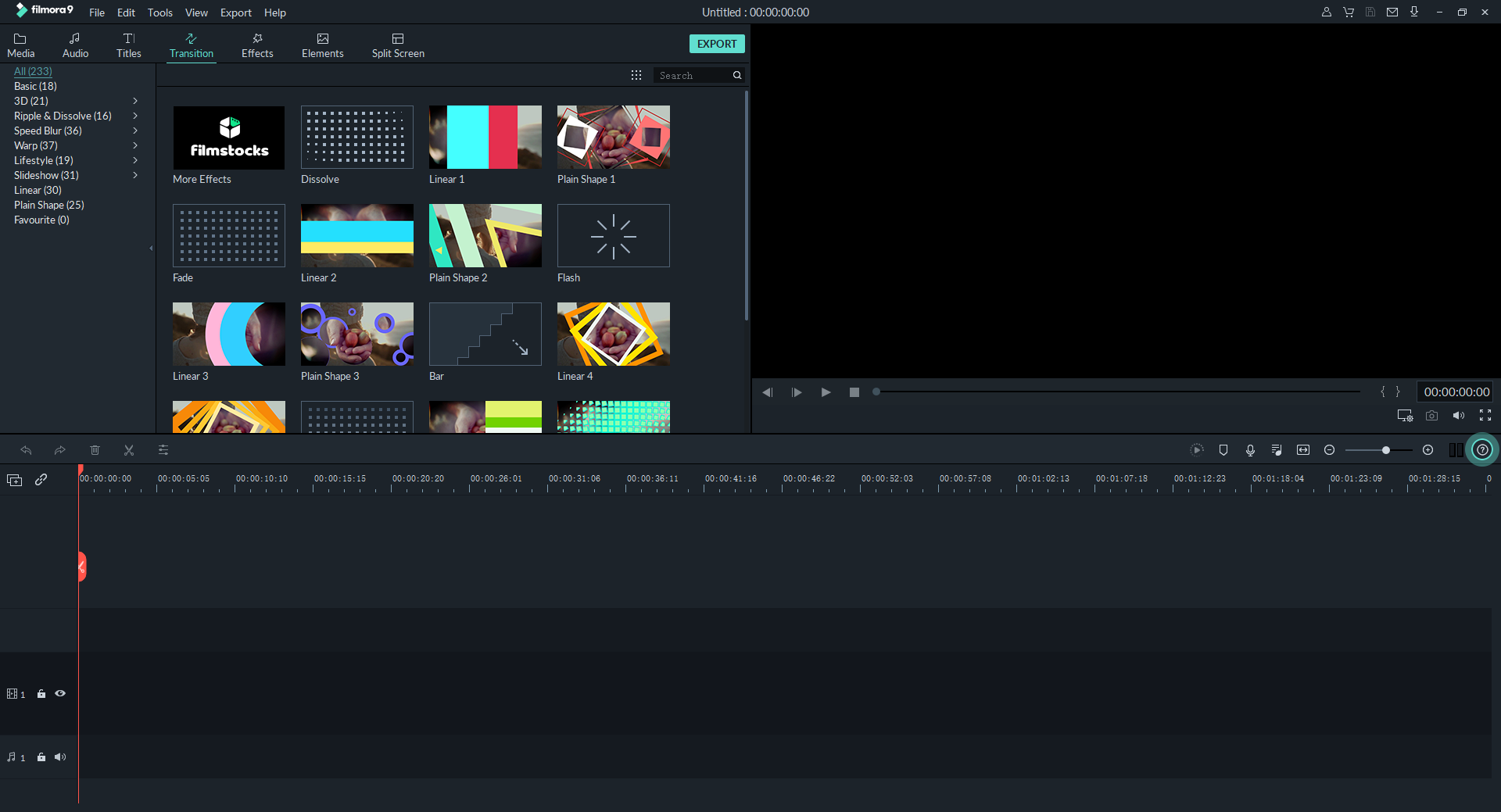
Wondershare Filmora9 Review (2020)

0

Nowadays, video marketing is on the rise and every brand needs to develop video advertisements for attracting customers online. For video creation and editing, one of the most popular and widely used video editing software is Wondershare Filmora9

With Filmora9, you can create, edit and share beautiful videos to build awareness of your brand. This article is all about Filmora9 reviews, the features of Filmora9, Filmora9 pricing and, the pros and cons of using it for video editing and creation. 

Overview of Filmora9:

Filmora9 is an easy to use video editing software that is built specifically for beginners so they can edit and develop amazing videos without difficulty. It is developed by Wondershare, which is a company that specializes in creating consumer software. 

Filmora9 can be used for editing 4k videos, splicing video clips, adding a wide range of effects, transitions, and overlays, adjusting audio and much more with a monthly and annual subscription fee. 

The best part about Filmora9 is that it keeps updating and growing with additional effects, transitions, and features so you can be more creative with every video you edit. They listen to their customers and update versions very often.

Features of Filmora9:

In this Filmora9 review, we will be elaborating on the features that help with video editing and creation. The following are its main features.

1. Creatively Inspiring:

With Filmora9, users can professionally edit their videos with multiple creative tools. The tools include inserting overlays, transitions, filters, grouping, slip, slide, rate stretch, ripple edit, isolating and much more. 

2. Audio Tools:

Sound is the most necessary part of any video and Filmora9 has just the right tools to manage and correct audio. It has the option of audio equalizing, background sound removal, sound fade, audio sync, mixing, noise reduction and much more to get your video’s sound to perfection. 

3. Video Animating features:

Filmora9 is packed with amazing video animation features that make your footage stand out from the rest. These include intuitive color wheels, color grading, scopes, and built-in video effects for a more professional and cinematic video. 

4. Customizable Workspace: 

Filmora9 has the option to customize workspace including windows, panels, and shortcuts to easily navigate and use the software according to the user’s preference. It even has the option of using multiple monitors to more effectively focus and work on every aspect of your video project. 

5. Music Beat Detection:

Filmora9 can detect music beats in your videos and mark audio beats which make it easier for you to edit audio to make your videos more dynamic. Matching the transitions in the video to your music beats makes them more vivid and attractive.

6. Over 800 Stylish effects:

Filmora9 comes with over 800 stylish effects and templates that can transform your videos into a piece of art. It is simple and easy to add these effects and impress your audience with their handcrafted templates made for perfection. 

7. Direct Sharing:

Filmora9 also has the wonderful option of sharing to YouTube and Vimeo directly from the software after finalizing the video. This helps content creators save time on uploading and sharing videos for their viewers. 

Filmora9 Pricing:

Filmora9 has different pricing for individuals, businesses, and educational purposes. Following is the pricing for Filmora9;

  1. Free Trial:

    Wondershare offers a full-featured free trial of Filmora9 for starters but it comes with a catch: for every video you export using the free version, a Filmora9 watermark is displayed on a third of the output. 

2. Individual Plan:

The individual plan consists of three types: annual plan, lifetime plan, and the bundle plan. 

The annual plan includes all features, free updates, no watermark, and free tech support and is renewed automatically every year. 

While the lifetime plan includes all the features of the annual plan with just a one-time payment for life. 

The Bundle plan includes all features of the annual plan plus Unlimited Downloads from the Filmstock’s Standard Library and New effects every month.

For Windows:

S. No. 

Plan

Cost

Type

1. Individual Annual Plan $39.99 Annually
2. Individual Lifetime Plan $59.99 One Time
3. Individual Bundle Plan $99.87 Annually

For Mac:

S. No. 

Plan

Cost

Type

1. Individual Annual Plan $44.99 Annually
2. Individual Lifetime Plan $55.99 One Time
3. Individual Bundle Plan $104.87 Annually

3. Business Plan:

The business plan consists of three types: the basic plan, standard plan, and the premium plan. 

The basic plan includes all features, free updates, no attribution, multi-user control, volume discount, permission for company use, access to Filmstock’s free library, and free tech support with per-user cost monthly cost that is billed annually. 

While the standard plan includes all the features of the basic plan plus access to filmstock’s standard library, 1 to 1 sales support and flexible payment options with per-user cost monthly cost that is billed annually. 

Lastly, the premium plan includes all the features of the standard plan plus access to filmstock’s premium library with per-user cost monthly cost that is billed annually.

For Mac and Windows:

S. No. 

Plan

User

Cost

Type

1. Basic Business Plan 1 $12.99 Monthly
2. Standard Business Plan 1 $24.99 Monthly
3. Premium Business Plan 1 $57.99 Monthly
  1. Student Plan: For students, Wondershare Filmora9 Video Editing Software costs only $7.99 a month that helps them save up to 28%.
  2. Educator Plan: For educators to receive a discount, they must fill a form on the official website and wait for their response. 

Pros and Cons of Using Filmora9:

Everything has its pros and cons but the key to good software is that its pros outweigh the cons of it. In this, Filmora9 video editor review, we have identified the following pros and cons of using Filmora9 for video editing:

Pros of Filmora9:

  • Easy to learn and use
  • Quick Video Editing
  • Wide range of effects, transitions, and overlays
  • 4k video and GIF output support
  • Easy sharing on Social Media
  • Split-screen feature (2 to 4 screens)
  • Multiple Import and Export Options
  • Frequent Updates and Improvements

Cons of Filmora9:

  • Limited storyline layers
  • Parts of the timeline cannot be selected and produced or exported
  • Lacks shortcuts for easy navigation. 

Conclusion:

According to the Filmora9 video editor reviews, it is indeed a good software for beginners and intermediate level video creators. It is simple and easy to use, yet it creates professional-looking videos without a hassle. 

We hope this Wondershare Filmora9 review helped you decide whether it is worth investing in the video editing software or not. 

Let us know your experience of using Filmora9 for video creation and editing in the comments below. We would love to hear your Filmora9 reviews so feel free to share your thoughts with us. 

The Pros and Cons of Fax Machines

0

In the modern business world, everyone is always looking for the next big thing to help them get a leg up on the competition. Similar to the world of consumer electronics, many business owners want the newest, shiniest toy in terms of technology. Often this new piece of software, high-tech productivity tool or latest advancement could give us just the edge we need.

But even in the modern world, there are still some older methods that stand the test of time and continue to be just as integral to business as they were decades ago. While fax machines are slowly becoming less common, you will still find one in almost every office across the country. Faxing continues to be a preferred method for sending and receiving documents, particularly in business settings and even more particularly when the documents contain sensitive information. 

There are a number of reasons for this, but there are also a number of reasons why they are declining in popularity. Faxing comes with lots of advantages, but there are also downsides when compared to more high-tech transmission methods of the digital world. This article will examine both sides of the coin, looking at the pros and cons of fax machines in the modern business environment. 

The Pros

Of all the advantages fax machines provide when compared to email, file-sharing and other digital options, none is more critical than security. In a dangerous world, where cybercriminals are growing in number and their techniques are growing in sophistication, the importance of keeping your documents safe cannot be overstated. With this being the case, faxing is still the preferred method when transmitting sensitive documents. 

A fax machine essentially takes an image, encodes that image and then transmits it via telephone lines. This means the document never enters the Internet and never becomes vulnerable to hackers. Even online fax providers such as eFax, which allow users to upload documents to their secure servers and have them faxed, offer more security than email.

With the growth of internet-based fax services, the convenience of faxing has also increased. Previously one of the cons to faxing was the fact that it required a fax machine and landline to operate, but this is no longer the case.

Additionally, faxes require almost no technical know-how and no computer usage, making them more attractive to old-fashioned clients and businesses. The fax machine has been a staple of business offices for several decades, and likely everyone in the office already knows how to use it.

The Cons

On the other hand, faxes are not a perfect option. While low-tech businesses may prefer the method, techier small businesses may not even have a fax machine, meaning fax is not even an option. 

Another downside to fax machines is the continuous upkeep required. To regularly use faxes, you have to spend money on ink, paper, and toner. The need for additional paper especially can be a drawback for more environmentally conscious users.

Also, fax machines come with the same risk as any other piece of equipment in that it may – and eventually will – fail.

In Summary

The advantages of faxing will likely keep them as a major communication method in the business world for years to come. While it is not without its flaws, the security and ease of use for sending and receiving faxes still make it valuable for most modern business owners.

Content:/com.android.browser.home/ | Enable Default Browser on Android

The “content:/com.android.browser.home/” is a web link code that is used to configure or tweak some changes in the default home page of an Android device. We all love our smartphones and we know that Android is one of the leading operating systems in the world. The configuration of the home page, when we buy a mobile phone, is always set in the default mode. But with the help of this particular link, we would be able to make some customization on the home page. To utilize the operating system up to its full potential, users can get into the default settings and make their own personalized changes.
content://com.android.browser.home/
However, some of the bloatware and default features make it quite a task for the user to customize their Android devices. But in order to reach the special accessibility settings in your device, you will need the above command syntax. There is another command syntax available as well for the changes.

What is a Browser?

First, let’s understand the meaning of a browser. It is a computer program with a graphical interface for the world wide web, through this one navigates through different web pages.

What are some of the Best Browsers Available?

  1. Mozilla Firefox
  2. Google Chrome
  3. Opera mini
  4. Microsoft Edge
  5. Safari

How to use “content://com.android.browser.home/”?

As the term suggests, deconstructing the syntax will give you the below both ways. content://com.android.browser.home/

Follow these steps to Replace the Default Home Page on this Android browser:

  • Open default browser on your android device.
  • On the top right corner, you will find the menu button and click on that.
  • Tap on the option “Settings” and then click on “Submenu”. After a scroll, you will be able to find the option “Android browser settings”.
  • Tap on it to proceed.
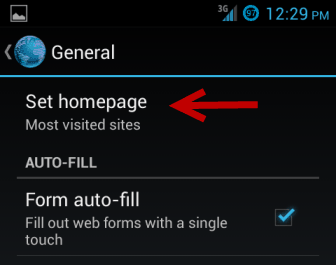
  • Open “General” settings.
  • After that click on the option to “Set home page”.
  • After this, you can set the choice of your default page or you can select the blank option as well.
Or what we can do here is, we can open the Default Android Browser and insert the mentioned URL, that is content://com.android.browser.home/ set. This will directly take you to the setting menu to change the default home page on your browser.

An Alternative Way of Selecting the Default Web Browser:

Changing the theme of the default web browser is quite simple yet an esoteric task for a lot of people. There are always different ways for different browsers to set their themes. Follow the steps mentioned below:
  • Open your default web browser.
  • Visit the homepage of the website that you wish to visit.
  • Now click on the menu button on the top right-hand corner.
  • You can now see the option called “ save as bookmark”, Click on that.
  • In the case of the chrome browser, you can click on the star option available on the top right corner.
  • Now push the menu button and check for any available bookmarks.
  • You should be able to visit the bookmark and access it through the history page as well.

How to Remove Content://com.android.browser.home/set?

If you want to remove the syntax, you can do that by following the steps below
  • Start the default installed web browser.
  • Then select the menu settings.
  • Tap on the General option there.
  • And then click on the pick Homepage.
  • Type the URL that you want to save to your homepage.
  • Then tap on the save button.
For different browsers, the method is always different. Let’s have a look.

For Google Chrome you need to follow the steps below:

  • Launch the Chrome browser.
  • On the top right corner, there will be three dots, tap on that
  • Search for the Homepage option and then click on it.
  • Tap on it and type the URL to set as your default browser.
However, in some instances, you may not be able to find the Homepage option. In that case, you need to enable the homepage option by yourself. Follow the below-mentioned steps to enable the Homepage option.
content://com.android.browser.home/
  • On the address bar, visit the page Chrome://flags/.
  • Then locate the option force enable Homepage button”.
  • Click on that option to facilitate the Homepage.

For Mozilla Firefox 

Follow these steps:
  • Launch the Firefox browser.
  • Tap on the three dots option and click on browser settings.
  • Select the General option from the setting.
  • After that go to the Home option and configure the homepage.
  • Select the Custom option to do the customization.

For Opera mini Browser

Follow these steps:
  • Launch the Opera Mini browser.
  • On the bottom, you can find the opera icon click on it.
  • You will now be able to see Opera Mini settings.
  • Launch the settings option.
  • Disable the News option on the Homepage.
  • Delete all the speed dial sites.
  • Click on the “+” icon.
  • Enter the URL of the site that you want to open as your Homepage.
  • At last, save your settings.

Why do you need a Homepage in the First Place?

Enable Default Browser in Android

The default homepage on a browser offers plenty of advantages. And content://com.android.browser.home/ has a very practical and useful aspect in it. If you travel a lot and change locations or use different WIFI connections, you would love to have a plug in-browser rather than a Homepage. In these cases opting for different settings would be a wise option. If you do not change or set a default Homepage, you are more likely to receive error messages that your connection is not secured. Configuring apps has now become easier than ever. New technologies like the content://com.android.browser.home/ syntax can make it possible. It makes surfing and browsing experience easier for the user. Be it on Chrome or on Firefox, browsing can be effortless and error-free using the particular syntax. However, everything depends upon the user. Some complaints regarding the particular syntax have been cited which tells that as it can give access to unwanted bloatware and malware links. This may help the user understanding the syntax and using where it is necessary.

5 Best Screen Capture Software 2018 for Windows | Easy Screenshots Tools

We all struggle while capturing the screen and editing it with another tool to edit or add a note which leads to use of multiple programs, while there are some with which you can achieve results in an app and that too for free. On windows, capturing screen by pressing [prt sc] need an effort, since there are some screenshots which we need for different cases like posterity, demonstration, or preservation.

Best Screen Capture Software

Thus to provide you ease of performing screengrab functions we are here with best five tools for doing better with your screenshots, whether to add text, draw lines, use special characters, some essential editing tools or capturing specific regions of screen with the need of any additional software to get it done. While using these tools, days of printing screen and pasting onto Windows Paint are over.

How to take a screenshot on your Mac?

As we were covering all the screen capture apps related to Windows but do not worry if you are using a macOS. However, there is no need for a particular screenshot tool, as you do everything with just your keyboard shortcuts. So if you wish to take a screenshot of the whole screen, use [shift]+[cmd]+[3] and you will find the image on your desktop as a .png file. Moreover, if you wish to grab the screen in a particular region, use [shift]+[cmd]+[4] and the crosshair will appear, then you can drag to select an area.

For more screen capture options, visit the Apple’s Support.

Contents

5 Best Screen Capture Software 2018

We have selected five best screen capture software for your Windows PC with a ton of features and are available to download for free. We have also mentioned the pros and cons each of these software holds.

So let us begin….

1. FastStone Capture

FastStone Capture is a fantastic screen capture program which can also be used in making documentation or compelling videos.

Best Screen Capture Software

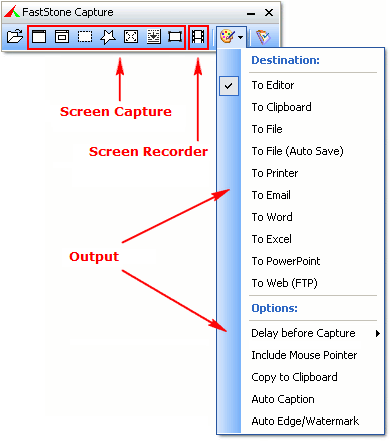
FastStone Capture is a very easy to use and capable screen capture software; you can use it for creating multiple purposes like creating various projects such as user manuals, instruction guide, tutorials or educational videos. The software comes with a set of editing tools and features to let you capture your screen and edit them accordingly before publishing or saving them. However FastStone Capture does lack some features and support option but has managed to claim the first spot because of the inclusion of features and skilled tools.

In FastStone, you can choose to capture either full screen, an active window, a rectangular region, freehand region or an object. The software also has support for a scrolling capture which lets you create a snapshot of the entire content on the page even if the part of it is hidden and required scrolling the screen. After you install and open the software, it opens a small toolbar with its quick functions like screen recording or capturing images, you can also directly drag an image over the toolbar to edit it. The FastStone Capture is easy to use screen recorder with a 30-day trial before you buy it for $19.95.

Pros

  • Easy to use
  • Lots of tools
  • Lets you capture scrolling screen

Cons

  • Limited help and support options
  • Missing some functions/tools

Click here to download and start using our most recommended screen capture software, the FastStone Capture.

2. Screenshot Captor – Best Features Screen Capture Software

The screenshot captor is the screen capture software which does more than usual software with its webcam support, annotations and editing your image files.

Best Screen Capture Software

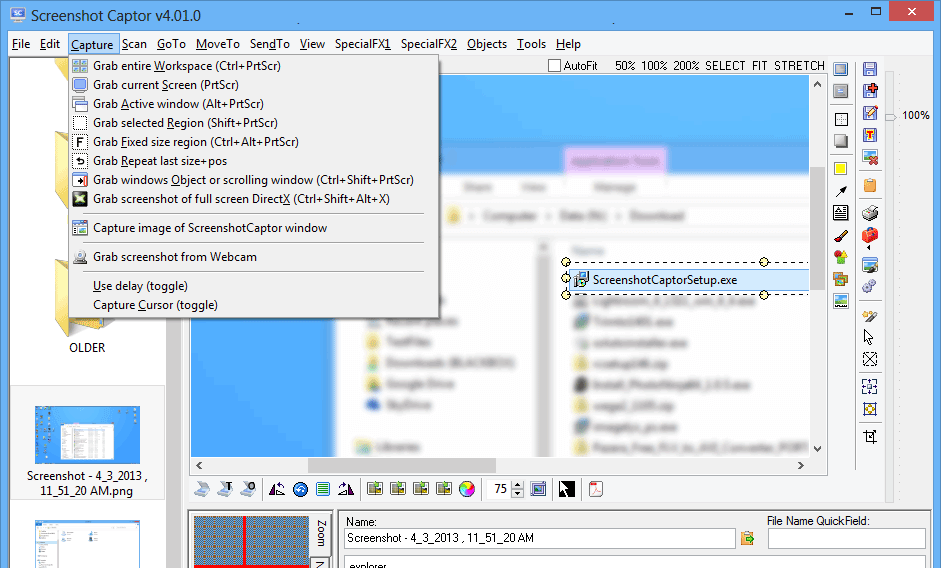
Screenshot Captor is one of the most feature-rich screen capture software in the list. It does a lot more than being a screenshot software like grabs images from your webcam and also includes a full set of scanning tools for your documents. Its most advanced features include capturing the scrolling window, with that, it even trims the borders for you. It also captures the screen for a fixed region. Moreover editing the captured photo is as comfortable as a piece of cake like slicing down the area, annotating and advanced image editor and blurring down the areas and it is loaded with all the features.

Like every software, Screenshot Captor also has a downside, its general interface is a bit quircky and can be understood by only few of them. Although all the other important functions/tools are well explained and easy to use. The Screenshot Captor is easy to use and available to download for free but if you like and regulary use this screen capture software, you can donate a small amout for appreciating in building this amazing feature packed screen capture software.

Pros

  • Highly Customizable
  • Editing tools
  • Long list of options of capture and export

Cons

  • Intricate licence key system
  • Quirky Interface

Click here if want to download Screenshot captor.

3. SnapDraw Free – Best Free Screen Capture Software

SnapDraw Free, is the tool you would be searching for with in-built image editor and great post-processing effects, it is a very useful screen capture software and also comes free for download.

Best Screen Capture Software

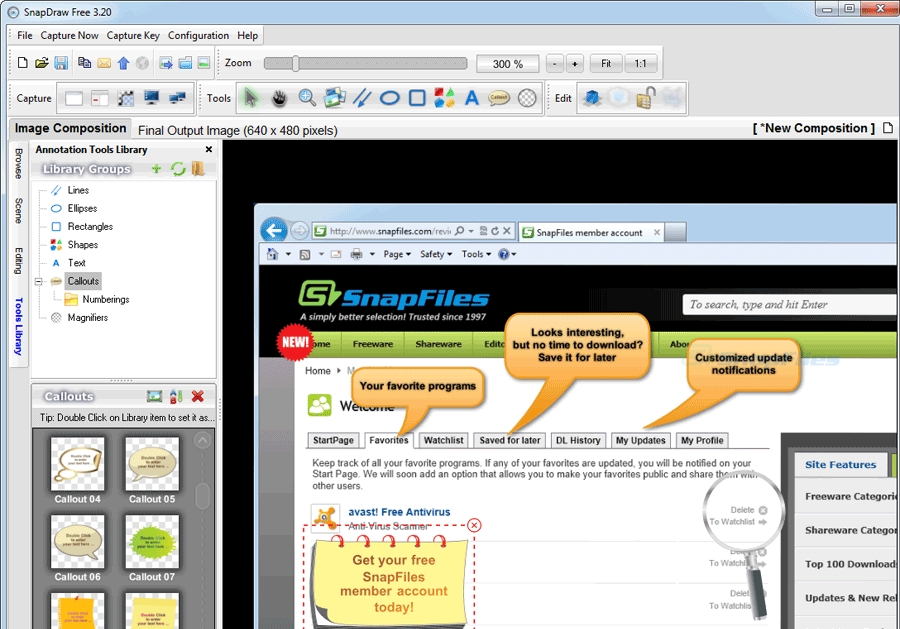
If you need a software to help you in putting an extra effort to present a captured screenshot well, this is the screen capture software for you. It is packed with all the primary post-processing tools like borders, backgrounds and even fading reflections applied with a single clicking. Moreover, it can also capture shots from multiple screens at once to capturing a single object on the window screen. As we already mentioned, it is software with lots of features, and there is hardly something it cannot perform among screen capture software.

It is very easy to use but a lot of in-built features can be confusing for some. It also has bunch of annotation features to layer your individually captures windows. You can also perform 3-D transformation using its tools and give you captured shots some action. And that’s not it, with it you can also choose to direclty upload the images to the FTP server or send it through email.

Pros

  • Great Editing tools
  • Lots of screen capture options
  • Excellent sharing options inlcuding FTP and email

Cons

  • Lots of tools can be confusing

Down Snapdraw free from here.

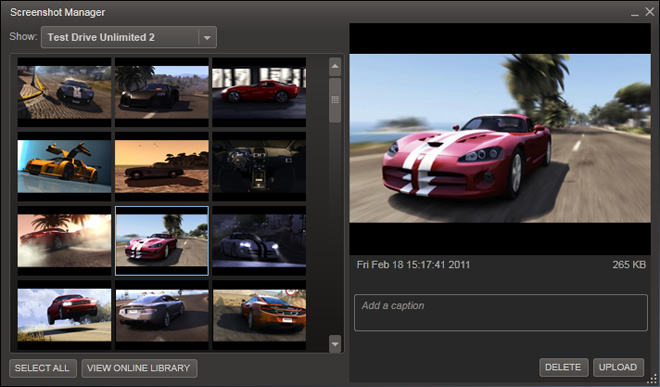
4. Steam – Best Game Screen Capture Software

Steam, a very popular software among gamers, has its own screen capture tool to capture any game you are playing. Steam is primarily known for buying and downloading games but also has a feature to take screenshots of the games you are playing.

Best Screen Capture Software

Now you would be wondering what difference it has than the other screen capture software mentioned in the list. However, if you have ever tried taking screenshot games using any screen capture software, you will know why steam is essential. While playing games in the highly advanced graphics mode, when you screenshot, the result mostly leave you with a grey image and loses that moment completely.

The greatest thing about it is that the screen capturing is not restricted to games only available through Steam or you can manually add games to your Steam library and when you launch it through Steam, you can use its default key [F12] for taking screenshots. Usally the shots are saved to a hidden folder but differs for each game but to make your search easy you van check it through Steam’s View > Screenshots Menu and then right-click and choose ‘Show on disk’ to find out where they exist.

Pros

  • Captures non-steam games
  • works with hardware acceleration

Cons

  • restricted to games

You can download Steam from here, if you to screenshot your gameplay.

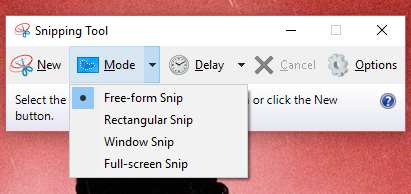
5. Windows Snipping Tool – Windows In-built Screen Capture Software

Windows Snipping tools you are not aware of. Windows Snipping Tools is included in the OS since its XP version, an often ignored tool buried in the start menu.

Best Screen Capture Software

The snipping tool is simple to use and has powerful enough to take useful screen captures. You can perform all the standard functions like grabbing fullscreen images, rectangles or currently active window. You can also perform free-form snips by dragging your mouse on the screen area you want to highlight and thus captures the only screen in the selected area.

It also consists of tools like scribbling your captures with its rudientary and highlighter tools. You can also set a delay on screen captures to capture something specific which you need to keep up and this is it. However, this software consists of as it is very basic screenshot tools but satisfies to capture screen as you can perform most of the taskd with the Windows built-in tools unless you wish to capture very specific region.

Pros

  • Built-in software
  • Simple tools

Cons

  • Limited Customization
  • Limited Editing Tools

You can find Windows Snipping Tools here.

Wrapping it Up

As you have already read about the best screen capture software for windows in our list. However, you can drop down a comment with your favorite snapping tool. Also if you have any query regarding this software, you can comment down, and we will be there to help you ASAP.

How Technology Has Reformed the Sporting Industry

0

As a sports fanatic, you’ll agree that the advancement in technology has impacted the sporting industry in various ways. Below is an in-depth analysis of how technology has changed the industry.  

50+ Best Ultra HD Wallpapers

Invention of Applications

The invention of gaming apps has had a significant impact on the sports gaming industry. The most impactful applications include:

  • Video Streaming Technology– This technology allows for the live streaming of sports such as football, basketball, wrestling, among others by downloading mobile apps. You can also stream live using computers, laptops, and PCs. This means that you don’t have to go to the stadium or watch television to enjoy a live match. You can enjoy the game from anywhere. 
  • Virtual Coaching– If you’re interested in a particular game and would like to learn it without the help of a physical coach or in a team, you can have a virtual coach train you. This means you’ll learn everything online through video chatting. Its flexibility makes it a cheap and easy option as you can work it around your schedule.
  • Ticketing Made Easy– The advancement of technology has enabled app developers to integrate payment methods that allow sports fanatics to purchase their tickets by the click of a button. This method of ticket sales has enabled saving of time as fans no longer have to queue outside ticketing offices waiting for their turn. 
  • E-sports and Gambling: – You can play games and bet online, thanks to technological advancement. They can place bets on their favourite teams and win themselves some extra cash on various betting websites. For example, if you’re involved in sports betting in India, you can find a sportsbook online for all the games you can bet on at any given time of the sporting season.

Stadium Technology

The continuous evolvement of technology has dramatically impacted fan experience in most stadia. Fan experience has improved in the following ways: –

  • HD Video Screening: – Improvement of technology has enabled the installation of large HD screens at various places across developed stadia. This ensures that the fans don’t miss any sporting action even when they are not seated at their seats. Also, fans can watch replays of parts matches that they weren’t able to watch live.
  • Wireless Network Connection– Technology has enabled the installation of wireless internet popularly known as Wi-Fi in stadia. Availability of Wi-Fi allows fans to search their favourite players online. Also, fans can be able to see the players’ lineup online before the start of a match. 
  • Installation of High-Speed Cameras– Technological advancement has led to the invention of high-speed cameras that are usually used in developed stadia. These cameras can capture numerous angles of a stadium at the same time. Fans can, therefore, access their photos online after the match and share them online with their friends and family.
  • Biometrics Technology: – This refers to the technology used to identify people by examining their physical and behavioural characteristics. It enables the security personnel to verify the authenticity of a ticket holder, hence, promoting security in the stadium. 

Prosthetic Technology

The technology enables people with disabilities to take part in sports. Disabled persons are now able to compete in sports thanks to artificial body parts. A good example is athlete Oscar Pistorius whose feet had been amputated at a very young age and was able to compete in both Paralympic and Olympic games thanks to prosthetic technology.

Hawk-eye Technology

It refers to the use of a computer system in games such as cricket and badminton, among others to provide accurate real-time results in a 3D form. The technology has improved fairness in the affected sports and also helped save time that would otherwise be used to project the results manually.

Use of Digital and Social Media Platforms

Due to the continuous improvement in technology, sports news and updates can widely be shared through social media platforms such as Facebook, Twitter, and LinkedIn, among others. Also, thanks to digital broadcasting, you can watch live and replay videos online.

Improved Fairness in Sports

Technology advancement has led to the invention of gadgets that assist referees in making fair decisions through replays. For example, the recent introduction of the video-assisted referee popularly known as VAR in football helps determine if a referee has made the correct decision.

Assists Sports Persons with Nutrition and Training Routines

Improvement in technology has made it easy for sports persons interested in getting the most out of their diet and training to reach helpful advice and tips by the click of a button. You can also get a personal trainer and nutritionist online.

Bottom Line

With the continuous advancement of technology, the sporting world is sure to continue changing and improving with each passing invention.

Full Profile Security and Unlimited Active Followers

0

When dealing with social media services, customers are always concerned about security. This is perfectly normal because there have been countless cases of people getting their Instagram accounts hacked. In some cases, photos get leaked, and vital information is lost. Therefore, customers want to be sure that buying Instagram followers do not compromise their account. Famoid ensures 100% security of your profile whenever you buy Instagram followers. They are keen on taking all the necessary precautions to ensure that your account remains safe and protected. For customers who happen to have security concerns about their accounts, you can inform the Famoid support team, and they will have your problems sorted out. The online platform ensures that your account remains protected even after buying Instagram followers. Check this out for more details on Famoid and their services.

How safe is it to buy Instant followers on Famoid?

Buying Instagram followers on Famoid is entirely safe and reliable. When you successfully buy followers on Famoid, there is nothing to discredit your account in any way. However, you might have some followers made up of unreliable accounts, and they might end up in trouble with Instagram. However, they will only be viewed and regarded as your followers. They will not have anything to do directly with your account. This clearly proves that you can successfully buy Instagram followers from Famoid without worrying about compromising your account. In case you face any challenges, you can always contact the 24/7 customer support to help you with clarifications and guidelines. Famoid offers a 100% secure and reliable way to buy followers for Instagram. For more information, you can check this out.

Importance of Privacy Protection

Famoid is very particular about safety and privacy. The company regards it as an essential part of their social media services, so every order on Famoid takes place in a completely safe environment. It offers 256 bit SSL protection in every area of the site. You make your payments through reliable payment agencies such as PayPal and Safe Charge. Famoid keeps your e-mail or username private and doesn’t share it with third parties. Your information remains private and totally secure with Famoid, and you can maximize the use of this secure system to buy real Instagram followers.

Instant and Rapid Delivery

Famoid does not only offer cheap Instagram followers, but it also provides users with top quality service. The delivery time between your order placement and seeing results is a maximum of 5 minutes with Famoid. This comes with a confirmation of your order. If you face any problems with your order, you can always contact the 24/7 customer support service. Their executives will always be willing to solve and answer all your questions. Buying Instagram followers on Famoid has always been quite the deal and a non-regrettable experience. Famoid is as secure as it is reliable.

How To Convert 4K MOV Video to MP4 Format Using Winx Video Converter Deluxe

0

The MOV and MP4 are some of the video formats that can be played on various devices. 

MOV is the default video format for Apple devices like iPhone, MacBook, etc. It also became the mainstream choice for the newly released cameras like Nikon, Canon, and drones that support the population of 4K video resolution recording and HEVC codec. These MOV videos can be played in computers, VLC, Windows media player, etc. They can also be easily edited in computers and can be uploaded in video sharing sites.

But there are some problems with this particular video format. Videos with MOV format cannot be played or recognized by TV’s, old computers, video players with old versions due to format incompatibility. Some players like windows media player, VLC cannot play 4K MOV videos in HEVC codec format due to their incapability of supporting these videos.

There is also a problem of importing videos in MOV in HEVC codec format to some video editing software like Sony Vegas, Adobe, Davinci, etc. 

Many of the developers have suggested a solution to all these problems. Some of these are to convert MOV in HEVC codec videos to MP4 H.264 video format, compress MOV videos to HD videos, etc. 

There are many companies and websites that allow users to convert MOV videos to MP4 format. But, after using many of these tools, I can suggest the best software for this work, i.e., WinX HD video converter.

WinX HD video converter deluxe is one of the best software that helps in the conversion of MOV videos to MP4 video format. It is a GPU accelerated video converter that allows you to convert, resize, cut, and download videos. This software is supported by devices with OS like Windows 10 or below. This also provides many user interface languages like English, French, German, etc. 

HIGHLIGHTS:  

  • Transcode any video to desired formats with 47x faster GPU acceleration without compromising quality.
  • The user can edit videos efficiently without any experience.
  • You can minimize 4K and HD videos without disturbing the original quality of the video.
  • It can import videos from any device and source. It has 370+ways of inputs to give 420+ outputs.
  • It allows you to download videos and music from 1000+ sites.
  • It helps you in making photo slideshow with music running in the background.

-> WinX has 50 million+ users since 2010 and processed 90 million+ videos on an average per year

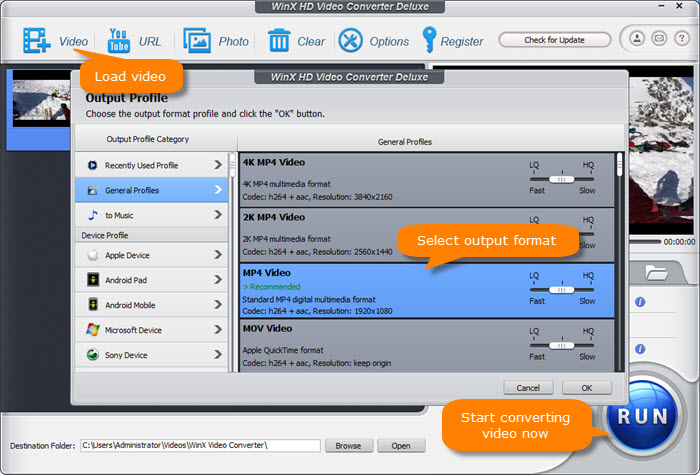
It is effortless to convert mov to mp4  or one video format to another format in this software by some simple steps:

  • Click the “upload video” button and upload the MOV video that needs to be converted.
  • In the output profiles, select the MP4 profile. Select the H.264 as the preset for the video codec.
  • Press the “RUN” button to start the video conversion.

The conversion completes faster than the time taken by any other software. The video is converted without compromise in video quality and reduces the size of the video up to 90%. 

You can download the WinX video convertor deluxe easily. Just go to the link given below and download the free trial version for windows or MacBook OS:

You can opt for the free trial version and try the software. Also, you can buy the full version of software and experience all the features provided by the converter. It also ensures a 30-day money-back guarantee if the buyer wants to cancel the premium version.

You can use these links for easy browsing of the website.

So, I suggest to all the readers to download WinX HD Video Converter free trial & get special discounts

How to Spy on an iPhone without Installing Software? 

0

There are times in your life when you need to spy on someone and there is no better way to do that than spy on their phone. Since our phones go everywhere we go, it is very easy to check someone’s whereabouts or activities by spying on their phone. So, if you want to spy on someone’s iPhone without having to install a software, you are in the right place. There are many apps that you can use and they all come with their own distinctive features for spying.

1. Spyic 

If you want to check the best spy app for iPhone, you would have to go with Spyic. It is a reliable and 100% safe app to use if you want to spy on your children, employees or spouse. The most notable thing about this app is the user-friendly interface that lets you understand and use the features effectively. Being available in 190 countries, this app is a favorite among parents and employers alike. 

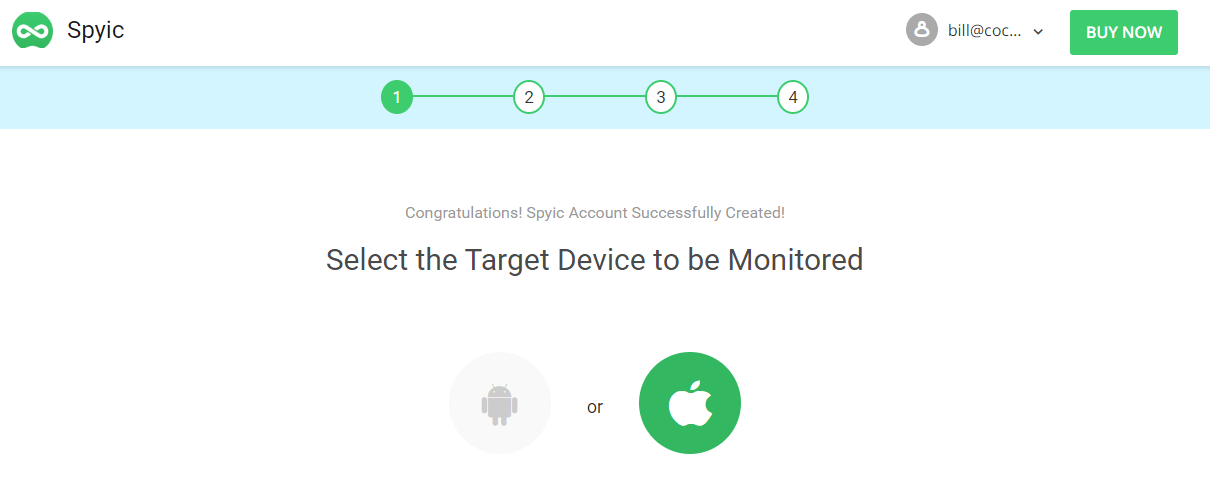
It is very easy to set up the app on your iPhone. First of all, you have to select the target device as an iOS device and choose the payment plan that suits you best. The subscription plans are quite affordable and you will surely find one for your needs. 

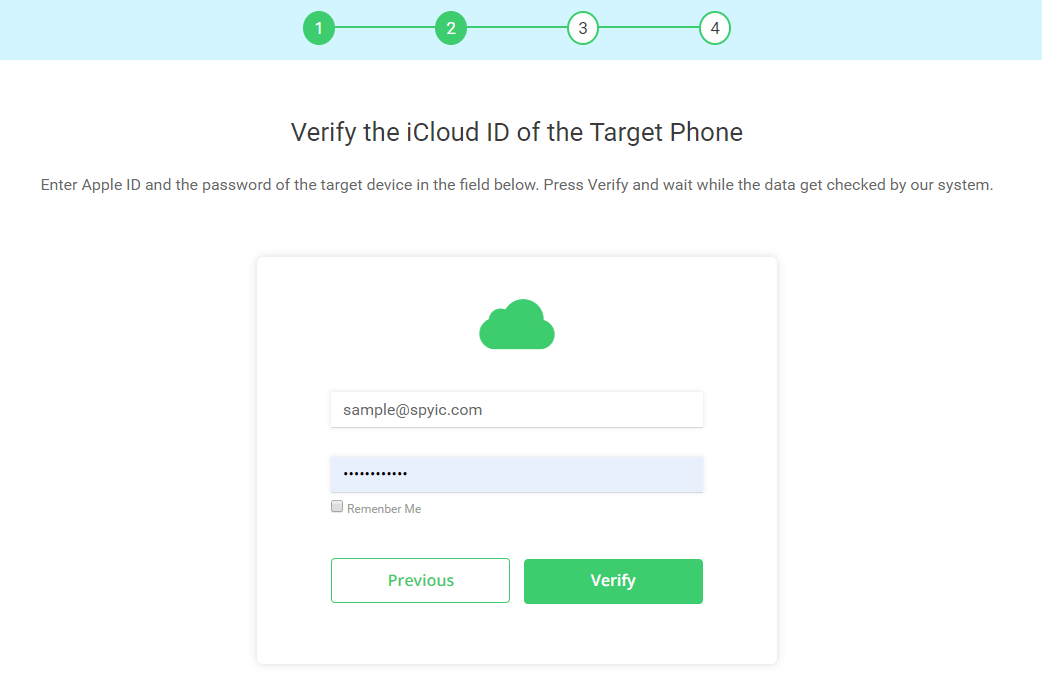
After that, you just have to access the target information by entering their iCloud credentials.

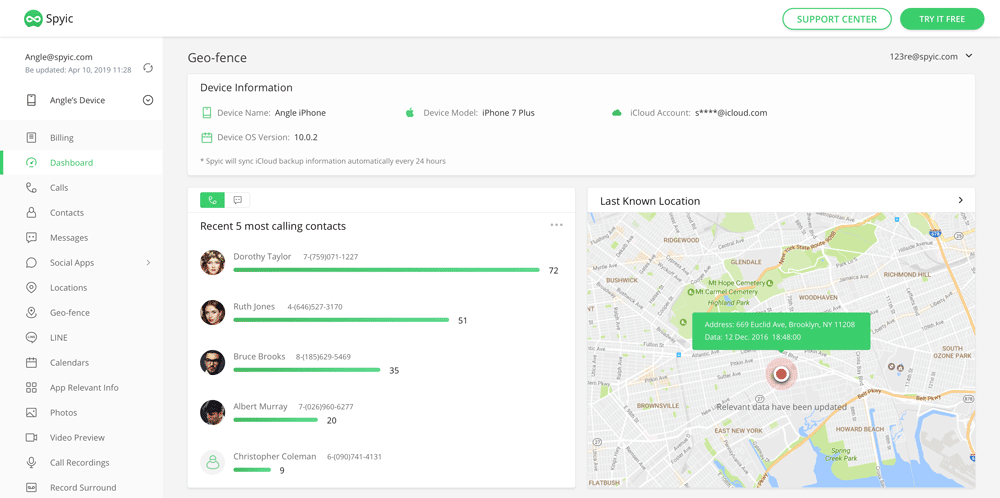
There is no need to worry about detection as the app icon is nowhere to be seen on the phone. Now, just use the web-based dashboard to monitor all the target’s activities.  

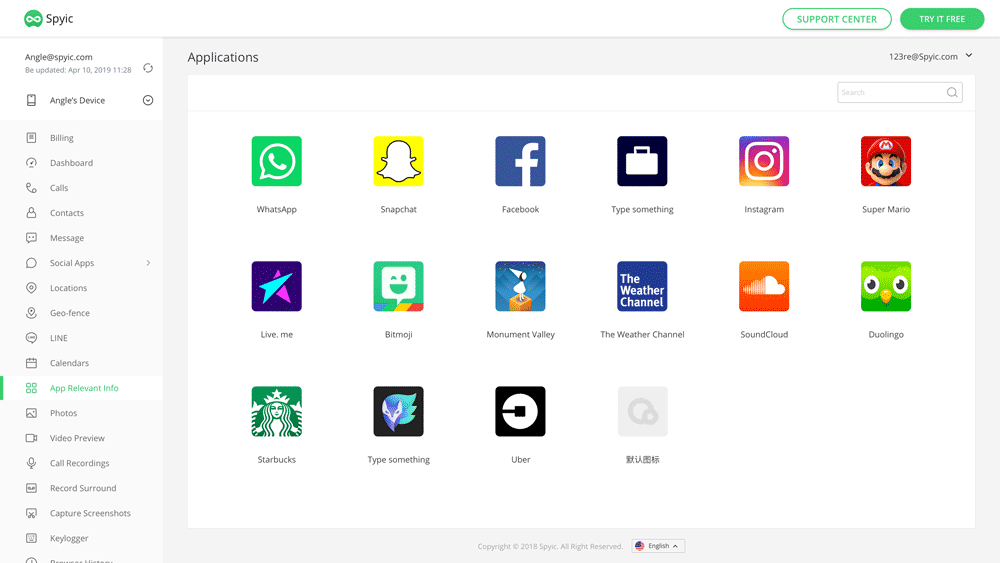
Here, you can view the dashboard. There is a list of options on the left plane. You can check whatever you want to check without the other person knowing that you are tracking every move that they are making. You can easily track every call, including the outgoing calls. Along with seeing the phone number, you will also be able to see the contact name and their profile photo in the phone book. You can even check where the person is at that exact time. Furthermore, you can mark several place such as a mall, club or an office and get notified when the person is at that location. 

Spyic lets you read text messages as they are being typed, owing to the Keylogger feature. This feature lets you monitor every stroke being made on the other person’s phone. There is no limitation on the social media apps you can monitor. So, you can get information about their activities on Facebook, Instagram, Snapchat, Viber, Kik, Messenger, LINE and even Tinder.

  • Cocospy 

Cocospy is quite like Spyic when it comes to tracking without installing software. There is no jailbreak required and all you have to do is enter the iCloud credentials of the target. After that, just set up the account and access your dashboard using your phone. There are a number of options such as tracking the other person’s phone calls, to-do lists, calendars, text messages, social media interactions and a lot more. 

This is a fool-proof way to keep a look at what your child is doing on his or her phone. You can even see the browser history to check what they are searching. This app lets you see the installed apps on their home screen and the location they are currently in.The best part is that you can do all this without being detected. Additionally, if your child has an iOS tablet, you can detect that too. In minutes, you can enter their iCloud credentials and monitor their activity. With the Location Tracker option, you can monitor the Wi-Fi and GPS-based locations. Mark the geographical coordinates and monitor the entry and exit times into these places easily using the Cocospy app.

  • Spyera

Spyera is another spy app that you can use for monitoring any iOS device without installing a software. It has plenty of features that you can use by simply entering the target’s iCloud credentials. This apps lets you check the call history such as incoming calls, outgoing calls and even the missed calls. Along with Whatsapp messages, the app also lets you monitor incoming and outgoing iMessages. It is an award-winning service with web-controlled interface. 

It also lets you read the target’s text messages and monitor where they are coming from. Other than that, it allows you to read emails and see camera pictures. So, if your child or partner is talking to someone that they should not be talking to or have pictures of something objectionable, you will be able to see it. If you get a subscription of just $4.99, the app will let you track the target in real time. 

  • Spy Bubble

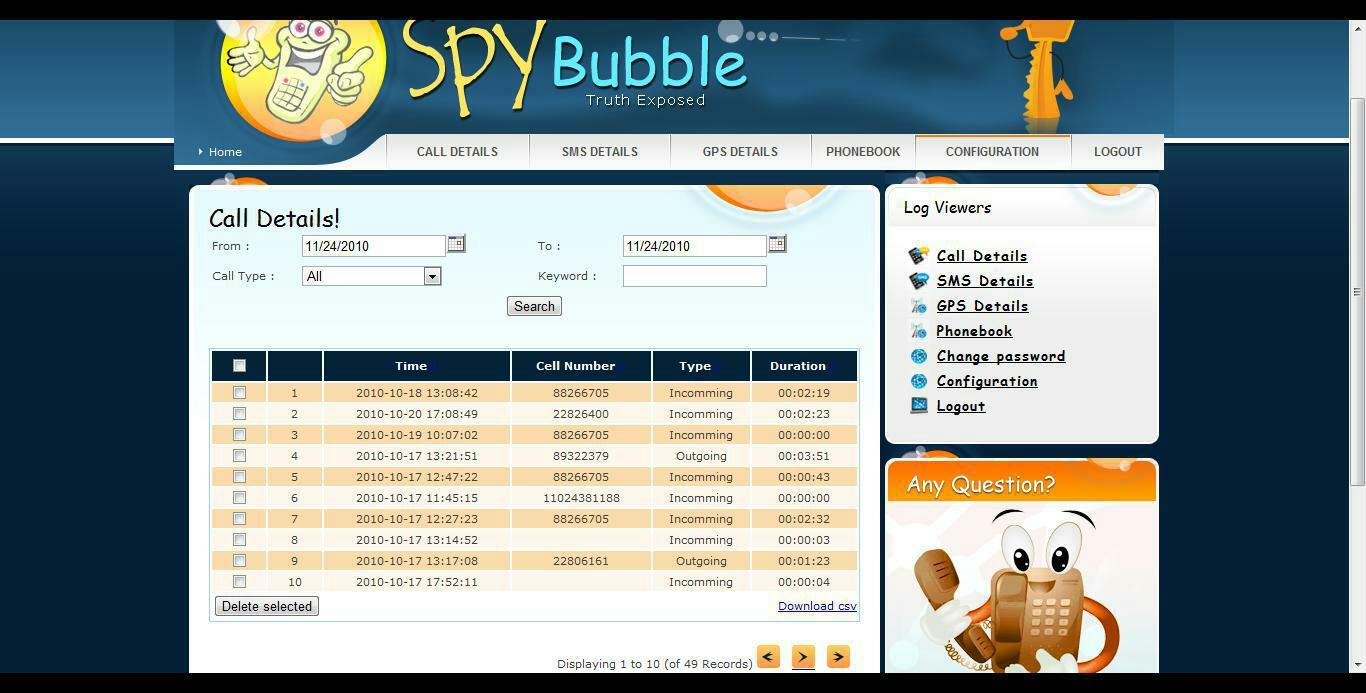
 There is no need to install the app in order to spy on anyone’s iPhone as you can just use the web-based interface. Spy Bubble lets you monitor the target’s social media accounts. This app also lets you see what the target is doing on their call log, iMessages, Whatsapp, Line, Multimedia and phonebook. You can also capture screenshots and see the target’s emails. 

However, there is no feature to check the watchlist contacts using Spy Bubble. It also does not have a Keylogger feature so you will not be able to access the passwords. They do have a global customer service so if you have any query, you can get in touch with them instantly. Also, their service is quite competitive and they make sure to update every now and then. 

  • Mobistealth

This a low-key app that you can use to keep in touch with your whole family. It is available for iOS devices so you can even use it to check what your kids are doing on their iPads. No jailbreak is required, making this app an easy one to use. The main use of this app is to check the target’s locations. This app lets you see where members of your family or your employees are at the moment. You can track family members using this app so that is quite a great advantage. Also, the subscription plans are quite affordable. The interface is pretty clean with no fuss. You will get the hang of it very easily. 

Conclusion

Sometimes, you have to spy on your loved ones to make sure that they are safe and responsible. You might need to check up on your employees too. In cases like this, these spy apps are a blessing for you. Hopefully, you would have selected an app for monitoring your target iPhone device by now. The benefit of these apps over other iPhone-spying apps is that these have a web-based Control Panel so you can access the target’s information without installing the apps.

Remo PST Repair Software Review

0

A PST file or a Personal Storage Table file is an open proprietary file format which is used to store copies of messages, calendar events, etc. 

These types of files are vital as they consist of personal data and information. That is why their preservation is needed at every stage.  

But whenever there are any issues with such type of files, like corruption, theft, etc, you need a repair software. And that is where Remo PST Repair Software comes in. 

So, today, we will be reviewing the Remo PST Repair Tool and by the end of this article, you’ll have a better idea of how helpful Remo PST Repair Software is for you. 

So, let’s see the performance of Remo PST Repair Software and analyse it thoroughly. 

Key Highlights  

  • Remo PST Repair software is a safe and secure way of outlook data recovery like notes, emails, contacts, etc. 
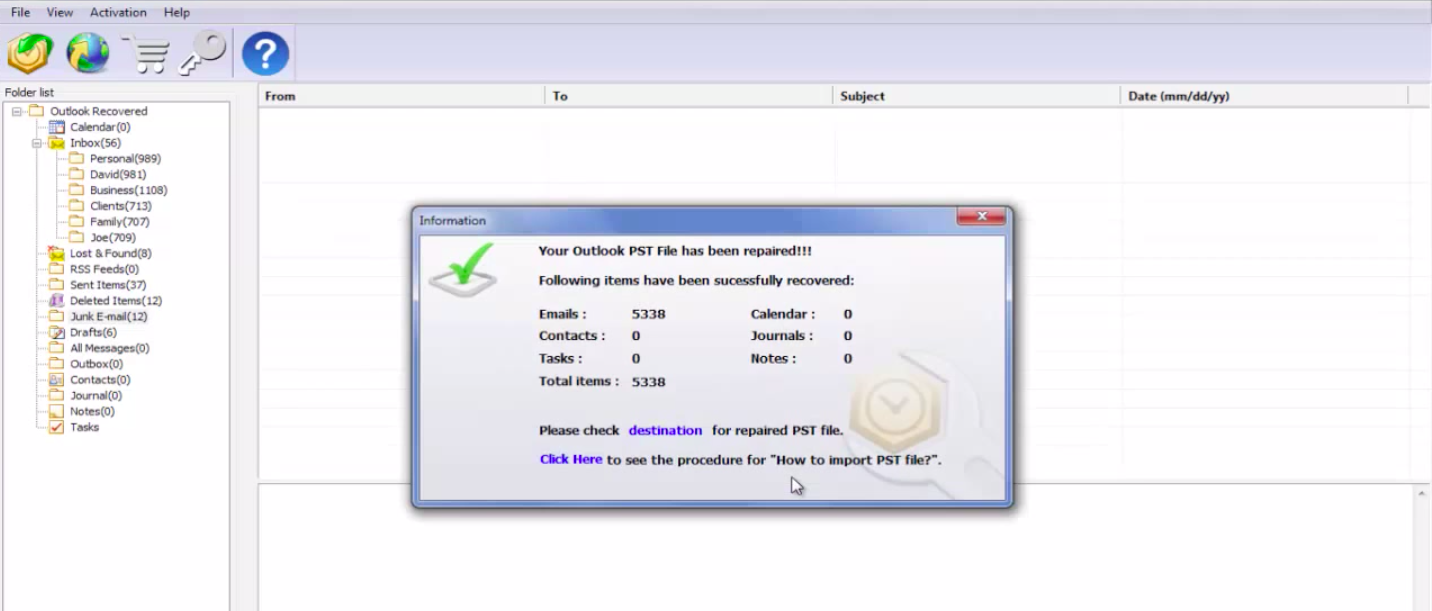
  • You can even preview the repaired PST file for the proper recovery of outlook data elements. 
  • The software is specially designed to perform a complete recovery of important elements for you like email inclusive of CC, BCC, and others. 
  • Comes with an easy to handle user-interface so that anyone who uses the software is not bothered much.
  • Remo PST Repair Software is equipped with an advanced repair algorithm so that it can repair and restore even the most severely corrupted PST files. 
  • The software is programmed with a “Read only Mechanism” which ensures a safe and harmless recovery of the PST files.
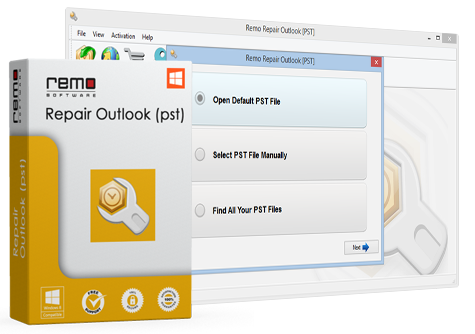
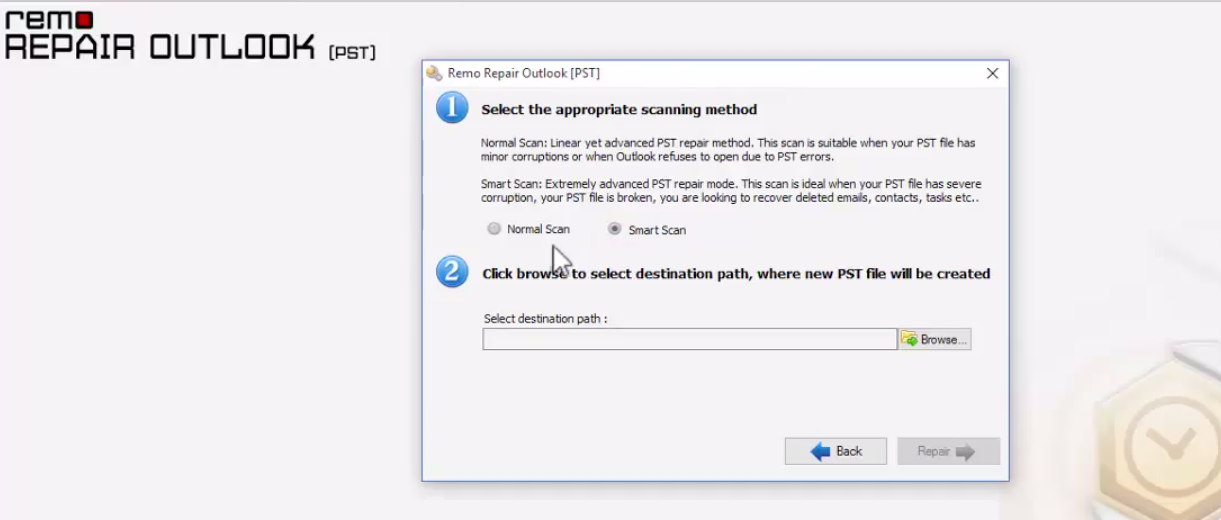
  • And you know what the best part is? The convenience of repairing the data. Yes, just 3 clicks -> Select > Scan > Repair and you’re done! ‘

Performance Review 

  • Remo PST repair software comes with a 2 scan methods -> Normal & Smart Scans to solve your issues. You can use both of the scans or a single scan if you wish. If the normal scan fails, you can go for the smart scan and easily you’ll recover all your corrupted PST files.  Usually, the smart scan is provided for repairing the inaccessible files.
  • The software is compatible with various versions of windows, including Windows 10. This gives you a lot of options because many a times, users can not find suitable repair software for their older versions of Windows. Along with that, all the versions of outlook 2000, 2003, 2007, 2010, 2013, and 2016. So, another great plus point for Remo software users.
  • We tried repairing compressed PST files and were amazed at the results. It is absolutely perfect for such PSTs because it repairs the compressed PSTs well. In addition, even the password protected PST files are compatible. That means an easy repairing of such files.
  • The fact that it provides you with the real time preview of recovered emails make it all the more unique. There are a very few other repair software that provide you with such an opportunity. But Remo Data Recovery software is popular for quick recovery. With this preview, the monitoring of the data and the security of data is ensured.
  • However, the recovery rate is a bit slower than others. For example, sometimes, it get stuck while recovering large and severely damaged PST files. It causes some inconvenience but if that is not the issue, and then you can be sure that it is one of the best repair software. 
  • The best part about the software is its usability and extremely handy user-interface through which you can perform the repairing of PST files easily. Even if you do not have any experience in doing such technical jobs, you’ll do good. 
  • And if you look at the price of the software, comparatively, it can upset you a bit. It is a bit higher as compared to the others. But as per the performance it really great. 

Summary 

In a nutshell, Remo PST Repair Software is a great option for PST file recovery if you want safe recovery. This software is compatible with all windows versions and all Outlook versions, so it can be used in any file recovery easily. Overall, It is an excellent choice for PST repair.