Blog Page 147

Best Inspirational and Motivational Movies

0

Movies and stories always gives some inspiration. It depend on you how you take a movie story, you just watch it for entertainment or for some motivation. There are lot of Inspirational movies in Hollywood and Bollywood. Here i am suggesting some Best Inspirational movies you must watch to get the motivation in life.

Latest Most Inspirational Movies

Best Inspirational Movies of Hollywood

Life of Pi : Life of pi is one of the best inspirational film by so far. The plot was based upon young boy and Bengal tiger. A young boy who survives a disaster sea was hurtled into a epic journey of adventure and discovery. During this journey he gets connected with Bengal Tiger. It’s like unconditional love.

2016-02-10_134340

  •  Directer:  Ang Lee
  • Writers: Yann Martel (Novel ) David Mangee (Screen Play )
  • Stars : Suraj Sharma, Irrfan Khan, Tabu, Rafe spall, Gerard Depardieu
  • Rating : 8/10

Invictus : The full story based up on Nelson Mandela, when he was president of south Africa. It was initiate a unique venture to unite the apartheid torn land. It was enlist the national rugby team during national world cup times.

2016-02-10_134520

  • Directer: Clint Eastwood
  • Writers :  Anthony Peckham (Screen Play),
  • Stars : Morgan Freeman, Matt Damon
  • Rating : 7.4 / 10

The wolf of wall street :  The Wolf Of wall Street is best motivational movie. The plot is based up on real story of jordan Belfort. Where he was wealthy stoke broker to involve in crime, federal government and corruption. It was really good movie.

2016-02-10_134726

  • Directer: Martin Scorsese
  • writers : Terence Winter  (Screen Play), Jordan Belfort (Book )
  • Stars : Leonardo Dicaprio, Jonah Hills, Margot Robbie, Rob Reiner, Kyle Chandler, Jean Dujardhi
  • Rating : 8.2/10

The pursuit of Happiness : The pursuit of Happiness is most popular movie in the list. It was the film based on homeless salesman. He faced so many struggles in his life. I think it’s best live experience we can see on this film.

2016-02-10_140608

  • Directer:  Garbriele Muccino
  • Writers: Steve Conrad
  • Stars : Will Smith, Jaden Smith, Thandie Newthon
  • Rating : 7.9/10

The social Network : The Social Network movie was based upon mark Zukerberg. How he creates Facebook and Whom would help during his project. It’s real story behind mark zukerberg. I have seen this movie so many times.

2016-02-10_143711

  • Directer:  David Fincher
  • Writers : Aaron Sorkin (Screen play), Ben Mezrich (Book )
  • Stars : Jesse Eisenberg, Andrew Garfield, Justin Timberlake
  • Rating : 7.8/10

Best Motivational  Movies All Time

Shawshank Redemption: It was based upon two imprisoned men bond over a number years. Where they were found solace and eventual redemption over acts of common decency. It was really inspires me a lot.

2016-02-10_144036

  • Directer:  Frank Darabont
  • Writers:  Frank Darabont (Screen play )
  • Stars : Tim Robbins, Bob Gunton, Morgan Freeman
  • Rating : 9.3/10

It’s a wonderful life : It’s wonderful life was best Hollywood movie ever. It was pot-rate very nicely. It will show how life would be like if you never exist in your life. Its really matters what you are doing in life. It was amazing movie.

2016-02-10_150902

  • Directer:Frank Capra
  • Writers :Frances Goodrich (Screen Play ), Albert Hackett (Screen Play)
  • Stars : Donna Reed, james Stewart, Lionel Barrymore, Karolyn
  • Rating : 8.3/10


Rocky :


2016-02-10_152506

  • Directer: John G. Avildsen
  • Writers: Stylvester Stallone
  • Stars : Stylvester stallone, Talia Shire, Burt young,
  • Rating : 8.1/10

Good Will Hunting : 2016-02-10_152840

  •  Directer: Gun Van Sant
  • Writers : Matt Damon , Ben Affleck
  • Stars : Robin Williams, Matt Damon, Ben Affleck, Minnie Driver, Casey Affleck
  • Rating : 8.3/10

Forrest Gump :

2016-02-10_153421

  • Directer: Robert Zemeckis
  • Writers: Winston Groom(novel ), Eric Roth (Screen play)
  • Stars : Tom Hanks, Robin Wright, Gary sinise, sally Field, Michael connor
  • Rating : 8.8/10

Best Inspirational and Motivational Movies for Bollywood

Manjhi (The Mountain Man )

2016-02-10_154417

  • Directer: Ketan mehta
  • Writers : Shahzad ahmad, rajbali Anjum
  • Stars : Nawazuddin Siddiqui, Radhika apte, Ashutosh Acharya
  • Rating : 8.2/10

Mary Kom

2016-02-10_155107


  • Directer: Omung Kumar
  • Writers : Saiwyn Qadras
  • Stars : Priyanka Chopra, Robin Das, Zachary Coffin, Darshan Kumaar, Sunil thapa
  • Rating : 6.8/10

Bhaag milka bhaag

2016-02-10_160957

  • Directer: Rakeysh Omprakash Mehra
  • Writers: Prasoon joshi
  • Stars : Farhan Akhtar, sonam Kapoor, Pavan Malhotra
  • Rating : 8.3/10

3 Idiots

2016-02-10_161115


  • Directer: Raj Kumar Hirani
  • Writers: RajKumar Hirani, Abhijat Joshi, Vidhu vinod Chopra
  • Stars : Aamir Khan, Madhavan, Mona singh, Kareena Kapoor, Boman irani, Sharman Joshi
  • Rating :8.4/10

Like Stars on earth

2016-02-10_161725

  • Directer: Aami Khan, amole Gupte
  • Writers: Amole Gupte
  • Stars : Aamir Khan, Darsheel Safary, Tisca Chopra,
  • Rating :8.5/10

Black

2016-02-10_160127

  • Directer: Sanjay leela Bhansali
  • Writers : Sanjay Leela Bhansali(Screen Play), Bhavani Iyer
  • Stars : Amitabh Bachchan, Rani Mukerji, Ayesha Kapur, Shernaz Patel, Dhritiman chatterjee
  • Rating : 8.3/10

Lagaan (Once upon a time in India)

2016-02-10_162540

  • Directer: Ashutosh Gowariker
  • Writers: Ashutosh Gowariker (Screen Play)
  • Stars : Aamir Khan, Gracy Singh, Rachel Shelley, Rajesh Vivek, Paul
  • Rating : 8.2/10

Swades

2016-02-10_163251

  • Directer: Ashutosh Gowariker
  • Writers: M.G Sathya,
  • Stars : Shah Rukh Khan, Gayatri Joshi, Kishori Balal
  • Rating :8.3/10


Fix iPod Touch Wont Turn On Error Problem

Recently i get an error on my iPad, my ipod touch wont turn on. If you are facing and struggling with this iPod touch wont turn on error problem and continuously seeing this error problem on your apple iPod then check out this below post to find out that how to fix iPod touch wont turn on error problem.

Also Check :


iPod touch is one of the favorite devices for all. It can be used in many ways. But if you facing the problem with your iPod then you surely feeling sad with it.

ipod touch wont turn on

It happens when you are pressing and holding the home button on your apple iPod but your iPod touch wont turns on. So for that, we are here going to fix this error problem by our tips and tricks methods.

If your iPod touch is not responding, then also know that there is still some hope. So, here are the some top best methods & tips and tricks to easily fix this iPod touch wont turn on the problem.

How to Fix iPod Touch wont Turn On

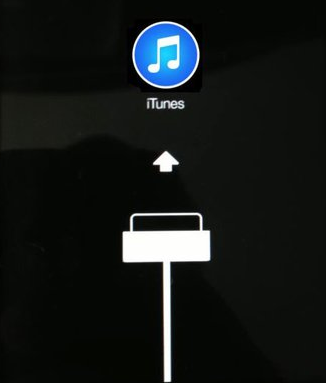
1. By using Recovery Mode

By using Recovery Mode

  • Press & hold the Power & Home buttons.
  • Hold till when an Apple Logo appears until the iTunes logo disappears
  • Connect your iPod touch to computer via USB cable
  • Launch iTunes now
  • Select ‘Update’ when prompted by iTunes
  • Now reinstall the iPod touch O.S. software
  • Take backup first or check it wont delete your data

That’s it, now it will fix this error problem.

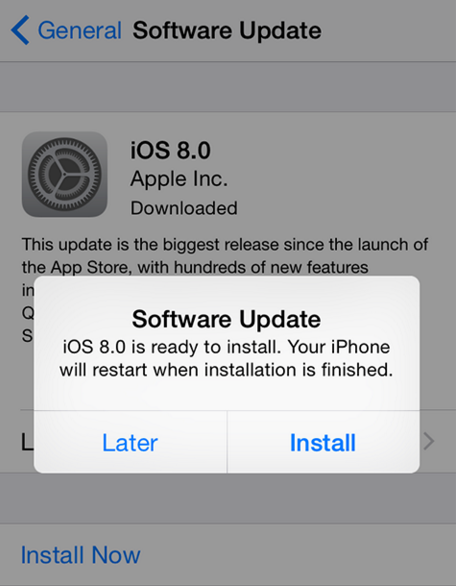
2. Update your Device Software

Update your Device Software

  • Connect your iPod to your computer via USB cable
  • If there is a new version of your device available then download it
  • & Upgrade it.

That’s it, it will update your apple iPod device software and fix this error problem from your iPod.

3. Reboot or Reset your Device

Reboot or Reset your Device

  • Hold Power button & Home button at the same time
  • Wait until the apple logo appears
  • That’s it, Done

It will do a reboot of your apple iPod device so that it can fix this error problem.

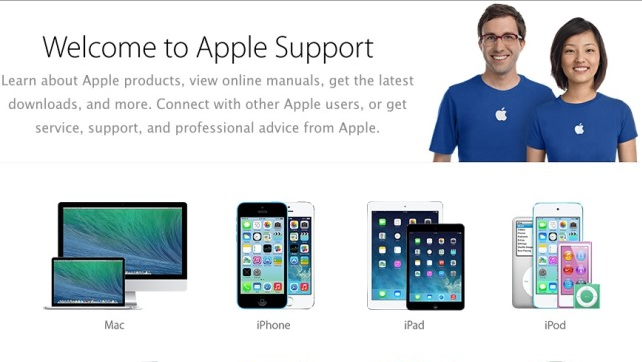
4. Contact Apple Support

Contact Apple SupportIf your iPod touch wont turns on after trying all of the above steps, you may need to get in touch with the apple support. This is the last option if your apple iPod is not solved by these above solutions.

Contact Apple for the support and help ..!!

These are the some top best methods to easily fix this iPod touch wont turn on problem. Hope it will help you to get rid out of this error problem from your iPod, iPhone and other apple products. If you struggling with any problem while fixing this error problem then comment down your problem below, so that we will fix it too.

How to Fix Gmail Server Error 707

Fix Gmail Server Error 707

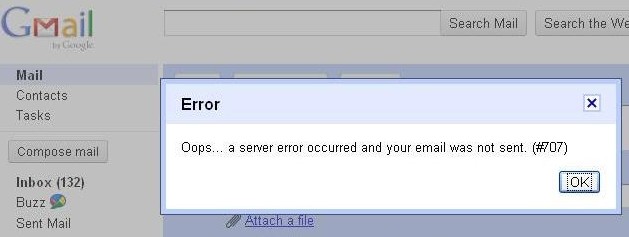
Who would not have google account, i think none of them. Because most of the internet users have google account. There are so many errors we face on google account and error 707 was one of them. This error occur when you try to send mail to someone. If you have this error then you will not able to send any email to others. You do not need to bother about this error because you can easily fix this gmail server error 707. What you need to do is simple change the google settings. Here i will give you full information about how to fix gmail error 707. You can do it yourself, you do not need anyone help. It’s a very simple and easy. Just follow below instructions.

gmail error 707

Other Android Errors and their Fix

How to Fix Gmail Server Error 707

If you do not have any idea about how to fix Gmail Server Error 707 . Just have a look here, You can find out so many solutions on internet but here we will give you the best way to resolve this error 707. First thing is you need to change google settings. Even you can try other methods also like clear the cache and cookies, update your browser to the latest version, disable the virus checker temporally, Simple try to sign in other browsers.

Gmail Error 707 FIX

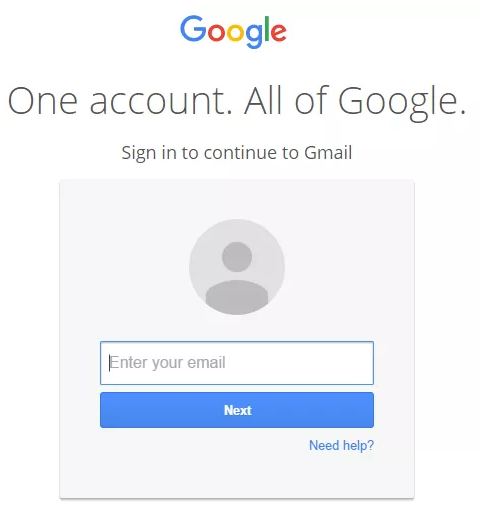
  • First and foremost thing is you need to sign in google account. Click here 

2016-02-12_170725

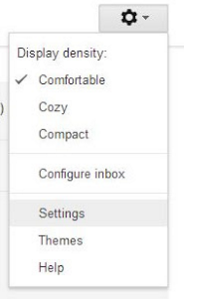
  • Now you need to click on gear box and click on settings button

2016-02-12_170747

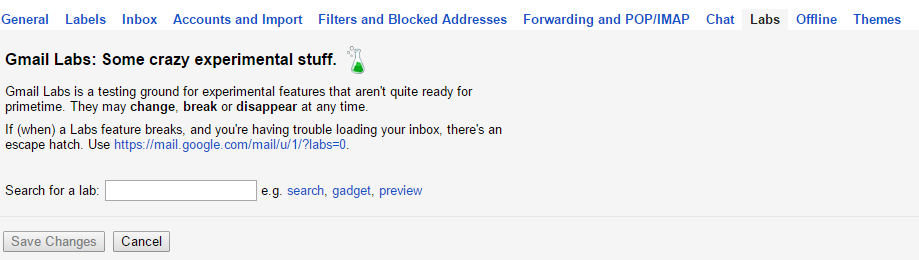
  • Now you will get full list of settings menu. In settings menu you will find out Labs options. Click on labs button.

2016-02-12_170046

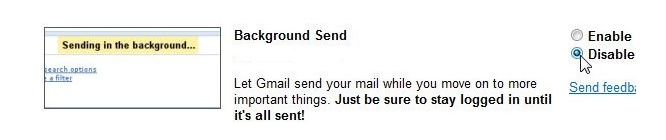
  • Now you need to scroll down the labs page and find out Background send option. Now you have to disable background send option on your google account settings.

2016-02-12_170159That’s it now will not get this error on your gmail account.

It’s a best solution for error 707 of Gmail server. Just try out this method for your problem. If you still have this error on your google account, you can try basic version of google account click here . Simple get rid of this error 707.

Top Best Clan Names for COC and COD

0

Hey, if you are choosing the best clan names for Clash of Clans (COC) and Call of Duty (COD). Then here i am suggesting some Cool, Good, Funny Clan names. If you need to start the clan names then these clan names will attract many of the players in the global chats.

There are basically the 2 games where you want the good and unique clan names & these two games are the “Clash of Clans” and the other one is “Call of Duty” game.

You can also Download the both games from here too..!!

‘Clash of Clans’Download Now

Clash of Clans‘Call of Duty’Download Now

Call of DutyClan names mean or used when if you want to sign up for the Clash of Clans game or Call of Duty games then you will need these clan names for your game to attract other by your clan names. So, for that, you have to think a catchy or an attractive clan name for you. So for that problem today, we are giving and showing you the Top best clan names for you.

Some Important Tips while picking a new Clan Names:-

For ‘Call of Duty’ Clan Names –

  • You cannot use any special characters such as dollar signs or exclamation points.
  • The length of your clan names must be only 20 characters or less.
  • Have a few names as the backup in case your 1st choice is taken.
  • The only character beyond letters or numbers can be use is an underscore.

For ‘Clash of Clans’ Names –

  • The length of your clan names must be only 15 characters.
  • You cannot use any special characters such as exclamation points.

Pick any that you like or wanting to !! It’s the all new.

How to change any Clan Names:-

1. Open the Clash of Clan or Call of Duty on your iPhone or Android

2. Click on Settings > then select Help & Support > then Report Issue

3. Then go to other problem

4. You will see an Email Pop Up where you can send a message to the creator

5.  In the Email request that they change your clan names to new one

6. Send the Email.

NOTE* – You should get a message back in a few days that they say that they changed your name.

So, here are the some top best clan names that you would like & want to pick it up surely.

Top Best Clan Names for COC and COD

  • Violent Vigorous
  • Mammoth Supremacy
  • Rotten gunslinger
  • Flagrant Assailant
  • Premium Alliance
  • Oceanic Almighty
  • Kindly Discipline
  • Jobless Irresistible
  • Puny Rebels
  • Unkempt liquidator
  • Exuberant Knights
  • Puffy Exile
  • Long Coercion
  • Irritating Desperado
  • Goofy Assassins
  • Kind Gangsters
  • Lyrical Voltaic
  • Painful Enemy
  • Chubby Warfare
  • Sturdy Gang
  • Eight Occupation
  • Willing Outlaws
  • Real Veterans
  • Nifty Deadly
  • Level Force
  • Tense Butchers
  • Seemly Sharpshooters
  • Shaky privilege
  • Heady Rebels
  • Bad Knights
  • Nauseating Exile
  • Ritzy Coercion
  • Bored Desperado
  • Bent Assassins
  • Unsuitable Gangsters

These are the some top best Clan names which you can use. It’s all new clan names that can be made by custom. Hope you will like them. It will also help you in many games that you can play daily.

How to Fix iPhone Error 23 [Restore Problem]

If you are receiving iPhone error 23. In most of the cases you will get this error when you try to restore or update your iPhone. I think most of the iPhone users might face this error. Here i will share with you how to fix error 23 on iphone. Basically you may get this error 23 due to some reasons like any hardware issues on your iphone, network isolation, MAC address being missed on your device, IMEI being default value or security software issues. If you do not have any idea about how to resolve this error 23 on your iphone. Just have a look here i will share with you 4 ways to fix iphone error 23. Just follow on below instructions.

error 23

Also Check :


How to Fix iPhone Error 23

Here i will solve problem of error 23 on your iPhone that often occurs when you trying to update or restore your iPhone. It’s a very common error to iPhone users. If you have any hardware problem on your device they you will get this error 23. What you have to do is you need to resolve hardware problems. Do not worry here i will give few solutions for this problem.

  1. Once check Mobile Battery

Sometimes you may get this error because of mobile battery. Just once open up your iPhone and remove battery from your iPhone. Just wait few minutes and then put it back again battery on your iPhone. If you do not know how to do it your self. Just visit the nearest apple store and find out solution for this problem.

2. Security Software

Error 23 may indicate hardware issues of your smartphone. If in case you are using out dated security software or if you are using incorrectly configured security software may get this error on your device. That’s why you need to check your security software on your mobile. If it was updated or not. Otherwise completely turn off security software. It’s a best solution for this problem.

3. Update iTunes Software

Sometimes you may get this error because of iTunes software. What you have to do is simple check that you are using updated software or not. If you are not using updated then open the iPhone software and download iTunes software on your iPhone. You may get rid of this problem.

4. Keep iPhone on DFU Mode

DFU mode can help to resolve this error 23 on your iPhone. I think it’s best solution for this error. it’s a very simple and easy method. First you need to turn off your iPhone. Now  you have to open iTunes on your computer. Now you need to connect your iPhone to your computer with the help of USB cable. Next you have to press and hold home button for three seconds and continue to holding on it, Now you need to press and hold the sleep/wake button continuously for few minutes. Again you need to keep holding the home/sleep button, and now you need to release the power button. Now you can able to connect to iTunes store on  your device. Now your iPhone will be detected in the recovery mode. Now back up and restore data on your iphone.

These are best solutions for this error 23. Just try it out which one is working for you. It’s best way to resolve your problem. I hope you may get rid of this error. Still if you are having this error on your iPhone. Just comment on below we will try to help you.

How to Fix Error 651 on Windows 7/8/10

How to Fix Error 651

Recently i have got a new desktop and i have installed windows 8 professionall. I do not know what’s problem on my device. I am unable to connect to internet on my device. It shows as error 651 on windows 8. This is connection error 651 of modem. Finally i have resolved this error on my windows. If you are getting same error on your windows, do not worry here i will share with you how to fix error 651 on windows 7/8/10. You may get rid of this error on your windows. There are few solutions are available for this error 651. It’s a very simple and easy. You can fix this error 651 on your windows in a simple manner. If you do not have any idea then just follow on belwo instructions.  You will get full information about how to fix error 651.

fix error 651

Other Android Errors and their Fix

 How to Fix Error 651 on windows 7/8/10

  1. Disable IPV6 internet connection

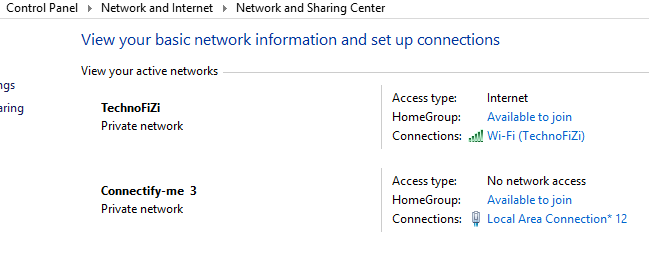
  • First you need to open control panel and Choose Network and Internet 
  • Now you have to select Networking and Sharing Center
  • Now you need to click on active network Connection.

2016-02-12_152938

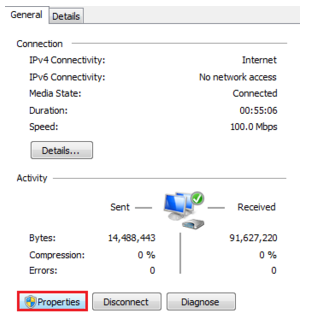
  • Now you have to select Properties and you can switch to networking tab

2016-02-12_153146Now you will get full list of networking tab, now you need to untick IPV6 internet protocol

2. Disable Auto Tuning Feature

If you are able to using router on your computer then this method may work for you. What you have to do is simple disable auto tuning feature. Just follow below steps

  • You need to launch Command Prompt with Administrative rights
  • Netsh interface tcp set global autotuning=disable  
  • Just simple copy the above command and paste it on command prompt
  • Now you have to restart and reconnect your internet connection

3. Reinstall Network Adapter

When you are unable to connect internet on your computer, may be error 651 arrive on your display. I think this is best solution for your problem. What you need to do is simple reinstall network adapter on your device

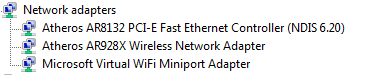
  • First you need to search devmgmt.msc
  • Now you have to double click on to launch device manager, just simple start searching network adapter category on your device
  • Just click on “+” icon , you will find out

2016-02-12_160718

  • Now you have to right click on first network adapter and You need to uninstall this software
  • Now you can restart your computer
  • Network adapter will reinstall automatically

4. Reconnect your Router

In most of the cases it will work for so many users. It’s best troubleshoot step. What you have to do is simple reconnect your router to your device. Just turn off your router and again connect your router to your device . If in case you are using LAN connection then unplug the wire and connect the wire again with your device.

5. Clean Boot

If you have any problem on your windows then this is the best solution for your problem. Because it will resolve any error on windows. If you want to perform clean boot then you will need to follow few conditions such as like you need to disable all your services. Just follow below steps

  • Just simple search for msconfig.exe
  • Now you have to launch Windows configuration on your device
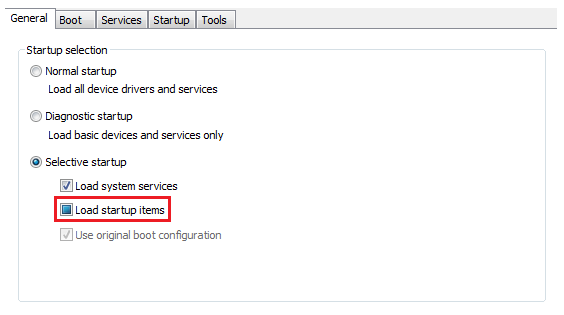
  • There is a general tab on windows configuration, you have to click on selective start up and choose load startup items 

2016-02-12_162824

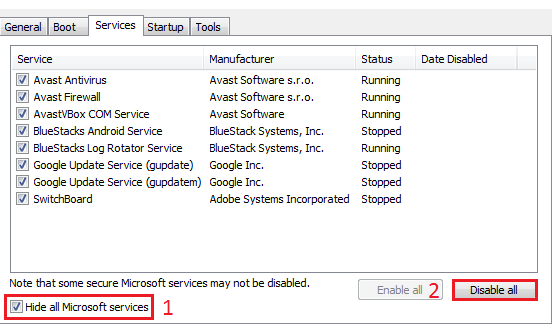
  • Now you have to click on service tab. Where you can see option like “Hide all Microsoft services ” stick on that option then click on disable all services.
  • Now you have to restart your computer. That’s it and try to connect your internet connection.

2016-02-12_163201

These are the best solutions for error 651 on windows. Just try it out which one is working for you. If you are having any problem while solving this problem, just comment on below. We will try to help you.

Fix and Solve Error Code 80048264 in Windows Phone (Top 4 Methods)

0

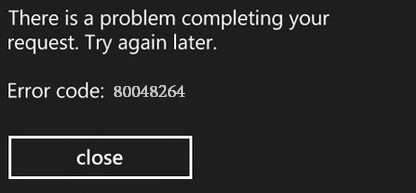
Did you ever seen this ‘Error Code 80048264‘ or ‘There is a problem completing your request try again later‘ error on your windows phone or if you are struggling with this error 80048264 problem, then here we can solve your this problem with some quick easy steps.

Error Code 80048264

Other Android Errors and their Fix

Windows phone is a family of mobile O.S. (operating system) for the smart phones developed and designed by the Microsoft company. If you have been using the windows phone then you might have to come across by this error problem.

This error basically starts when you are trying to download any app from the marketplace or update your apps, A Pop-up will open with ‘Error code 80048264′ in your windows phone. You can also get this error in your windows phone app store when you are opening applications.

From that error, you are not able to install or download any new apps from the windows phone store. Many users are complaining about this error problem. So for that today, we are going to solve this problem.

Solve Error Code 80048264 in Windows Phone

Here, I am going to show you 3 easy simple methods to Fix and Solve this Error Code 80048264 problem in your Windows mobile Phone. Since there are no specific fix or solution methods to this Error. But we have some easy steps which can fix this Error 80048264 problem.

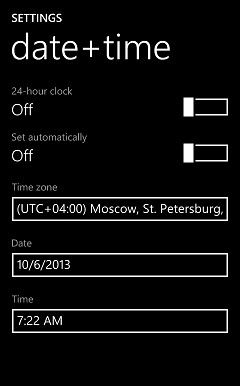
1. Check Date & Time Settings

Check Date & Time Settings

  • Go to Settings
  • Select Data & Time Settings & Click on it
  • Manually Set the Data & Time

That’s it, it will fix this error problem.

2. Sync your Microsoft Account

Sync your Microsoft Account

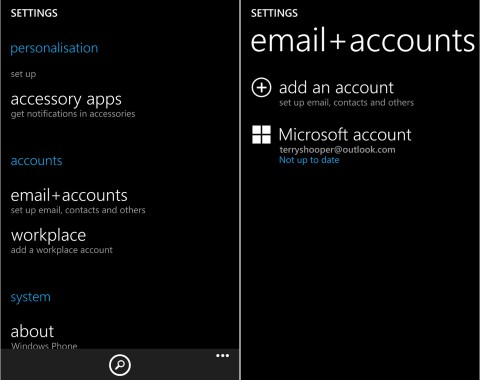
  • Go to the Settings
  • Select Email+Accounts option
  • Search for your Microsoft account and go for it
  • Click on your Microsoft account & hold it until you get some option
  • Select Sync option & it will sync

It will also fix your Error code 80048264 problem.

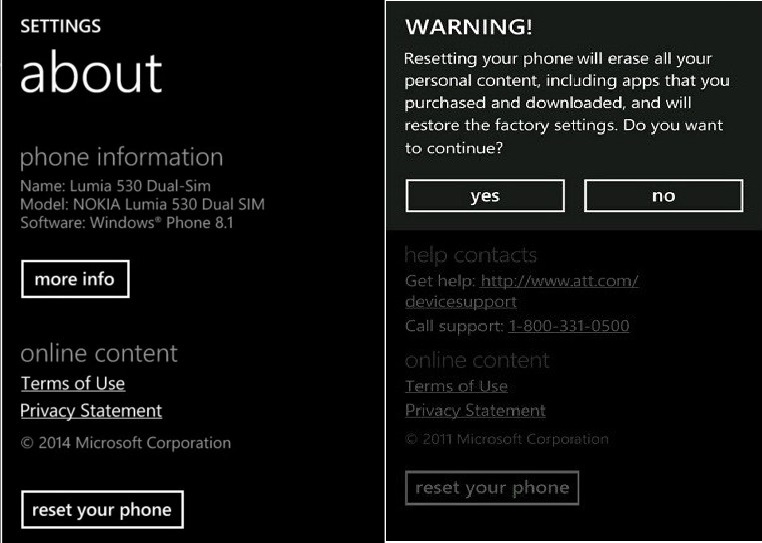
3. Reset your Phone

Reset your Phone

  • Go to Settings
  • Click on the About Phone Option
  • Select on Reset your Phone
  • Now, Simply select Yes

It will clear all your data & reset your phone. It will perform a factory reset of your phone.

Or

  • Switch off your device
  • Press & hold the Volume down button & then press the power button
  • Release the volume down button when a Pop-up screen open
  • Then, press the Volume up > Volume down > Power > Volume down
  • That’s it, Done

It will reset your windows phone and clear all your data & all your files from your phone. & this will also surely fix your windows phone error code 80048264 problem from your phone. Hope these methods will help you to fix this problem and get rid out of this.

How to Change Google Drive Default Folder Location on Windows

Basically Google Drive is used as file storage. By using google drive you can share your files, you can edit your documents, spreadsheets and presentations with collaborations. It was developed by google only. Google drive work as like interface between user and computer. Google drive is a client based software and it should be run on users computer only. Here i will share with you how to change google drive default folder location on windows. Google drive will support all devices such as like Windows 7, Windows 8, Windows vista, Windows XP, Windows OS X and MAC. Now you can access offline also. It’s not a very difficult to change google drive default folder location. You can change it very easily just have a look here i will give you full information about How to change google driver default folder location on windows.

How to Change Google Drive Default Folder Location on Windows

It’s not a big think you may change your folder location very simply. Actually By default the folder address will be store as C:\Users[User]Google Drive. Even It’s automatically create shortcut on your browser. If you want to get that folder then you can find out on default location. If you want to change google driver default folder location then just have a look here.

1. Disconnect Account

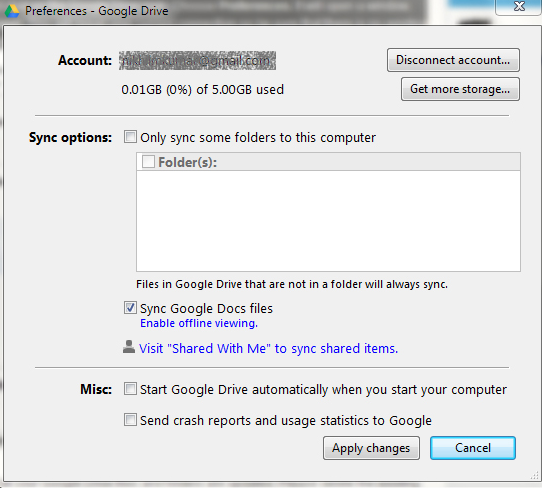
2015-12-29_145113Just simply go to system tray and click on google drive option. Select preference button then it will pop up new window. Next you have to click on disconnect account then it will disconnect the present connection.

2. Delete the Google Drive Folders

Now you have to delete the existing files on google drive and at the same time shortcuts on favorites. While doing this process do not open any browser.

3. Sign In

Now you need to sign in again on chrome.  Simple enter the your username and password on your browser.

4. Change Folder Location

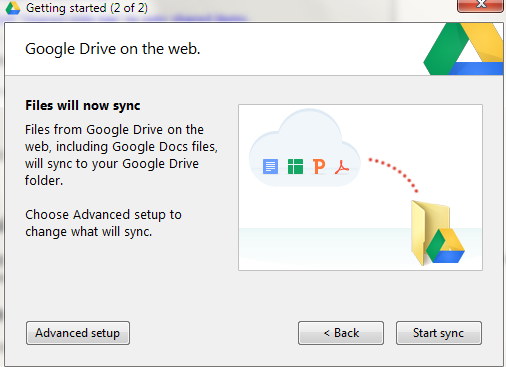
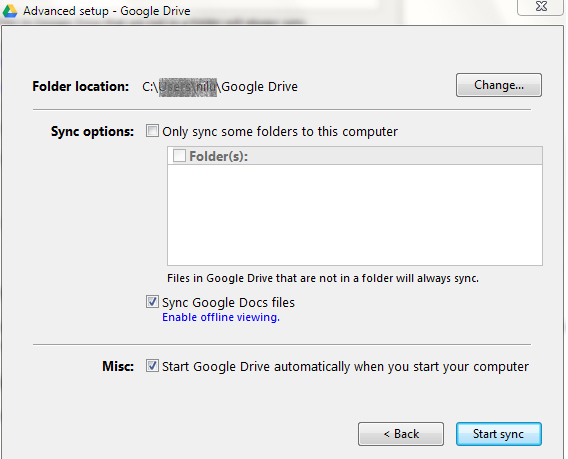
After that you need to click on advanced set up. Next you have to click on change location button. It will navigate towards to new location of google drive. Now you may create your own folder location by click “make new folder”. Simply store where do you want to be. Be sure that during this process, select the empty folder. Otherwise it will show the error message. By clicking start sync it will show you default google drive location . Now you can delete your old folders. Change Google Drive Default Folder location

Change location of Google Drive Default Folder

I hope you have changed successfully. It’s a very easy to change google drive default folder location on windows. What you have to do is simple changing the settings of google drive. Just be careful while doing this process. Do not worry about your folders. It will safely save on your drive. If you are facing any problem while doing this process you can comment on below. We will try to help you.

How to Install Avast Free Antivirus in Offline Mode

Now you can protect your computer with best free antivirus. Now it’s available in offline mode also. Basically Avast is used as like security software. Where it protects your system from anti virus and some unknown enclosed applications. If you want to Avast Free antivirus then this article must be useful for you because here i will share with you how to install avast Antivirus Offline Mode. It’s a very simple and easy, what you have to do is simple you need to upgrade older version of your avast software. Even it has many different key features and it will protect your communications from inceptions. Just have a look here i will help you to download avast offline installer.

Avast Free Antivirus

Now you can protect against unwanted privacy finishing, spyware and malware etc. The best thing about avast software is available on offline and online also. If you want to install new versions you can upgrade from older version. You can select  from online or offline mode it’s up to you which one do you want. Would you like to know about more just follow the below instructions.

Key Features of Avast Offline installer

  • You can improved antivirus and spyware engine
  • There is a new intelligent scanner
  • smart virus updates
  • There is a new behavior field
  • Green computing process
  •  Web shield programming
  • It has a secure DNS system
  • There is a enhanced Interface
  • Even it has a smart scanner

System Requirements for Avast Offline Installer

  • The RAM memory size will be 256 MB or Above
  • The hard disk free space will be 1.5 GB
  • It can support multi platforms like windows phone, windows 7, 8, 10, windows XP, Windows Vista.
  • processor intel Pentium 4/ AMD Athlon 64 or above

What’s new on Avast Offline Installer

  • There is a Emergency software updater
  • It can support multiple platforms
  • You can change in autosandbox Modules
  • There is a outlook plugin redesign
  • Opera support in webRep

Download Avast free offline Installer 2016

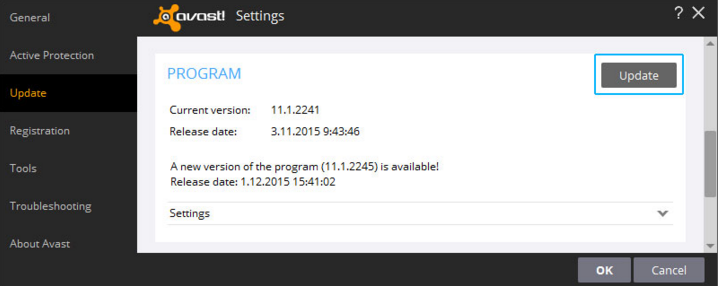
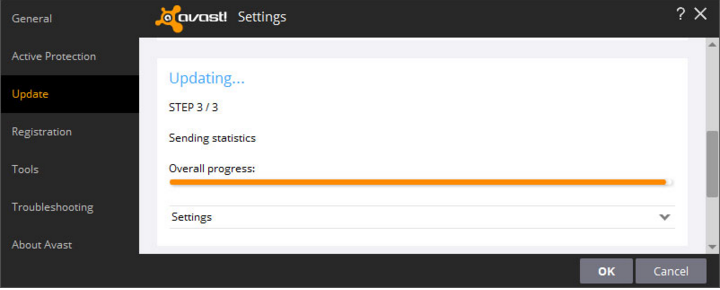
  • If you want download avast free offline installer then you need to upgrade your Avast software. Start begin with the program Update process. Simple go to settings – update and now it open to program tab where it will show the new version of avast download software and just click on update option.

Download Avast free offline Installer

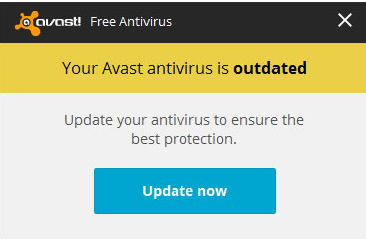
  • If in case your avast antivirus is outdated then sometimes you will get message like update your antivirus to ensure the best protection simple click on update now option.

your avast antivirus is outdated

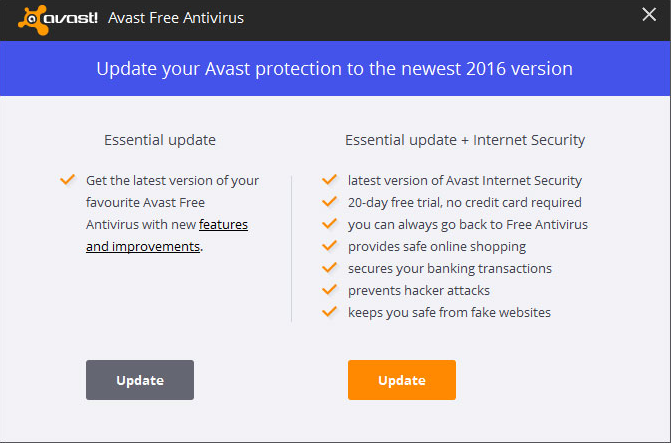
  • Now you have to select update type. There are two types are available one is essential update and other one is essential update + internet security. Just select which one you want to update.

upgrade avast free antivirus

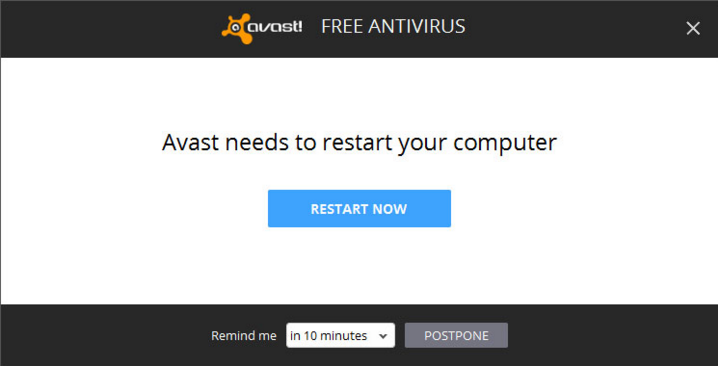
  • Now it’s start updating on your computer. After finishing process you need to restart your computer.

how to install avast free antivirus

avast free antivirus

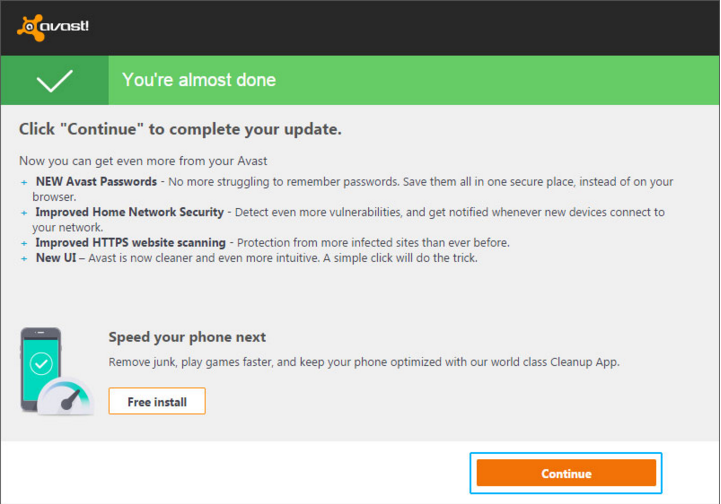
  • When you restart the computer you will get notification like complete your update. If you want to clean up your computer then click to continue option.

avast free antivirus installation

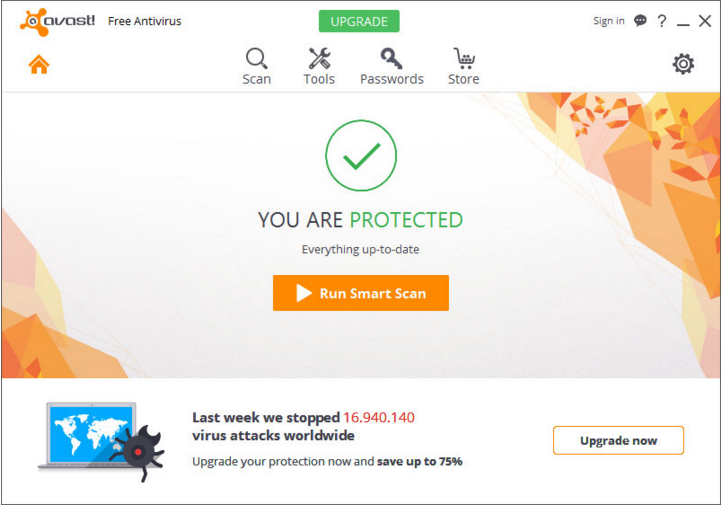
  • Now you need to click on upgrade now button. Now you can enjoy latest version of avast software.

avast offline installerI hope you have successfully downloaded avast offline installer. By downloading avast software you can clean up your computer. If you want to protect your computer then start downloading avast free antivirus on your computer. If you face any problem while downloading just comment below. We will try to find out best solution for your problem.

How to Fix Error Code 36 in MAC

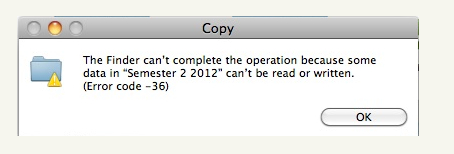
If you are getting error  code 36 in your MAC. Do not worry, it’s a very common error for mac users. This error may occur when you try to dragging or copying files from one location to other location in your mac. In most of the cases you may get this error 36 in mac because of mac external hardware issues, malware’s, junk files, viruses and corrupt files. You can easily fix this error 36 in your mac. You can get rid of this error by using mac-keeper software. You can clean your mac in just one click. If you do not have any idea about how to fix error code 36 in MAC. Just have a look here you will find out best solutions for error 36 in mac.

Other Errors and their Fix

How to Fix Error Code 36 in MAC

Here you will get full information about how to fix error code 36 in mac. You do not need to worry about this error because there are software like mac-keeper, it will protect your MAC. Basically mac keeper is a little software, where you can used as like clear the clutter. You can clean your MAC fast and easy way. What you have to do is you need to download this software on your mac. Click here to download mac keeper . By using this software you can resolve different errors in your mac. Even it’s available freely. You do not need to pay any money. If in case still you are facing this error then try other methods. just follow here you will find out best solutions for error code 36 in MAC.

error code 36

  1. Just once check External Media

Sometimes you may get this error 36 in mac because if there is any issue on your external media. You may get this problem because of there is no connection stability. So what you have to do is you need to copying files while booting your mac in safe mode. Then should start copying files otherwise you will not able to copy files in your mac. It’s a best solution.

2. Verify permission and sharing options

As i said earlier that error 36 was often related to an input and output errors, It may indicate some hardware issues on your device. That’s why you need to resolve this error on your mac. You must verify the permissions of copying the files under finder. Now you have to go to “permission and sharing option and click on ” everyone ” button. Before doing this process you need to verify that your account has read access to these files. After finishing this process now you can try to copy the files again.

3. Try to move files using other mediums

It’s not a easy task. You have to do very carefully then only you will get rid of this error 36 in your mac. You must try to shift your files with the help of other mediums leaving finder. It’s not easy to copying files in finder. You should be careful. When you trying to copy files in finder, you need to take so many permissions whiles processing. If you are having still this error then try it below one.

  • Simple go to applications > Utilities > Terminal. Now you need to type following command like “dot_clean” on terminal window.
  • Now you can drag the particular file to the terminal window where you are facing this error
  • When you click on that file then automatically you will get path of that file on your command prompt
  • After finishing this process click on enter button.
  • Then again try to copy files which one you want to be

These are best solutions for error code 36 in Mac. The best solution for this error is using mac keeper software. Just try it out which one is working for you. i hope you may resolve error 36 in your mac. if you have any doubts regrading error 36, you can comment on below. We will try to inform you.

How to Fix “Cannot Connect to itunes store Error ” on iphone/ipad/ipod

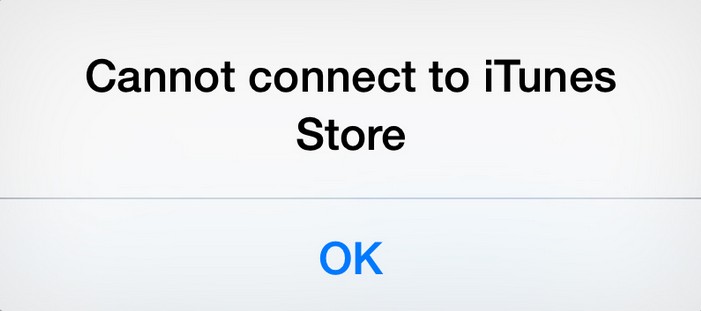
If you are getting an error when you trying to connect to itunes store. Do not worry Here i will share with you how to fix ” cannot connect to itunes store error on your iphone. Sometimes its happen due to some reasons like IOS settings, WiFi, Internet and network connection problems. You can fix very easily in your device. Before begin this process you need to check few things like internet connectivity and make sure that you have latest version of operating system on your device. It is a very small bug, you can overcome this problem very easily. Just have a look here you will get to know about how to fix cannot connect to itunes store error on iphone/ipad/ipod.

Cannot Connect to itunes store

Also Check :


Fix Cannot connect to iTunes store

Enable and Disable iTunes Parental Control

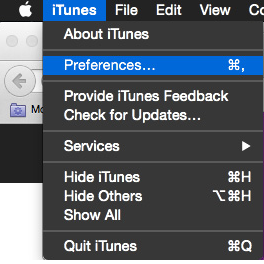
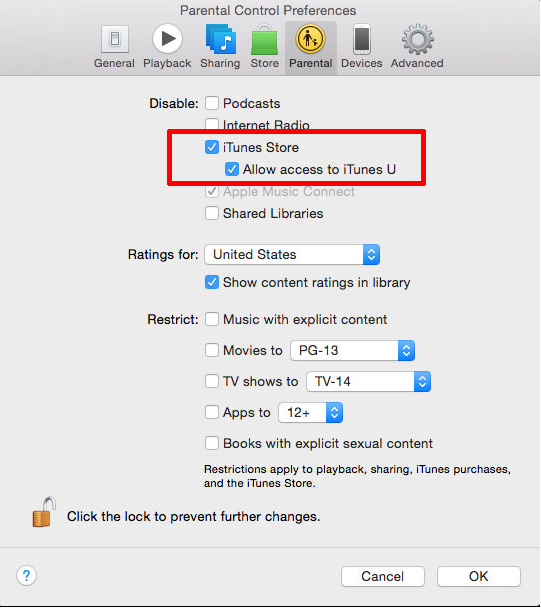
2016-01-02_141939

  • First you need to launch itunes on your iPhone then go to preferences.
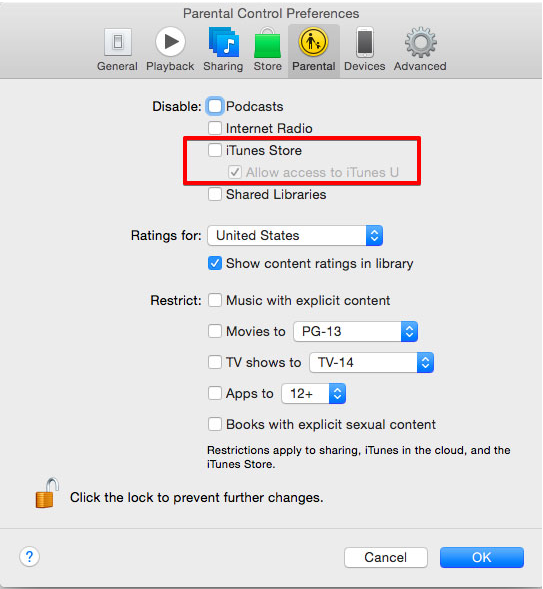
  • Next go to parental control tab – you have to disable to iTunes store and allow access to itunes store.

2016-01-02_142005Now you can quite from itunes. Now you have to relaunch itunes and you will get message like you directly to itunes you without any problem. Just head back to parental control and enable allow access to itunes U. Now you can connect itunes store to your iphone with out any tension.

2016-01-02_1420292. Switch WiFi 3G network and restart your connection

  • Now you need to Switch to 3G network
  • Exist from App store or itunes app
  • Now you have to open app store or itunes app again on your iphone

3. The data – change workaround

  • simple go to settings – general – time and date
  • Now you can change set automatically turn on
  • you have to exit itunes and app store and restart again

4. Software Update

  • Make sure that your device is up to update or not. otherwise just go to settings- general – software update .
  • Just once check that your version of mac OS X is up to date or not
  • And also check that your itunes and safari are updated to their new version

5. Troubleshoot Problems on Windows

  • Just once check that you have latest version of itunes
  • If the itunes store shows empty and it will display the words of itunes store, Resolve conflict between software that monitors internet traffic and apple software.
  • Make sure that you do not have any network connectivity issues
  • If you need to configure windows to allow itunes to access the itunes store. After that follow the below instructions
  • It can support multiple platforms like windows XP, Windows Vista, window 7/window 8/window 10
  • First you need to navigate to the host files at C:\WINDOWS\SYSTEM32\DRIVES\ETC.
  • Now you have to choose host file. There must be have a duplicate of the hosts file like “Copy of hosts” (Windows XP), “hosts-copy” (Windows7/8/10, windows vista)
  • Simple drag the original hosts file on your desktop
  • Now just right click the duplicate file and select open file. If you are promoted to select program and would you like to open file then double click the notepad.
  • When it opens, select edit > select all
  • Select edit> delete
  • Select file> save
  • Now you need to close the notepad.
  • Just right click the duplicate file and select rename from the pop-up menu
  • you need to enter hosts and click on enter option
  • now you have to restart you computer
  • Now try to connect to the itunes store

These are best solutions to solve cannot connect itunes store issue. Just try it out which one is working on your iPhone. Before applying any method just once checked out you have a good internet connection on your mobile. Otherwise you will get trouble. I hope this article is useful for you.

How to Change Gmail Password (Google Account ) Easily in 2 Minutes

0

Change Gmail Password

Would you like to change your google account password and you do not have any idea about changing password. Do not worry today here i will share with how to change gmail password. Now you can easily reset your google account password. Recently google has changed password settings. There is a little bit difference between since and then. It’s a very simple process. Just it will take few minutes of your own time. There are so many people with same password to all google products, that’s why you may get security problem. It’s good to change your google account password. Just have a look here you will get full information about how to change google account password. 

how to change gmail password

How to Change Gmail Password

If you are searching for how to change gmail password then just follow the below instructions. It’s a very easy process. Just follow step by step.

Your gmail account and all the Google products like Youtube, blogger, drive etc are connected with the same account. So if you change your gmail password, password of Google account will change automatically and the same with all other google products.

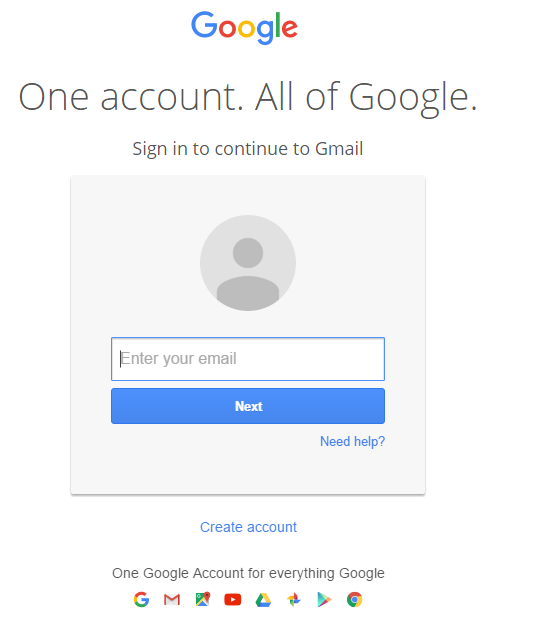
2016-02-07_133745

  • Now you need to sign in by entering your email and click on next button.
  • Now you have to enter your password and that would be valid password of your gmail account.
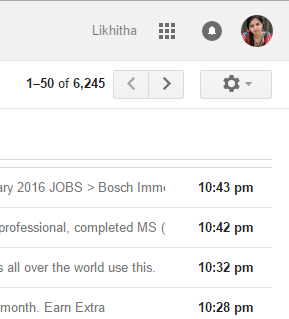
  • It will open up your google account. At right most side you will find out setting option and click on that button

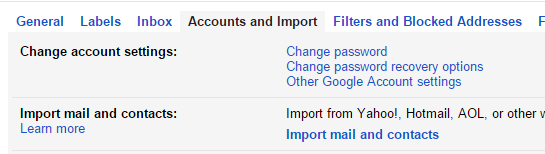
2016-02-07_133848 Now you will get full information about settings menu. In settings menu you can see there is Account and import option. Click on that button

2016-02-07_133936

  • When you click on that button, you may get change password option

2016-02-07_134009

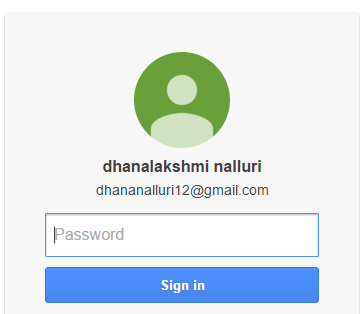
  • Click on change password option. Now it will open up in to new page. Now you need to sign in again by entering old password.
    2016-02-07_140545
  • Now you will get new form Where you need to enter new password. Just type new password and click on change password option.

That’s it you have changed successfully.

Its so easy to change gmail password. You just need to follow the above steps and in 2 minutes you will secure your account with new password. And its a good habit to change password of gmail regularly. Its make your account more secure and helps you protect your data and privacy.

If you still unable to change Gmail password, then just let me know the issue in comment box.